If you’re looking to enhance your living space, smart home wireless automation controllers can make a significant difference. These devices not only streamline daily tasks but also improve energy efficiency and convenience. From versatile smart buttons to reliable thermostats, there’s a wide range of options available to suit your needs. Let’s explore the top choices that can transform your home environment and make your life easier.
Ewelink WiFi Wireless Smart Relay Module for Remote Power Control

If you’re looking to simplify your home automation and gain remote control over your appliances, the Ewelink WiFi Wireless Smart Relay Module is an excellent choice. This module lets you control devices through the eWeLink app, plus it works with Amazon Echo and Google Home for voice commands. You can set timers, create scenes, and share control with others. It operates on low voltage and features two working modes: self-locking and inching mode. Setup is easy—just power it on, check for the light flash, and configure it in the app. Enjoy seamless control over your home!
Best For: Individuals seeking an affordable and convenient solution for remote control of home appliances through a user-friendly app and voice commands.
Pros:
- Easy setup with low voltage options and straightforward configuration via the eWeLink app.
- Voice control compatibility with popular assistants like Amazon Alexa and Google Assistant.
- Flexible working modes including self-locking and inching mode for versatile use cases.
Cons:
- Limited to 2.4G WiFi, which may not be suitable for homes that only support 5G networks.
- Requires binding with the eWeLink account for full functionality, which may be a barrier for some users.
- Dry contact relay output may not be suitable for all types of appliances or complex setups.
Wireless Zigbee Smart Button for Smart Home Devices

The Wireless Zigbee Smart Button is an ideal choice for tech-savvy homeowners seeking seamless control over their smart home devices. This 4-way remote control switch connects effortlessly with platforms like Tuya, Home Assistant, and Hubitat, requiring just a Tuya Zigbee Hub. You can customize the four buttons for single press, double press, or long press actions, making it easy to trigger devices, adjust blinds, or activate scenes. With features for smart automation, you can schedule actions or respond to sensor data. Plus, the included lithium battery guarantees months of reliable performance, expanding your smart home capabilities effortlessly.
Best For: Tech-savvy homeowners who want seamless and customizable control over their smart home devices.
Pros:
- Easy integration with popular smart home platforms like Tuya, Home Assistant, and Hubitat.
- Customizable button actions for versatile control of devices and scenes.
- Long-lasting performance with a high-capacity lithium button battery included.
Cons:
- Requires a Tuya Zigbee Hub for initial setup, which may be an extra cost for some users.
- Limited to Zigbee-compatible devices, restricting compatibility with some smart home ecosystems.
- Automation features may require technical knowledge to set up effectively.
Amazon Smart Thermostat – Works with Alexa and Ring

For those looking to simplify their home heating and cooling while maximizing energy savings, the Amazon Smart Thermostat is an ideal choice. It works seamlessly with Alexa and Ring, allowing you to control your environment effortlessly. With ENERGY STAR certification, you can save about $50 a year on energy bills, plus discover potential local rebates post-purchase. Utilize Echo devices to create comfort zones, adjusting settings based on your presence. The Alexa app lets you manage temperatures remotely, while step-by-step installation guidance guarantees a smooth setup. Trust in Honeywell’s 130 years of experience for reliability and performance in your smart home.
Best For: Those seeking an energy-efficient, user-friendly thermostat that integrates seamlessly with smart home devices like Alexa and Ring.
Pros:
- Energy Savings: Potential to save an average of $50 annually on energy bills with ENERGY STAR certification.
- Smart Features: Ability to create comfort zones and automate temperature adjustments based on presence detection.
- Remote Control: Convenient temperature management through the Alexa app with step-by-step installation guidance.
Cons:
- C-Wire Requirement: Installation requires a C-wire, which may not be available in all homes.
- Limited Compatibility: While it works with Alexa and Ring, it may not be compatible with other smart home ecosystems.
- Initial Setup: Some users may find the installation process challenging without prior experience with smart devices.
30A High Power WiFi Wireless Smart Switch for Smart Home Automation
Looking to streamline your high-power appliances? The 30A High Power WiFi Wireless Smart Switch is your go-to solution for smart home automation. This DIY module works seamlessly with the eWeLink app, Amazon Alexa, and Google Home. You can control devices like air compressors and hot water heaters remotely, with real-time status updates right from your phone. Set timers or schedules for automatic control and create smart scenes to manage multiple devices at once. Plus, enjoy hands-free voice control for ultimate convenience. Just remember to verify your router supports 2.4GHz and follow the installation guidelines.
Best For: Those looking to automate and control high-power appliances in their smart home without limitations on distance.
Pros:
- Supports high-power devices up to 30A, making it suitable for various appliances like air compressors and water heaters.
- Remote control via eWeLink app allows for real-time status updates and device management from anywhere.
- Voice control compatibility with Amazon Alexa and Google Home offers convenience and hands-free operation.
Cons:
- Installation requires cutting off power, which may be challenging for some users.
- Only compatible with 2.4GHz routers, limiting options for users with dual-band systems.
- User manual is available in only two languages (Chinese and English), which may not accommodate all users.
GoveeLife Wireless Mini Smart Button Sensor (2 Pack)
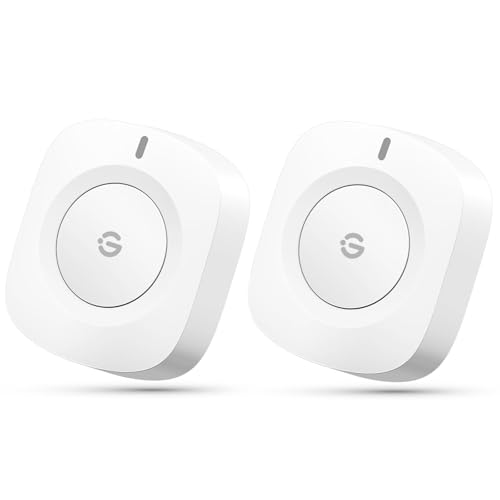
GoveeLife Wireless Mini Smart Button Sensor (2 Pack) is perfect for anyone seeking an easy way to control multiple GoveeLife smart products in their home. With just one touch, you can effortlessly manage devices in the same space, making your life more convenient. The sensor supports GoveeLife’s dual-mode devices through Wi-Fi and Bluetooth, with an effective range of 180 feet. You can connect up to 50 devices, enhancing your smart home experience. Its compact design makes it portable, and it comes with a battery that lasts four months. Just remember to unplug the insulation strip before first use!
Best For: Individuals looking for an easy and efficient way to control multiple GoveeLife smart devices in their home environment.
Pros:
- One-touch control: Easily manage multiple devices with just a single press.
- Wide compatibility: Connects with up to 50 GoveeLife smart ecological devices, enhancing the smart home experience.
- Portable design: Compact and lightweight, making it convenient to use anywhere within its effective range.
Cons:
- Limited connectivity: Does not support 5G WiFi, potentially affecting performance in certain networks.
- No voice assistant integration: Cannot connect to Alexa or Google Assistant for voice control capabilities.
- Battery dependency: Requires battery replacement every four months, which may be an inconvenience for some users.
Aqara Zigbee Wireless Mini Switch for Smart Home Devices

The Aqara Zigbee Wireless Mini Switch stands out as an ideal choice for those seeking seamless integration of smart home devices. Compatible with Apple HomeKit, Google Home, and Alexa, it requires the Aqara Hub for operation. This compact switch offers one-touch control with single, double, and long presses to manage your devices or activate scenes. It even doubles as a doorbell, complete with customizable ringtones. With a solid customer rating of 4.3 stars and a convenient 30-day return policy, it’s a reliable addition to your smart home setup. Just remember to keep it within 400 inches of the hub!
Best For: Those looking to enhance their smart home experience with an easy-to-use, versatile switch compatible with major home automation platforms.
Pros:
- Easy Integration: Works seamlessly with Apple HomeKit, Google Home, and Alexa.
- Versatile Control: Features one-touch control with multiple pressing options for managing devices and activating scenes.
- Customizable Functionality: Can be used as a doorbell with different ringtones available.
Cons:
- Hub Requirement: Requires an Aqara Hub for operation, which is sold separately.
- Limited Range: Must be kept within 400 inches of the Aqara Hub to function properly.
- Battery Dependent: Operates on a single Lithium Metal battery, which may need replacement over time.
Amazon Basics Smart Dimmer Switch and Remote for Alexa

For those seeking a seamless way to integrate smart lighting and other devices into their home, the Amazon Basics Smart Dimmer Switch and Remote for Alexa stands out. This device connects effortlessly with your Echo, allowing you to control lights, play music, and manage appliances without any wiring. With its portable, battery-powered remote, you can adjust settings from anywhere in your house. You’ll love creating automations and interacting with multiple Alexa-enabled devices simultaneously. Setting it up takes just minutes—simply remove the battery tag and follow the Alexa app’s guided steps. Elevate your living space with this convenient smart controller!
Best For: Those looking to easily control smart lighting and devices throughout their home without the need for complex wiring.
Pros:
- Easy setup: Connects quickly through an Echo device with simple guided steps in the Alexa app.
- Portable remote: Battery-powered remote allows control from anywhere in the house, enhancing convenience.
- Versatile automation: Interacts with multiple Alexa-enabled devices simultaneously for streamlined control.
Cons:
- Limited compatibility: Works exclusively with Alexa and Echo devices, limiting integration with other smart home systems.
- Battery dependency: Requires batteries for the remote, which may need to be replaced periodically.
- No direct wiring: While convenient, the lack of wiring may limit functionality in some advanced smart home setups.
GoveeLife Motion Sensor for Smart Home Automation

If you’re looking for a hands-free solution to enhance your smart home experience, the GoveeLife Motion Sensor stands out as an ideal choice. This wireless mini contact sensor detects motion within 16-19 feet, making it perfect for bedrooms, hallways, and bathrooms. It automatically controls GoveeLife devices, ensuring lights turn off when you leave. With a 120° adjustable mount, you can place it anywhere for peak performance. Plus, it connects with the Govee Home app, allowing you to manage up to ten sensors. Enjoy four months of battery life, all while saving energy and elevating your home automation effortlessly.
Best For: Those seeking a convenient, hands-free automation solution for smart home devices in various indoor settings.
Pros:
- Wireless design makes installation simple and versatile.
- Energy-saving feature automatically turns off lights when no motion is detected.
- Long battery life of up to four months reduces maintenance frequency.
Cons:
- Limited to GoveeLife products and requires at least one WiFi device for operation.
- Not compatible with popular smart assistants like Alexa or Google Assistant.
- Only supports a maximum of ten sensors per account, necessitating additional accounts for more.
Smart Garage Door Opener – Universal WiFi Remote Controller
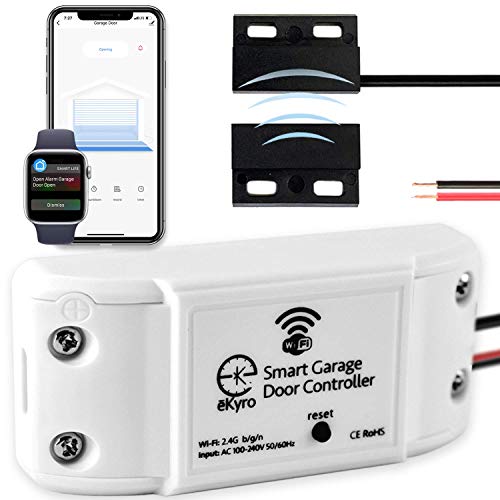
Looking for a convenient way to control your garage door? The Smart Garage Door Opener – Universal WiFi Remote Controller is your solution. Compatible with Alexa, Google Home, and Siri, you can easily manage your garage door through voice commands or mobile devices. This universal adapter connects to most existing openers, allowing remote monitoring without monthly fees. Plus, you’ll receive alerts if your door is left open, enhancing security. If you have multiple doors, simply pair additional controllers. Just keep in mind that it doesn’t work with the RYOBI eKyro opener. Elevate your home automation with this essential gadget!
Best For: Homeowners seeking a convenient and secure way to control their garage doors with voice commands and mobile devices.
Pros:
- No monthly fees: Enjoy all features without incurring additional costs.
- Multiple compatibility: Works with various voice assistants and most existing garage door openers.
- Enhanced security: Receive alerts if the garage door is left open, providing peace of mind.
Cons:
- Limited compatibility: Not compatible with RYOBI eKyro openers, requiring an adapter for some models.
- Additional costs for alerts: SMS or phone call alerts incur extra charges, which may not be necessary for basic use.
- Requires individual controllers for multiple doors: Each garage door needs its own Smart Garage Door Controller for operation.
SONOFF Zigbee Switch SNZB-01P Wireless Push Button

The SONOFF Zigbee Switch SNZB-01P Wireless Push Button is an ideal choice for smart home enthusiasts who crave effortless control over their devices. To get started, you’ll need a SONOFF ZigBee Bridge. This versatile switch supports the Zigbee 3.0 protocol, making it compatible with various Zigbee hubs. You can customize button actions for single, double, or long presses to control multiple devices. Plus, it integrates seamlessly with Alexa routines through the SONOFF hub. With a 5-year battery life, this push button also serves as an emergency alert system, enhancing your home’s functionality and safety in one compact design.
Best For: Smart home enthusiasts looking for customizable control over their devices with seamless integration into their existing systems.
Pros:
- Customizable button actions allow for versatile control options, including single, double, and long presses.
- Seamless integration with Alexa routines enhances automation and convenience in smart homes.
- Long battery life of up to 5 years reduces the hassle of frequent replacements.
Cons:
- Requires a SONOFF ZigBee Bridge for operation, which may be an additional cost for users.
- Limited compatibility with only Zigbee 3.0 compliant hubs, potentially restricting user options.
- Battery-powered, which may require replacement and could lead to downtime if not monitored.
Factors to Consider When Choosing a Smart Home Wireless Automation Controller
When you’re choosing a smart home wireless automation controller, there are several key factors to keep in mind. You’ll want to evaluate compatibility with your existing devices, how easy it is to install, and its range and connectivity options. Don’t forget to check for voice control integration and customization features that suit your lifestyle.
Compatibility With Devices
Selecting a smart home wireless automation controller requires careful consideration of its compatibility with your existing devices. First, check if the controller supports popular protocols like Zigbee, Z-Wave, or Wi-Fi. This guarantees seamless integration with your current setup. Next, confirm that it can connect with ecosystems like Amazon Alexa, Google Home, and Apple HomeKit to maximize functionality. You should also verify if a specific hub is needed, as some devices require proprietary hubs for operation. Additionally, consider how many devices the controller can manage simultaneously, since some have limits. Finally, look for customizable features that allow interaction with various device types and support control methods like voice commands or app controls for a more tailored experience.
Installation and Setup Ease
Installing and setting up a smart home wireless automation controller should be straightforward and user-friendly. Look for controllers with step-by-step installation guides available via a mobile app or website, making the process smoother. Make sure the device connects to your existing Wi-Fi network, particularly 2.4GHz, since many smart home devices don’t support 5GHz. Check if additional hubs or adapters are needed, as this can complicate installation and increase costs. Opt for controllers that feature clear visual indicators, like LED lights, to confirm readiness for configuration and successful connections. Finally, evaluate the user interface of the associated app; intuitive navigation can greatly enhance your setup experience and ongoing management of your smart home system.
Range and Connectivity
Understanding the range and connectivity of smart home wireless automation controllers is essential for guaranteeing your devices function effectively throughout your home. The effective range typically varies from 30 to 500 feet, depending on the technology used, like Wi-Fi or Zigbee. Wi-Fi operates mostly on the 2.4GHz frequency for greater range, while the 5GHz band offers faster speeds but shorter distances. Zigbee can connect devices up to 300 feet in open space and supports mesh networking to extend range. Keep in mind that many devices require a specific hub for effective communication, and physical barriers or interference from other electronics can limit connectivity. So, plan your setup carefully to guarantee ideal performance.
Voice Control Integration
As you set up your smart home automation system, consider how voice control integration can greatly enhance your experience. With voice commands, you can effortlessly manage your smart devices, making your life more convenient and accessible. Look for compatibility with popular voice assistants like Amazon Alexa, Google Assistant, and Siri, as this can greatly expand your system’s functionality. You can even create custom routines that trigger multiple devices with a single command, adding to the convenience. Keep in mind that a stable internet connection is essential for effective operation, and some devices may need account binding and synchronization within their respective voice assistant apps. This integration can truly elevate how you interact with your smart home.
Customization Options Available
When choosing a smart home wireless automation controller, you’ll want to contemplate the extensive customization options available to enhance your experience. These options let you create personalized routines and scenes, tailoring device interactions to your preferences and schedules. Many controllers support multiple action types, allowing you to assign different functionalities to single, double, and long presses for greater control. You can also program automation triggers based on sensor data or schedules, enabling devices to react intelligently to environmental changes. Additionally, you can create complex integrations where multiple devices respond to a single command, streamlining your smart home management. Advanced features, like emergency alerts, let you set critical responses to specific actions, enhancing your home’s security and responsiveness.
Energy Efficiency Features
Considering energy efficiency can greatly enhance your smart home experience. By choosing a smart home controller, you can considerably reduce your energy consumption. Look for ENERGY STAR certified devices, which can save you an average of $50 annually on energy bills. Features like programmable timers and schedules allow you to automate devices based on your usage patterns, optimizing energy usage effortlessly. Additionally, integrating smart thermostats lets you adjust settings automatically based on temperature and occupancy, further enhancing efficiency. With remote control capabilities, you can monitor and manage energy consumption in real-time, ensuring devices aren’t left on unnecessarily. Finally, some systems analyze energy usage patterns, providing insights that help you make informed decisions to improve overall energy efficiency.
Automation and Scheduling Capabilities
Choosing the right smart home wireless automation controller involves examining its automation and scheduling capabilities, which can greatly enhance your daily life. Look for controllers that offer preset timers or scheduling options to automate device operation based on your preferences, boosting convenience and energy efficiency. Confirm the controller supports various timing types, like scheduled, countdown, and loop timing, for added flexibility. Check if the system allows scene creation, enabling you to trigger multiple devices with a single command. Consider customizable features that let you adjust trigger intervals or program actions based on specific sensor data, enhancing your smart home experience. Finally, confirm compatibility with a wide range of smart devices to maximize automation and scheduling potential.