If you want a desktop that keeps power use down without sacrificing everyday performance, you’re in the right place. The best energy efficient desktop computer options today are compact, quiet, and built to handle work, browsing, streaming, and light multitasking.
This roundup focuses on practical choices for home offices, small businesses, and general productivity—so you can pick a system that fits your workload, space, and budget.
Best 10 Energy Efficient Desktop Computer Picks for 2026
Renewed Mini Business Pick

- 10th Gen Core i5-10500T in a tiny mini PC
- 16GB RAM and 256GB SSD for daily work
- Wi‑Fi, Bluetooth, and 4K DisplayPort support
Best For: Compact office setups that need a renewed mini desktop
Slim Expandable Tower

- Energy Star slim tower with 180W power draw
- Core i3-14100, 8GB DDR5, and 512GB SSD
- Supports up to four FHD monitors or two 4K displays
Best For: Home or office users who want a slim, upgrade-friendly desktop
AI-Ready Slim Desktop

- Core Ultra 5-225 with built-in AI support
- Energy Star slim tower with 180W power rating
- 16GB memory, 512GB SSD, and multi-monitor support
Best For: Shoppers wanting a modern, efficient slim desktop with AI features
Refurbished Business Value

- Certified refurbished with 90-day warranty
- Compact SFF desktop with integrated graphics
- Includes keyboard, mouse, and DVD drive
Best For: Budget buyers needing a basic Windows 11 Pro business desktop
Modern Speed Pick

- 6-core Core i5 with up to 4.1 GHz boost
- 32GB RAM and 1TB SSD for fast performance
- Built-in Wi‑Fi and Bluetooth included
Best For: Multitaskers and office users who want a quick refurbished desktop
Compact Efficiency Choice
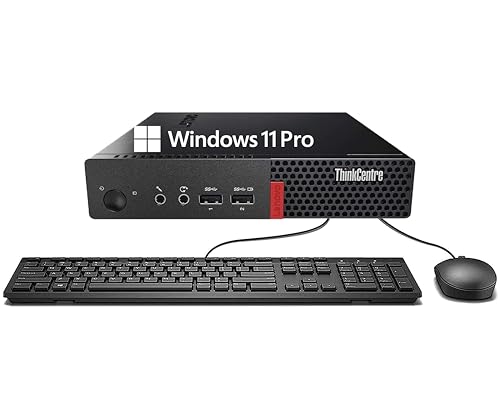
- Ultra-compact mini PC design
- 8GB RAM and 256GB SSD for everyday use
- Includes Wi‑Fi, Bluetooth, keyboard, and mouse
Best For: Tiny workspaces and light productivity users
Value Refurbished Office Pick

- Compact small-form-factor desktop
- 16GB RAM with 256GB SSD
- Dual 4K display support with WiFi
Best For: Budget office and everyday productivity
Performance-First Business Desktop

- 8-core i7 with 32GB RAM
- 1TB NVMe SSD for fast loading
- WiFi 6E and dual-display support
Best For: Fast multitasking in a compact office PC
Balanced Compact Workhorse

- 6-core i7 with 32GB RAM
- 512GB NVMe SSD and Windows 11 Pro
- Built-in WiFi, Bluetooth, dual DP
Best For: General-purpose productivity with compact size
Renewed Mini Business Pick – HP EliteDesk 800 G6 Mini
If you want an energy efficient desktop computer for everyday business work, the HP EliteDesk 800 G6 Mini is a compact option built around a 10th Gen Core i5-10500T. Its small footprint, integrated graphics, and 16GB of RAM make it a practical fit for office apps, browsing, and light multitasking without taking up much desk space.
Best For: Office users who want a compact renewed mini PC with Wi‑Fi, Bluetooth, and 4K support.
Pros:
- Low-power Core i5-10500T processor is well suited to a compact mini desktop design.
- 16GB RAM and a 256GB SSD provide a responsive setup for daily work.
- 4K support with DisplayPort output adds flexibility for modern monitors.
- Built-in Wi‑Fi and Bluetooth reduce cable clutter in a small workspace.
Cons:
- Renewed unit with a limited 90-day warranty.
- 256GB storage may feel small if you keep lots of local files.
- Integrated graphics are fine for basics, not demanding creative work.
This is a sensible pick if you value a tiny form factor and efficient everyday performance over upgrade headroom. It works best as a simple business desktop where low space use matters as much as low power draw.
Slim Expandable Tower – Dell Slim ECS1250 i3
The Dell Slim Desktop ECS1250 is a strong energy efficient desktop computer choice if you want a modern slim tower with a current Intel Core i3-14100, WiFi 6, and Energy Star certification. It balances everyday speed with a compact design, making it useful for home offices and business workspaces that need room for multiple monitors.
Best For: Users who want a slim, Energy Star desktop with easy upgrade access and multi-monitor support.
Pros:
- Energy Star certification and a 180W power draw align with efficient everyday use.
- Supports up to four FHD monitors or two 4K displays for multitasking.
- Tool-less entry and a removable side panel make upgrades easier.
- Includes WiFi 6 plus built-in security features like a TPM chip and lock slot.
Cons:
- Only 8GB RAM out of the box, which may be modest for heavier multitasking.
- Single memory slot limits flexibility compared with some larger towers.
- Uses Windows 11 Home rather than a business-focused edition.
For buyers who want a clean-looking desktop with better expandability than a mini PC, this Dell slim tower is well rounded. It is especially appealing if monitor support, security, and simple future upgrades matter to you.
Quiet Low-Power Mini – KAMRUI AK1PLUS N5095
The KAMRUI AK1PLUS is an energy efficient desktop computer built for simple, low-power computing in a tiny footprint. With an Intel Celeron N5095, 16GB of RAM, and a 28W power consumption rating, it is aimed at everyday work like browsing, video calls, office tasks, and light multitasking.
Best For: Budget-minded users who want a quiet mini PC for everyday home, office, or school use.
Pros:
- Very low 28W power consumption for efficient daily use.
- 16GB RAM and a 256GB SSD help keep basic tasks responsive.
- Dual 4K display support adds useful productivity space.
- Compact design includes practical ports and expansion options up to 4TB total storage.
Cons:
- Celeron N5095 is designed for everyday tasks, not demanding workloads.
- Best suited to light computing rather than heavy media editing or gaming.
- Storage expansion is good, but the base 256GB SSD may fill quickly.
If efficiency and size matter most, this mini PC makes a lot of sense. It offers enough speed for routine tasks while keeping power use, noise, and desk clutter to a minimum.
AI-Ready Slim Desktop – Dell Slim ECS1250 Ultra 5
The Dell Slim Desktop ECS1250 with Intel Core Ultra 5-225 is a modern energy efficient desktop computer for users who want a slim tower with newer AI-focused hardware. It comes with 16GB of memory, a 512GB SSD, and the same compact Dell styling and multiple-monitor support found in the ECS1250 line.
Best For: Buyers who want a slim desktop with AI-capable Intel Core Ultra performance and Energy Star efficiency.
Pros:
- Intel Core Ultra 5-225 adds built-in AI features for productivity-focused use.
- Energy Star certification and a 180W power rating support efficient operation.
- Supports up to four FHD monitors or two 4K displays.
- Tool-less access, TPM chip, and a lock slot add convenience and security.
Cons:
- Uses integrated graphics, so it is not intended for graphics-heavy workloads.
- No monitor is included, so it is best for users who already have displays.
- External speakers are required if you want audio output from the built-in speaker setup.
This model is a smart fit if you want a current-generation Intel platform in a tidy, power-conscious desktop. It stands out most for users who value efficient multitasking, easy upgrades, and a space-saving tower design.
Refurbished Business Value – HP ProDesk 600 G1 SFF
If you’re shopping for an energy efficient desktop computer on a budget, this HP ProDesk 600 G1 SFF is a practical refurbished option for basic business use. Its compact small-form-factor design, integrated graphics, and modest Intel Core i5-4570 platform make it a sensible fit for everyday productivity without extra bells and whistles.
Best For: Small office tasks, basic home productivity, and buyers who want a refurbished desktop with Windows 11 Pro.
Pros:
- Certified refurbished with testing, cleaning, inspection, and a 90-day warranty
- Compact SFF design with integrated graphics for straightforward daily use
- Includes 8GB RAM, 500GB storage, keyboard, mouse, and DVD drive
- Windows 11 Pro preinstalled for business-ready setup
Cons:
- Uses an older 4th-gen Core i5 platform
- 500GB HDD is slower than SSD-based systems
- Basic configuration is better for light workloads than demanding apps
Overall, this HP is the most budget-focused choice here, especially if you want a simple desktop that keeps power needs and expectations modest. It makes sense for users who value affordability and included peripherals over modern performance features.
Modern Speed Pick – Dell Optiplex 3060 1TB SSD
This Dell Optiplex 3060 is a strong pick if you want an energy efficient desktop computer with faster everyday responsiveness. The combination of a 6-core Intel Core i5-8500, 32GB RAM, and 1TB SSD should make it feel snappy for office work, multitasking, and general home use, while built-in Wi‑Fi and Bluetooth add convenience.
Best For: Users who want a faster refurbished tower for multitasking, office work, and daily productivity.
Pros:
- 6-core Intel Core i5-8500 with up to 4.1 GHz boost
- 32GB RAM and 1TB SSD for fast boots and smooth multitasking
- Built-in Wi‑Fi and Bluetooth for easier wireless setup
- Windows 11 Pro with support from a Microsoft Authorized Refurbisher
Cons:
- Still an integrated-graphics system, not aimed at heavy visual workloads
- Ships as a tower, so it takes more space than a mini PC
- Listed with mixed RAM details in the supplied specs
For buyers comparing refurbished desktops, this Dell stands out on speed and storage. It’s a better fit than older HDD-based systems if you want a more responsive daily driver with modern wireless features.
Compact Efficiency Choice – Lenovo ThinkCentre M710q Tiny
If your priority is an energy efficient desktop computer in a very small footprint, the Lenovo ThinkCentre M710q Tiny is the most space-saving option in this group. Its mini PC design, low-power Core i3-6100T processor, SSD storage, and integrated graphics make it a straightforward fit for light productivity and everyday use.
Best For: Small desks, office basics, and users who want a compact desktop with low-power styling.
Pros:
- Ultra-compact mini PC design saves desk space
- 256GB SSD and 8GB DDR4 RAM for quick everyday responsiveness
- Includes Wi‑Fi, Bluetooth, DisplayPort, keyboard, and mouse
- Windows 11 Pro with a simple, productivity-focused setup
Cons:
- Core i3-6100T is best for light workloads, not demanding apps
- 256GB storage is modest if you keep lots of files locally
- Built for basic productivity rather than performance-heavy tasks
This Lenovo is the clearest choice if you want maximum compactness and simple efficiency. It’s ideal for everyday computing where size, low-power operation, and easy placement matter more than raw speed.
Value Refurbished Office Pick – Dell OptiPlex 3050 SFF
If you want an energy efficient desktop computer for everyday office work, this renewed Dell OptiPlex 3050 SFF is a practical low-power option with a compact footprint. It pairs a 6th Gen quad-core i5, 16GB of RAM, and a 256GB SSD with Windows 11 Pro, making it a straightforward choice for email, documents, web browsing, and dual-monitor setups.
Best For: Budget-conscious buyers who need a compact business desktop with modern connectivity and solid everyday responsiveness.
Pros:
- Small form factor design keeps desk space usage low.
- SSD storage and 16GB DDR4 help the system feel responsive for daily tasks.
- Supports 4K dual-display output through HDMI and DisplayPort.
- Includes WiFi, keyboard, mouse, and Windows 11 Pro.
Cons:
- Older i5-6500 processor is best suited to office and light productivity use.
- Renewed condition may matter to buyers who prefer brand-new hardware.
- 256GB storage is modest for larger media libraries or heavy file storage.
This model stands out as the most affordable path to a compact, efficient work PC. It won’t be the fastest option in the lineup, but its balanced specs and included accessories make it a smart value pick for basic business use.
Performance-First Business Desktop – Dell OptiPlex 7070 SFF
If you need an energy efficient desktop computer that still delivers stronger multitasking headroom, the renewed Dell OptiPlex 7070 SFF is the fastest-feeling option here. Its 8-core i7-9700, 32GB of RAM, and 1TB NVMe SSD are aimed at users who want quick boot times, smooth app switching, and room to grow in a compact business tower.
Best For: Power users and office buyers who want a compact desktop with excellent multitasking capacity and ample fast storage.
Pros:
- 8-core i7-9700 offers strong multitasking performance.
- 1TB NVMe SSD provides fast storage and quick boot speeds.
- 32GB DDR4 RAM is well suited for demanding office workflows.
- Includes WiFi 6E, wireless keyboard and mouse, and dual-display support.
Cons:
- More performance-oriented than a basic efficiency-first office PC.
- Renewed hardware may not appeal to buyers wanting new-in-box equipment.
- Integrated graphics are fine for productivity, not graphics-heavy work.
This is the strongest choice if your priority is a responsive, compact workstation for daily business use. It combines fast storage, lots of memory, and modern wireless connectivity in a familiar OptiPlex design.
Balanced Compact Workhorse – Dell OptiPlex 7060 SFF
The Dell OptiPlex 7060 SFF is a sensible energy efficient desktop computer for users who want a balanced mix of speed, expansion, and compact size. With an 8th Gen i7-8700, 32GB of RAM, and a 512GB NVMe SSD, it offers strong everyday responsiveness for business tasks, home productivity, and dual-monitor setups.
Best For: Buyers who want a compact Windows 11 Pro desktop with strong general-purpose performance and room for future expansion.
Pros:
- 6-core i7-8700 handles multitasking well.
- 32GB DDR4 RAM and 512GB NVMe SSD support fast, smooth use.
- Two DisplayPorts make dual-monitor setups easy.
- Includes built-in WiFi, Bluetooth, and wireless keyboard and mouse.
Cons:
- Not as storage-heavy as the 1TB NVMe model above.
- Integrated graphics are designed for productivity rather than creative workloads.
- Renewed condition may not suit everyone.
This model sits in the middle of the lineup as a well-rounded option for most buyers. It has the specs to feel quick without going overboard, making it a strong fit for practical everyday computing.
How We Picked These Energy Efficient Desktop Computers
We focused on desktops that balance performance with lower power draw, favoring efficient processors, solid-state storage, and compact mini or small-form-factor designs. We also considered memory capacity, wireless connectivity, upgrade potential, and whether each system makes sense for real-world daily use rather than raw specs alone.
Quick Comparison
For the lightest use cases, mini PCs and entry-level small desktops are usually the most power-conscious. For more demanding multitasking, newer Intel Core i5 and Core Ultra models offer better performance per watt. Refurbished business desktops can also be a smart value if you want dependable hardware at a lower price, but they may use older chips and draw more power under load.
Key Buying Factors for an Energy Efficient Desktop Computer
Processor Efficiency
Look for newer low-power CPUs or business-class chips tuned for efficiency. A modern processor can do more work with less energy than an older high-wattage model, especially in a desktop that stays on for long stretches.
Form Factor and Cooling
Mini PCs and SFF desktops usually save space and consume less power than full-size towers. Smaller cases can also mean simpler cooling and less fan noise, which is helpful in an office or bedroom setup.
Storage and Memory
An SSD is a must for responsiveness and lower power use compared with a hard drive. For memory, 8GB is fine for basic use, while 16GB or more is better if you keep many tabs, apps, or documents open at once.
Ports and Connectivity
Wi-Fi, Bluetooth, and multiple display outputs improve convenience and reduce the need for extra accessories. If you plan to run dual monitors or connect to a dock, check for DisplayPort, HDMI, or USB-C support.
Who Should Buy Which Energy Efficient Desktop Computer?
If you want a basic Energy Efficient Desktop Computer for web browsing, email, and office apps, a smaller mini PC or entry-level SFF model is usually enough. If you work with larger spreadsheets, lots of browser tabs, or heavier multitasking, choose a newer Core i5, Core Ultra, or higher-memory configuration. If budget matters most, a refurbished business desktop can be a strong value, especially for home offices and general productivity.
For the best balance of efficiency and longevity, prioritize a system that matches your workload today and gives you a little headroom for tomorrow.