Choosing a CNC router for hobbyists means balancing work area, rigidity, spindle power, software compatibility, and setup difficulty. The right machine can handle anything from signs and carvings to aluminum parts without overwhelming your workshop or budget.
We compared 10 popular hobby CNC routers across beginner-friendly kits, compact engravers, and larger all-metal models. Use the guide below to match machine capability with your materials, project size, and experience level.
Best 10 Cnc Router for Hobbyists Picks for 2026
Best Beginner Upgrade

- All-aluminum frame with linear-rail Z-axis
- 400 x 400 x 60mm working area
- Pre-wired setup with expandable spindle support
Best For: Hobbyists wanting stability, workspace, and upgrade flexibility
Best Precision Metal Option

- 710W digital spindle for demanding cuts
- Dual rails and ball screws for claimed ±0.03mm precision
- All-metal chassis with app and software support
Best For: Makers focused on precise aluminum and acrylic work
Best Entry-Level Value

- Compact 300 x 180 x 45mm work area
- Beginner-friendly GRBL control with Candle support
- Offline controller enables flexible G-code operation
Best For: Beginners learning CNC on small home projects
Best Expandable Metal Cutter

- 800W router supports 8,000–24,000 RPM
- Rigid dual-guide frame for metal-capable work
- Wi-Fi control and extensive upgrade options
Best For: Advanced hobbyists planning to expand into metal cutting
Best Overall Upgradeable Pick

- 410 x 405 x 77mm work area
- 710W router for wood, acrylic, and suitable metal work
- Expandable design with T-track spoilboard
Best For: Hobbyists planning larger projects and future upgrades
Best Ready-to-Use Precision Pick

- All-metal XYZ guides and ball screws
- 800W spindle with 6,000–30,000 RPM range
- Mostly assembled with broad GRBL support
Best For: Makers prioritizing quick setup and precise desktop work
Best Value Learning Platform
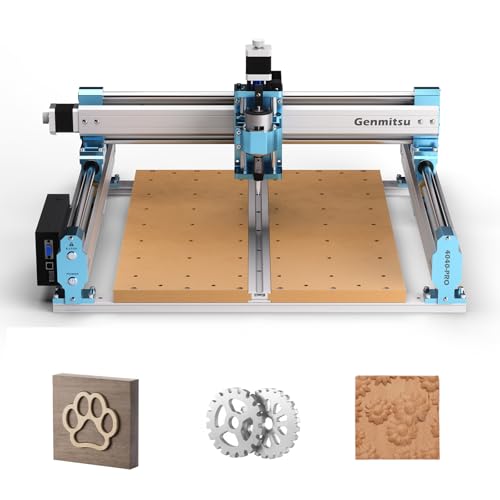
- 435 x 400 x 80mm working area
- Rigid lead-screw motion and reinforced spoilboard
- GRBL control with upgrade-ready accessory ports
Best For: Beginners and intermediate makers building skills over time
Precision Power Pick
Genmitsu 4030-Evo Ultra 2 CNC Router

- 800W router with 8,000–24,000 RPM range
- Dual rails and ball screws for rigid motion
- Wi-Fi, fourth-axis, laser, and probe support
Best For: Precision-focused hobbyists working with wood and light metals
Desktop Metal Specialist
Genmitsu 3020-PRO Ultra CNC Router

- 710W spindle reaches up to 30,000 RPM
- All-metal frame with reinforced X-axis
- Supports spindle and laser-module upgrades
Best For: Desktop hobbyists cutting wood, acrylic, PCB materials, and light metals
Safety-Focused Starter
LUNYEE 3018 PRO MAX CNC Router

- 500W spindle for compact cutting and carving
- Six limit switches plus emergency stop
- Offline GRBL control and manual handwheels
Best For: Beginners working on smaller wood, plastic, acrylic, and MDF projects
Best Beginner Upgrade – FoxAlien Masuter Pro
If you want a practical cnc router for hobbyists, the FoxAlien Masuter Pro combines an all-aluminum frame with a relatively generous 400 x 400 x 60mm working area. Its pre-wired components and quick assembly make it approachable for DIY users working with wood, acrylic, MDF, nylon, and similar materials.
Best For: Hobbyists who want a stable beginner machine with room for larger projects and future spindle upgrades.
Pros:
- All-metal construction and a linear-rail Z-axis support rigidity and stability.
- Large 400 x 400 x 60mm engraving area suits signs and other sizable projects.
- Pre-wired parts, a step-by-step manual, and included engraving bits simplify setup.
- Supports multiple spindle clamp sizes and optional expansion components.
Cons:
- The included 60W spindle is more suited to hobby-scale work than demanding cutting.
- The 69mm spindle clamp and some upgrades must be purchased separately.
- The machine has a fixed 12V power setup.
The Masuter Pro is a sensible middle ground for hobbyists who value a sturdier frame and larger workspace without immediately moving to a heavier-duty machine. Its expandable spindle setup also leaves room to develop as your projects become more ambitious.
Best Precision Metal Option – Genmitsu 3030-PROVer Ultra
The Genmitsu 3030-PROVer Ultra is a strong choice when a cnc router for hobbyists needs to handle more demanding materials. Its 710W digital spindle, all-metal chassis, dual linear guides, and ball screws are designed for precise work in aluminum, acrylic, and other projects where rigidity matters.
Best For: Makers who prioritize precision, metal-capable construction, and a more powerful spindle in a compact machine.
Pros:
- 710W digital spindle provides substantially more power than the older 300W spindle design referenced in the notes.
- All-metal construction, dual HG15 linear rails, and 1204 ball screws support a claimed ±0.03mm precision.
- Pre-assembled modules reduce setup time and include a side-mounted emergency stop.
- Works with the Genmitsu app, Candle, UGS, and Easel.
Cons:
- At 23kg, it is less portable than smaller desktop CNC machines.
- The supplied details do not specify the complete working-area dimensions.
- Its 230V corded-electric specification may require checking outlet compatibility.
For hobbyists moving beyond light engraving, the 3030-PROVer Ultra offers a more rigid platform and a significantly stronger spindle than entry-level machines. It is particularly compelling when aluminum work and repeatable detail are higher priorities than minimum size or weight.
Best Entry-Level Value – Genmitsu 3018-PRO
The Genmitsu 3018-PRO is an approachable cnc router for hobbyists who are learning the basics of CNC carving, engraving, and milling. Its compact 300 x 180 x 45mm work area fits smaller benches, while GRBL control and an offline controller provide flexible ways to run projects.
Best For: Beginners, classrooms, and home workshops exploring small projects in wood, acrylic, PVC, plastic, PCB, and soft aluminum.
Pros:
- Compact footprint makes it practical for home workbenches and maker spaces.
- GRBL control offers a well-established workflow with Candle and broad community resources.
- The included offline controller can run compatible G-code without a continuously connected computer.
- Supports several accessible materials with suitable bits and cutting settings.
Cons:
- The 300 x 180 x 45mm working area limits project size.
- Its 120W motor is intended for light-duty hobby work rather than demanding metal cutting.
- The plastic material construction is less substantial than the all-metal alternatives in this roundup.
The 3018-PRO remains a sensible starting point for learning CNC fundamentals without committing to a larger machine. Choose it when compact size, simple GRBL control, and small projects matter more than high power or extensive cutting capacity.
Best Expandable Metal Cutter – CNC 3030-Evo Max
The 3030-Evo Max is a versatile cnc router for hobbyists who want a small machine with stronger metal-cutting potential and extensive upgrade paths. It includes an 800W trim router, dual steel linear guides, Wi-Fi control, and support for materials ranging from wood and acrylic to aluminum, brass, and stainless steel.
Best For: Advanced hobbyists seeking a rigid, upgradeable machine with metal-cutting capability and flexible control options.
Pros:
- 800W trim router offers six speed settings from 8,000 to 24,000 RPM.
- Dual MGN-15 linear guides and higher-torque stepper motors support rigid cutting.
- Upgrade options include a 1.5kW spindle, ball screws, closed-loop motors, and a 3060 table.
- ESP3D Wi-Fi control works through a PC, smartphone, or tablet without a USB cable.
Cons:
- Router speed adjustment requires manual dial control, even though run/stop can be software controlled.
- Several advanced capabilities require separately available upgrades.
- The 39.5-pound machine is heavier and less convenient to move than entry-level models.
The Evo Max stands out for hobbyists who expect their machine to grow with their skills. Its included router is already more capable than basic entry-level setups, while the upgrade ecosystem, advanced GRBL_ESP32 firmware, and Wi-Fi control provide substantial long-term flexibility.
Best Overall Upgradeable Pick – Genmitsu 4040-PRO MAX
For hobbyists comparing a cnc router for hobbyists, the Genmitsu 4040-PRO MAX offers a useful balance of workspace, power, and upgrade potential. Its 410 x 405 x 77mm work area, reinforced spoilboard, and 710W router suit larger wood, acrylic, and suitable metal engraving projects.
Best For: Hobbyists who want a capable 3-axis router with room to add accessories and expand the Y-axis.
Pros:
- Large 16.1 x 15.9 x 3.0-inch working area.
- 710W router supports higher-power engraving and cutting.
- Reinforced spoilboard with integrated T-track improves clamping flexibility.
- Supports optional wireless control, Y-axis extension, rotary, and dust-shoe upgrades.
Cons:
- Wireless control requires an optional Wi-Fi module.
- Its larger, heavier 16.4 kg build may require a sturdy workspace.
The 4040-PRO MAX is a strong choice for makers who expect their projects to grow. The upgrade ecosystem and stable X-axis design make it more adaptable than a basic entry-level machine, though accessories may add to the overall cost.
Best Ready-to-Use Precision Pick – LUNYEE 3020 Nova
The LUNYEE 3020 Nova is a practical cnc router for hobbyists who value precision and a quick start. Its all-metal frame, 1204 ball screws, HG-15 linear guides, and 800W spindle are designed for work across wood, acrylic, plastics, and selected metals.
Best For: Makers who want a mostly assembled desktop router with precise motion and broad GRBL software support.
Pros:
- 1204 ball screws and HG-15 linear guides target backlash reduction.
- 800W spindle offers 6,000–30,000 RPM and six speed settings.
- Supports common GRBL software, including UGS, Fusion 360, Easel, and Candle.
- Arrives assembled with wiring pre-connected; only the Z-axis module needs installation.
Cons:
- The 3020 format provides less working area than the 4040 models here.
- A vise, engraving modules, and other accessories are separate considerations.
With its ready-to-use design and stated ±0.05mm accuracy, the Nova emphasizes convenience without giving up a metal motion system. It is especially appealing for hobbyists who want to move quickly from unboxing to desktop projects.
Best Value Learning Platform – Genmitsu 4040-PRO
For hobbyists seeking a cnc router for hobbyists with a roomy desktop footprint, the Genmitsu 4040-PRO combines a 435 x 400 x 80mm work area with lead-screw drives and a reinforced hybrid spoilboard. It is suited to signs, reliefs, prototypes, and woodworking projects using appropriate tools and settings.
Best For: Beginners and intermediate makers who want a stable GRBL platform they can upgrade as their skills develop.
Pros:
- Reinforced spoilboard helps reduce bed flex and maintain cutting depth.
- Dual 16mm steel tubes and lead screws support rigid motion.
- 32-bit controller with silent Toshiba drivers enables quieter operation.
- Pre-assembled modules can reduce setup time to about 15 minutes.
Cons:
- Supplied details list a 75W horsepower rating, so it is not the highest-powered option here.
- Some advanced accessories, including air assistance and MPG controllers, are add-ons.
- Material results depend on suitable bits and cutting settings.
The 4040-PRO is a sensible learning platform for makers who want more room than compact routers provide. Its rigid motion system, accessible GRBL workflow, and supported accessory ports give it a clear path from introductory carving to more advanced projects.
Precision Power Pick – Genmitsu 4030-Evo Ultra 2 CNC Router
For hobbyists seeking a cnc router for hobbyists that can move beyond wood and acrylic, the 4030-Evo Ultra 2 combines an 800W trim router with dual linear rails, ball screws, and a rigid aluminum frame. Its larger format and metal-oriented motion system make it a strong choice for detailed, demanding projects.
Best For: Hobbyists who want precision-focused routing across wood, acrylic, PCB materials, aluminum, and brass.
Pros:
- 800W router with six speed settings from 8,000 to 24,000 RPM.
- Dual HGH-15 linear rails and 1204 ball screws support rigidity and repeatability.
- GRBL 1.3a supports laser engraving, a fourth axis, coolant control, and touch-probe functions.
- Wi-Fi control, customizable macro buttons, limit switches, and an emergency stop add flexibility.
Cons:
- Speed adjustments require manual dial control.
- At 38 kg, it is substantially less portable than compact desktop routers.
- The more capable hardware may be more than beginners need for simple engraving.
The 4030-Evo Ultra 2 is a serious hobbyist platform for users who value mechanical stability and upgrade potential. Its pre-assembled major components and included setup resources help reduce the initial assembly burden.
Desktop Metal Specialist – Genmitsu 3020-PRO Ultra CNC Router
The Genmitsu 3020-PRO Ultra is a compact cnc router for hobbyists designed around an all-metal frame and a 710W spindle. It offers a practical balance of desktop size, cutting power, and upgrade flexibility for projects involving wood, acrylic, PCB materials, and selected metals.
Best For: Desktop users who want a compact, metal-capable router with a straightforward modular setup.
Pros:
- 710W spindle provides adjustable speeds from 6,500 to 30,000 RPM.
- All-metal construction and reinforced X-axis backplate support stable cutting.
- Powerful 60mm stepper motors deliver 7.3 Nm of torque and cuts in aluminum up to 1.5mm per pass.
- Supports multiple spindle and laser-module bracket sizes for future expansion.
Cons:
- Its 11.8-by-8.1-inch work area limits the size of projects.
- The product is positioned as a desktop machine rather than a large-format router.
- Its metal-cutting capability still requires appropriate feeds, speeds, and workholding.
With a one-year warranty and modular two-step assembly, the 3020-PRO Ultra is approachable for hobbyists who need more cutting authority than a basic engraver while keeping a relatively compact footprint.
Safety-Focused Starter – LUNYEE 3018 PRO MAX CNC Router
The LUNYEE 3018 PRO MAX is a practical cnc router for hobbyists who want an all-metal 3018-style machine with safety controls and offline operation. Its 300 x 180 x 80mm work area suits smaller carving, cutting, marking, and etching projects.
Best For: Beginners and hobbyists handling compact wood, acrylic, MDF, plastic, and occasional aluminum or copper projects.
Pros:
- 500W spindle reaches up to 12,000 RPM and supports movement speeds up to 5,000mm/min.
- All-metal construction uses reinforced aluminum profiles for durability and stability.
- Six limit switches and an emergency-stop button provide useful safety protection.
- Offline GRBL control, manual handwheels, and spindle/carving modes support flexible operation.
Cons:
- The 300 x 180mm work area is limited for larger projects.
- The 500W spindle and 12,000 RPM maximum are less powerful than the other listed routers.
- The optional 12mm-axis upgrade kit is sold separately.
The 3018 PRO MAX stands out for its accessible format and safety-oriented design. It is a sensible entry point for small work, especially when offline control and included installation resources matter more than maximum cutting capacity.
How We Picked the Best Cnc Router for Hobbyists
We focused on the features that matter most in a home workshop: frame rigidity, usable cutting area, spindle or router power, motion hardware, upgrade potential, safety controls, and ease of setup. We also considered whether each machine is better suited to beginners, detailed engraving, woodworking, or light metal cutting.
Because advertised specifications can vary by configuration, treat material claims as starting points rather than guarantees. Cutting results depend on tooling, feeds and speeds, workholding, dust control, and the machine’s calibration.
Quick Comparison
| Machine type | Best for | What to prioritize |
|---|---|---|
| 3018-class compact router | Learning CNC and small projects | Low cost, simple setup, compact footprint |
| 3020 or 3030 all-metal router | Mixed materials and improved rigidity | Linear guides, ball screws, and stronger spindle |
| 4040-class router | Larger signs, panels, and furniture components | Work area, frame stiffness, and dust management |
| 4030-class heavy-duty router | Frequent aluminum and demanding cuts | Rigid construction, stable motion, and workholding |
Key Buying Factors for a Cnc Router for Hobbyists
Work Area and Machine Footprint
Check the actual X, Y, and Z travel rather than the model name alone. A larger work area supports bigger signs and panels, but it also requires more bench space and usually costs more. Leave room around the machine for wiring, dust collection, and access to the emergency stop.
Frame Rigidity and Motion System
Aluminum frames, steel reinforcements, dual linear guides, and ball screws can reduce flex and backlash. These features are especially valuable when cutting aluminum or using larger cutters. Compact V-wheel machines can still be excellent for engraving and light routing when properly adjusted.
Spindle Power and Materials
Higher wattage does not automatically mean better performance. Match the spindle to your intended materials and cutting depth. Wood and plastics are generally easier than aluminum, which demands conservative settings, sharp tooling, secure workholding, and effective chip removal.
Controls, Software, and Safety
Confirm compatibility with your preferred sender and design software, and look for limit switches, an emergency stop, reliable homing, and an enclosure option. Beginners should favor clear documentation and an active support community over raw specifications.
Who Should Buy Which Cnc Router for Hobbyists?
New CNC users: Choose a compact 3018-style kit if your priority is learning workflows, engraving, and making small parts on a limited budget.
Woodworkers and makers: A 3020-, 3030-, or 4040-class machine offers a practical balance of working area, power, and rigidity for signs, carvings, plastics, and general workshop projects.
Aluminum-focused users: Favor an all-metal design with linear guides, ball screws, and a rigid frame. Plan on slower cuts, careful calibration, and strong workholding.
Growing hobby shops: Select a larger 4040 or 4030 model if you expect to make bigger projects regularly. The added capacity is worthwhile only if your workspace, dust collection, and budget can support it.