In 2026, smart home control tablets are set to transform how you manage your living space. With cutting-edge features and seamless integration, these devices will streamline your daily routines. Imagine controlling your lights, thermostat, and security from one intuitive interface. But with so many options available, how do you choose the right one for your needs? Let’s explore the top contenders and what they can offer you.
Smart Home Control Panel Android 14 (10.1″)

If you’re looking for a versatile smart home control solution, the Smart Home Control Panel Android 14 (10.1″) is an excellent choice. Its 10.1-inch capacitive touch screen with a 1280*800P resolution guarantees crisp visuals and easy navigation. Powered by the Android 14 OS and an RK3566 processor, it delivers smooth performance. With 4GB RAM and 32GB ROM, you’ll have ample space for apps and settings. Enjoy robust connectivity options, including WiFi 6E and Zigbee support, making it compatible with various devices. Plus, built-in sensors for light, temperature, and humidity enhance your smart home experience, assuring comfort and convenience.
Best For: Individuals seeking a comprehensive and user-friendly smart home control solution.
Pros:
- High-resolution touch screen provides clear visuals and intuitive navigation.
- Robust connectivity options ensure compatibility with various smart home devices.
- Built-in sensors for light, temperature, and humidity enhance home automation and comfort.
Cons:
- Limited internal storage of 32GB may require more frequent management of apps and data.
- Dependence on WiFi for optimal performance could be a drawback in areas with unstable internet.
- Potential learning curve for users unfamiliar with smart home technology and integration.
Amazon Echo Hub, 8” Smart Home Control Panel with Alexa

The Amazon Echo Hub is perfect for anyone looking to streamline their smart home experience with an intuitive 8” control panel powered by Alexa. You can effortlessly control lights, smart plugs, and cameras using just your voice or a simple touch. This hub integrates seamlessly with thousands of Alexa-compatible devices, including locks and thermostats, while supporting various connectivity options like WiFi and Zigbee. Plus, it enhances your home security, allowing you to monitor and manage systems remotely. With privacy controls and sustainable materials, the Echo Hub combines functionality with eco-friendliness, making it a smart choice for modern living.
Best For: Individuals seeking an easy-to-use smart home control panel that integrates multiple devices and enhances home security.
Pros:
- Seamless integration with thousands of Alexa-compatible devices, making it versatile for various smart home setups.
- User-friendly interface with both voice and touch controls for effortless management of lights, cameras, and other devices.
- Enhanced home security features that allow remote monitoring and control of security systems.
Cons:
- Additional costs for optional accessories like table-top stands and power-over-Ethernet adapters for installation.
- Dependency on Alexa and internet connectivity for full functionality, which may not appeal to users preferring standalone systems.
- Limited compatibility with non-Alexa smart devices, potentially restricting integration for users with diverse technology ecosystems.
eufy Smart Display E10, Smart Home Hub

For anyone seeking a seamless way to manage their smart home devices, the eufy Smart Display E10 stands out as an ideal solution. This 8-inch smart home hub offers compatibility with various devices, making it easy to integrate into your existing setup. You’ll get instant alerts with hands-free notifications when someone rings the doorbell or opens the door. Enjoy live monitoring with up to four simultaneous feeds, ensuring thorough coverage of your property. Plus, it automatically downloads historical events for instant playback. Its user-friendly touchscreen is accessible for all ages, making security management a breeze for everyone in your home.
Best For: Those looking for an intuitive and efficient way to manage their smart home security system.
Pros:
- Instant alerts provide real-time notifications for doorbell rings, door unlocks, and detected movements.
- Live monitoring allows for up to four simultaneous video feeds, ensuring comprehensive coverage of your property.
- User-friendly touchscreen design makes it accessible for all ages, enhancing ease of use for the entire family.
Cons:
- Limited device compatibility may exclude certain smart home products from integration.
- Dependence on Wi-Fi could lead to performance issues in areas with weak signals.
- Size may be cumbersome for smaller spaces, as the 8-inch display requires adequate surface area for placement.
Amazon Smart Plug | Works with Alexa | Simple setup, endless possibilities
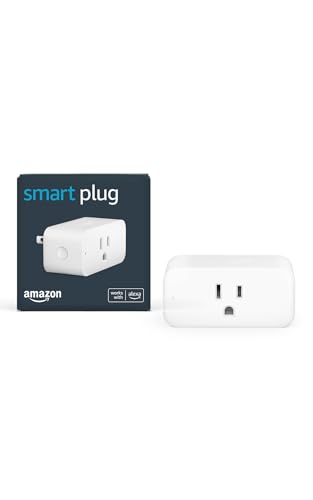
Transforming your home into a smart haven is effortless with the Amazon Smart Plug, especially if you want to bring voice control to any outlet. Simply plug it in, open the Alexa app, and you’re ready to go in minutes. It works seamlessly with devices like lamps, fans, and coffee makers, allowing you to control them hands-free. You don’t need a smart home hub, and it reliably reconnects after outages. Plus, you can automate routines, like turning on lights or brewing coffee, all with simple voice commands. Enjoy the convenience and endless possibilities of a connected home!
Best For: Individuals looking to easily integrate voice control into their home appliances without the need for a smart home hub.
Pros:
- Simple setup process allows for quick installation and use.
- Compatible with a variety of devices, enhancing convenience in daily tasks.
- Reliably reconnects after outages, ensuring consistent functionality.
Cons:
- Limited to devices with physical on/off switches, restricting compatibility.
- Requires an Alexa-enabled device for full functionality.
- May not support advanced automation features compared to dedicated smart home systems.
ApoloSign 32 Inch FHD Smart Portable TV (2nd Gen)

With a stunning 32-inch FHD touchscreen and a powerful 15000mAh battery, the ApoloSign 32 Inch FHD Smart Portable TV (2nd Gen) is perfect for families who crave both entertainment and functionality. You’ll enjoy vibrant visuals with its 1920×1080 resolution and ten-point touch support. The Android 15 OS gives you access to apps like Netflix and YouTube, while 128GB storage guarantees smooth performance. Plus, the built-in Google Gemini AI Voice Assistant makes navigation a breeze. With a mobile base and 24/7 customer support, you can effortlessly move it around your home and get help whenever you need it.
Best For: Families seeking a versatile and portable entertainment solution for home and on-the-go use.
Pros:
- Exceptional display quality with 32-inch FHD resolution and ten-point touchscreen support.
- Long battery life of up to 8 hours, making it ideal for portable use.
- User-friendly with access to popular apps and voice assistant for easy navigation.
Cons:
- Limited internal storage of 128GB may not be sufficient for heavy users.
- The mobility may require adequate space for maneuvering around.
- Might not be suitable for outdoor use without proper protection from elements.
10.1″ POE Smart Home Touch Panel (Android 14)

The 10.1″ POE Smart Home Touch Panel (Android 14) is perfect for tech-savvy homeowners seeking seamless control over their smart devices. With its 1280x800P resolution and responsive capacitive touch screen, maneuvering your smart home has never been easier. Powered by an RK3576 processor and equipped with 4GB RAM and 64GB ROM, this panel guarantees smooth performance. You’ll enjoy robust connectivity options, including WiFi 6E and Bluetooth 5.3. Plus, it supports multiple protocols like I/O and RS-232. Built-in sensors for light, temperature, and humidity enhance your smart home experience, while the four LED light bars add a stylish touch.
Best For: Tech-savvy homeowners looking for a comprehensive solution to control their smart devices seamlessly.
Pros:
- High-resolution display with 1280x800P for clear visuals.
- Robust connectivity options including WiFi 6E and Bluetooth 5.3 for enhanced performance.
- Built-in sensors for light, temperature, and humidity, providing a more responsive smart home experience.
Cons:
- Limited storage capacity of 64GB may not be sufficient for all users.
- Dependent on power supply through RJ45 POE, which may require additional infrastructure.
- May have a learning curve for users unfamiliar with smart home technology.
Kasa Smart Switch 2-Gang HS200-2, Compatible with Alexa and Google Home

For those looking to enhance their smart home experience, the Kasa Smart Switch 2-Gang HS200-2 stands out with its compatibility with both Alexa and Google Home. This single-pole switch, requiring a neutral wire, operates on a 2.4GHz Wi-Fi network and doesn’t need a hub. Its sleek 2-gang design allows you to control two circuits effortlessly. Installation is a breeze with the Kasa App, ideal for users without complex wiring knowledge. You can control your lights remotely or via voice commands, plus advanced scheduling features help automate your lighting and improve security with the “Away Mode.”
Best For: Homeowners looking to easily integrate smart technology into their lighting systems without complex installation.
Pros:
- Easy Installation: The Kasa App provides guided setup, making it accessible even for those with minimal wiring knowledge.
- Voice Control Compatibility: Works seamlessly with Amazon Alexa and Google Assistant for convenient hands-free operation.
- Enhanced Security Features: The “Away Mode” helps deter intruders by randomly turning lights on and off.
Cons:
- Neutral Wire Required: The need for a neutral wire may limit compatibility with older homes or certain electrical setups.
- 2.4GHz Wi-Fi Only: Does not support 5GHz networks, which could affect performance in certain environments.
- Limited to Single Pole Control: Cannot be used for multi-way switch setups, reducing versatility in larger spaces.
Leviton Decora Smart Switch (D215S-1RW)

Looking for a smart switch that seamlessly integrates with your existing home setup? The Leviton Decora Smart Switch (D215S-1RW) is your answer. This Wi-Fi-enabled switch requires a neutral wire and supports Matter, Alexa, Google Assistant, and Apple Siri. You can easily control lights from anywhere, set schedules for exterior lights, and even create a lived-in look when you’re away. With an auto-shutoff feature for energy efficiency, installation is a breeze—just replace your existing switch! Plus, it’s compatible with various configurations, making it a versatile choice for your smart home. Enjoy enhanced convenience and safety today!
Best For: Homeowners looking for a smart lighting solution that integrates easily with existing smart home systems.
Pros:
- Seamless integration with popular voice assistants like Alexa, Google Assistant, and Apple Siri.
- Remote control and scheduling features allow for convenient management of lights from anywhere.
- Easy installation process that simply replaces existing switches, compatible with multiple configurations.
Cons:
- Requires a neutral wire, which may not be available in all homes.
- Only connects to 2.4 GHz Wi-Fi, potentially limiting connectivity for some users with dual-band routers.
- Dependent on firmware updates for Matter support, which may not be immediate.
Wall Mount 10.1 inch PoE Android 11 Tablet PC for Smart Home

Designed specifically for smart home enthusiasts, the Wall Mount 10.1 inch PoE Android 11 Tablet PC offers seamless control over your entire smart ecosystem from a single, easily accessible location. Its sleek matte black finish blends effortlessly into any décor while saving space with its wall-mounted design. By drawing power through an Ethernet connection, you eliminate clutter and additional hardware. Powered by Android 11 and the RK3566 processor, it delivers speedy performance, enhanced by built-in Wi-Fi and Bluetooth. Enjoy multimedia capabilities, browse the web, or access a vast library of apps and games via the Google Play Store—all at your fingertips.
Best For: Smart home enthusiasts looking for a centralized control solution for their devices in a sleek, space-saving design.
Pros:
- Streamlined smart home control from one location, enhancing convenience.
- Wall-mounted design saves space and reduces clutter from additional hardware.
- Powered by Android 11 with a fast RK3566 processor, ensuring smooth performance and connectivity.
Cons:
- Limited screen size (10.1 inches) may not be ideal for all users’ preferences.
- Dependence on Ethernet for power may restrict placement options.
- Potential compatibility issues with certain smart home devices not listed in the specifications.
Smart Sleek Socket: Universal Outlet Concealer with Wi-Fi Smart Power Strip
The Smart Sleek Socket is perfect for anyone wanting a clutter-free and modern living space. Its seamless design hides plugs and cords, allowing your furniture to sit snugly against the walls. You can manage devices like lamps and fans using the Sleek Socket app, compatible with Alexa and Google Home for effortless control. It fits various outlet sizes and installs easily—no tools required! With fast-charging USB ports, you can charge two devices simultaneously while keeping outlets available. Plus, its smart outlets handle up to 1625W, ensuring safety and efficiency in your home. Enjoy a tidier, smarter living environment!
Best For: Those seeking a stylish and efficient solution to manage cords and plugs while enjoying smart home features.
Pros:
- Seamless design blends perfectly with walls, enhancing the aesthetic of any room.
- Smart control capabilities allow for easy management of devices through an app or voice commands.
- Fast-charging USB ports enable simultaneous charging of two devices, keeping outlets free for other uses.
Cons:
- Limited to handling a maximum of 1625W, which may not support high-powered devices.
- May not fit unconventional outlet designs, limiting usability in some homes.
- Requires a stable Wi-Fi connection for full smart functionality, which could be a drawback in areas with poor connectivity.
Factors to Consider When Choosing a Smart Home Control Tablet
When you’re picking a smart home control tablet, there are several key factors to keep in mind. Screen size, operating system compatibility, and connectivity options can all impact your experience. You’ll also want to evaluate how well the tablet integrates with your existing devices and the usability of its interface.
Screen Size Importance
Choosing the right screen size for your smart home control tablet can greatly enhance your experience. A larger display, like 10.1 inches, offers ample space for viewing and controlling multiple devices simultaneously. This added size improves visibility, making navigation through apps and settings easier. Plus, a bigger screen often means better touchscreen responsiveness, which reduces input errors during interactions. You’ll also benefit from split-screen functionality, allowing you to monitor various camera feeds or control devices at once. Don’t forget about resolution; a higher resolution paired with a larger size guarantees clearer visuals, perfect for video calls or live monitoring. Ultimately, selecting the right screen size sets the foundation for a seamless smart home management experience.
Operating System Compatibility
Finding the right smart home control tablet goes beyond just screen size; operating system compatibility plays an essential role in your overall experience. When choosing a tablet, consider the operating system, as it dictates how well it works with your smart home devices and apps. Android and iOS are popular choices, but Android often offers broader compatibility with third-party products. Make sure the tablet’s operating system is up-to-date for improved features and security. Look for tablets that support multiple communication standards like Zigbee, Matter, and Thread to enhance device interoperability. Finally, a robust app ecosystem on your chosen platform can greatly elevate your smart home functionality and customization, making your life easier.
Connectivity Options Available
As you explore options for a smart home control tablet, connectivity should be at the forefront of your decision-making process. Look for tablets that support advanced connectivity options like WiFi 6E and Bluetooth 5.3, guaranteeing faster and more reliable connections to your smart home devices. Models with Ethernet ports and Power over Ethernet (PoE) capabilities provide stable power and internet access without extra wiring. Confirm compatibility with multiple communication protocols such as Zigbee, Matter, and Thread for better interoperability. Additionally, evaluate inclusion of serial communication protocols like RS-232 and RS485, which are essential for integrating legacy devices. Finally, check for support of wireless standards like Bluetooth Low Energy (BLE) to efficiently connect battery-operated smart devices.
Device Integration Capabilities
When considering a smart home control tablet, device integration capabilities play a significant role in your overall experience. You’ll want to check its compatibility with smart home protocols like Zigbee, Matter, and Thread, which guarantee seamless connections with a variety of devices. Supporting multiple connectivity options, such as WiFi 6E and Bluetooth, is vital for efficient communication throughout your home. Look for a tablet that can control various devices—lights, thermostats, security systems, and smart appliances—to enhance your smart home setup. Additionally, consider whether it allows management through voice commands or mobile apps, giving you flexibility in interaction. Finally, verify the tablet’s software gets frequent updates to support new devices and maintain security.
User Interface Usability
A user-friendly interface is essential for maximizing your experience with a smart home control tablet, ensuring that you can easily navigate and manage your connected devices. Look for a capacitive touch screen that offers responsive design for smooth interactions. High-resolution displays, like 1280x800P or better, provide clear visuals that make identifying icons, buttons, and live feeds simple. Intuitive layouts that categorize functions help you control multiple devices effortlessly, regardless of your age. Voice command integration enhances usability by allowing hands-free control when you’re busy or can’t access the screen. Additionally, customization options for widgets and shortcuts let you tailor the interface to fit your needs, boosting your overall satisfaction and efficiency when managing your smart home.
Battery Life Considerations
Choosing the right smart home control tablet involves careful consideration of battery life, since it directly impacts how long you can use the device without interruptions. Look for tablets with a battery capacity of at least 15,000mAh; some can last up to 8 hours on a single charge. Efficient power management features are key, optimizing usage and extending operation time without frequent recharges. Check the charging options, like power-over-Ethernet (PoE) or fast-charging capabilities, to minimize downtime. Additionally, standby modes can conserve battery life when the tablet isn’t actively in use. Finally, keep in mind that larger screens with high resolutions may consume more power, so balance screen size with your battery life needs for the best experience.
Installation and Setup Ease
For a hassle-free experience, you’ll want to prioritize installation and setup ease when selecting a smart home control tablet. Look for options that offer wall mounting or power-over-Ethernet (PoE) capabilities to simplify your setup and reduce the need for extra hardware. Devices with guided installation through user-friendly apps can be invaluable, especially if you’re not tech-savvy. Aim for tablets that support straightforward plug-and-play setups, which are ideal for renters or those with limited DIY skills. Verify compatibility with your existing home network and devices to streamline integration. Finally, evaluate whether the control panel supports multiple protocols like Wi-Fi, Bluetooth, and Zigbee, as this flexibility can greatly enhance your installation experience.