When it comes to enhancing your living space, smart home scene controllers can make a significant difference. They offer convenience and automation that streamline your daily routines. With options like the MOES Smart Home Touchscreen and SONOFF Smart Switch, you can manage everything from lighting to temperature effortlessly. But how do you choose the right one for your needs? Let’s explore the top contenders and what makes each unique.
MOES Smart Home Touchscreen Control Panel with Alexa Built-in

If you’re looking for a seamless way to control your smart home, the MOES Smart Home Touchscreen Control Panel with Alexa Built-in is the perfect choice for you. This in-wall panel features a 5-inch full touch screen, allowing you to manage devices with ease. Its extensive compatibility with Smart Life devices, like switches and cameras, enhances your smart home experience. With Alexa built-in, you can use voice commands for hands-free control. Plus, the integrated Zigbee gateway functionality means you won’t need separate equipment. Installation is a breeze, supporting both wired and wireless connections for your convenience.
Best For: Those seeking a user-friendly and versatile solution for managing their smart home devices with both touch and voice control.
Pros:
- Extensive Compatibility: Works with a wide range of Smart Life devices, enhancing the interconnectedness of your smart home.
- Built-in Voice Control: Alexa integration allows for hands-free management of devices and scenes.
- Easy Installation: Supports both wired and wireless connections, making setup simple and convenient.
Cons:
- Requires Smart Home Ecosystem: Best utilized within a broader smart home setup, which may require additional devices.
- Limited Screen Size: The 5-inch screen may be small for some users who prefer larger displays for control.
- Dependence on Internet Connectivity: Functionality may be limited if internet service is unreliable or disrupted.
Leviton Decora Smart Controller Switch (D2SCS-1RW)

The Leviton Decora Smart Controller Switch (D2SCS-1RW) is an ideal choice for homeowners looking to elevate their smart home experience with effortless scene control. This Wi-Fi-enabled switch requires a neutral wire and connects seamlessly with My Leviton, Alexa, Google Assistant, and Apple Home/Siri. You can easily create custom scenes like “Movie Time” using its multi-button control. Installation is a breeze—just replace your existing light switch and avoid complex programming. Plus, with its 2-year warranty and support for multiple devices, you’ll enjoy flexible control from anywhere in your home. Transform your space with this smart solution today!
Best For: Homeowners seeking an easy-to-install smart switch that integrates with various smart home systems for customizable lighting scenes.
Pros:
- Easy Installation: Simple wiring allows for quick replacement of existing light switches with no complex programming needed.
- Voice Control Compatibility: Works seamlessly with popular voice assistants like Alexa, Google Assistant, and Siri for hands-free operation.
- Custom Scene Creation: Allows users to create personalized lighting scenes, enhancing the ambiance of your home.
Cons:
- Neutral Wire Required: Installation requires a neutral wire, which may not be available in all homes.
- Limited to 2.4GHz Networks: Only supports 2.4GHz Wi-Fi, potentially limiting connectivity in environments that primarily use 5GHz networks.
- Custom Buttons Only Available in the US: The option for custom engraved buttons via the app is restricted to users in the United States.
Wireless Zigbee Smart Button for Smart Home Devices

For those seeking seamless control over their smart home devices, the Wireless Zigbee Smart Button stands out as a versatile solution. This compact 12-scene controller features four buttons that allow single-click, double-click, and long-press actions, making it easy to adjust lighting, activate smart curtains, or trigger pre-programmed scenes. You’ll appreciate its energy efficiency, running on just two AAA batteries for up to two years. Plus, it connects effortlessly with platforms like Tuya, Hubitat, and Home Assistant, eliminating the need for voice commands or apps. Experience the convenience of smart automation with just a gentle press after a long day.
Best For: Those looking for an efficient and user-friendly way to control multiple smart home devices without relying on apps or voice commands.
Pros:
- Easy to use with multiple click options for diverse functions.
- Energy-efficient design with a battery life of up to two years.
- Wide compatibility with various smart home platforms including Tuya and Home Assistant.
Cons:
- Requires a compatible Zigbee hub for operation.
- Limited to four buttons, which may not suffice for users with extensive smart home setups.
- Initial setup may require some technical knowledge for pairing with hubs.
Wireless Zigbee Smart Button for Smart Home Devices

Designed for those who crave seamless control over their smart home environment, the Wireless Zigbee Smart Button offers a versatile solution for managing devices and scenes effortlessly. This 4-way remote control pairs easily with platforms like Tuya, Hubitat, and Home Assistant, requiring just a Tuya Zigbee Hub. With four customizable buttons, you can trigger actions through single, double, or long presses, whether adjusting blinds or activating scenes. Plus, program the buttons for automatic scene activation based on schedules or sensor data. Powered by a long-lasting lithium battery, it guarantees reliable performance while integrating with HomeKit and SmartThings for expanded compatibility.
Best For: Individuals seeking an efficient and customizable way to control their smart home devices with minimal effort.
Pros:
- Versatile Control: Four customizable buttons allow for single, double, and long press actions, making it easy to manage various devices and scenes.
- Seamless Integration: Compatible with popular platforms like Tuya, Home Assistant, and Hubitat, ensuring effortless pairing and operation within existing smart home setups.
- Smart Automation: Enables automatic scene activation based on schedules or sensor data, enhancing the overall smart home experience.
Cons:
- Requires Hub: Needs a Tuya Zigbee Hub for functionality, which may be an additional cost for some users.
- Limited to Zigbee: Only compatible with Zigbee technology, potentially excluding users with non-Zigbee smart home devices.
- Battery Replacement: Relies on a lithium button battery, which will eventually need replacement for continued use.
SONOFF Smart Switch with Touchscreen (Compatible with Alexa and Google Home)
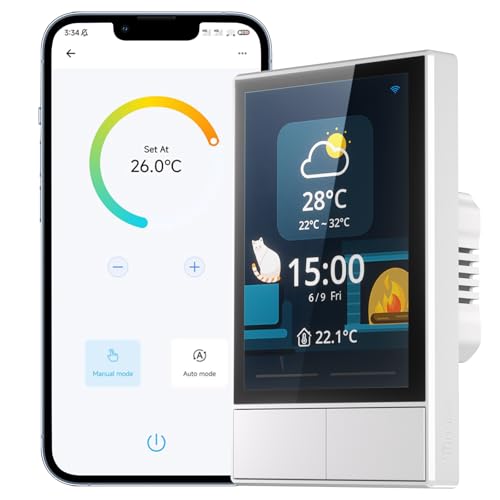
Looking to streamline your smart home experience? The SONOFF Smart Switch with Touchscreen is your all-in-one control center, letting you manage multiple devices effortlessly. With compatibility for Alexa, Google Home, and Siri, you can switch lights and adjust temperature settings simply by speaking. Its integrated panel displays real-time updates like weather and indoor conditions, ensuring you’re always informed. The built-in thermostat automatically manages your heating and cooling, while dual-channel switches and the eWeLink app offer flexible control. Weighing just 9.6 ounces, this sleek, white switch fits seamlessly into any room, enhancing your home automation journey.
Best For: Individuals looking to enhance their smart home experience with a versatile and user-friendly control center.
Pros:
- Voice Control: Compatible with Alexa, Google Home, and Siri for hands-free operation.
- Integrated Features: Combines smart wall switch, thermostat, and real-time updates in one device.
- User-Friendly: Easy to operate via touchscreen, dual-channel switches, or the eWeLink app.
Cons:
- Limited Compatibility: Not compatible with SmartThings, which may restrict integration with some systems.
- Average Customer Ratings: Holds a rating of 3.9 out of 5 stars, indicating mixed customer satisfaction.
- Weight Consideration: Weighs 9.6 ounces, which may be considered heavy for some wall switch installations.
TOPGREENER Smart Light Switch Wi-Fi Scene Controller (TGWFSC8)

The TOPGREENER Smart Light Switch Wi-Fi Scene Controller (TGWFSC8) is an excellent choice for anyone wanting to streamline their smart home experience with customizable control. You can create up to 14 programmable scenes to manage multiple Wi-Fi devices simultaneously, like turning on lights or activating your entertainment system. This device works seamlessly with all TOPGREENER Wi-Fi products and Smart Life-compatible devices, making pairing and control easy through the respective apps. Plus, it supports voice commands via Amazon Alexa and Google Assistant. Just remember, it requires a neutral wire and a secured 2.4GHz Wi-Fi network for ideal functionality.
Best For: Those looking to enhance their smart home setup with customizable control over multiple Wi-Fi devices.
Pros:
- Easy customization: Create up to 14 programmable scenes for various occasions.
- Voice control compatibility: Works with Amazon Alexa and Google Assistant for hands-free operation.
- Wide compatibility: Integrates seamlessly with other TOPGREENER and Smart Life-compatible devices.
Cons:
- Requires neutral wire: Installation may be complicated for homes without a neutral wire.
- Limited to 2.4GHz network: Only operates on a secured 2.4GHz Wi-Fi network, which may limit range.
- Wall plate sold separately: Additional purchase required for a complete installation.
Amazon Basics Smart Dimmer Switch and Remote for Alexa

If you’re seeking an easy way to control your smart home devices without complex wiring, the Amazon Basics Smart Dimmer Switch and Remote for Alexa is a perfect choice. This device seamlessly integrates with your Echo, allowing you to manage smart lights, play music, adjust blinds, and more—all with just a click. The battery-powered remote is portable, giving you control from anywhere in your home without needing voice commands. Plus, setting it up is a breeze; just connect it through your Echo, follow the guided steps in the Alexa app, and you’re ready to enjoy powerful automations at your fingertips.
Best For: Individuals looking for a simple, wireless solution to control smart home devices without the need for voice commands.
Pros:
- User-friendly setup: Easy installation via the Alexa app with no complicated wiring required.
- Portable remote: Battery-powered remote allows for control from anywhere in the house.
- Versatile automation: Can manage multiple Alexa-enabled devices simultaneously for enhanced convenience.
Cons:
- Limited compatibility: Only works with Alexa, restricting use with other smart home ecosystems.
- Battery dependency: Requires batteries for the remote, which may need to be replaced over time.
- No physical switches: Some users may prefer traditional wall switches for controlling lights.
SONOFF NSPanel Smart Switch – 2-Switch Panel Home Control

For tech-savvy homeowners seeking seamless control over their living spaces, the SONOFF NSPanel Smart Switch stands out as an ideal solution. This sleek, black 2-switch panel features a touchscreen interface to manage your lighting and temperature effortlessly. With built-in thermostat functionality, you can set specific indoor temperatures, ensuring comfort throughout the day. Plus, control your devices via dual-channel switches, touchscreen, or the eWeLink App, while enjoying voice command options with Alexa and Google Home. The NSPanel also provides real-time updates on weather and indoor conditions, keeping you informed at all times. Transform your home into a smart haven with ease!
Best For: Tech-savvy homeowners looking for seamless control over lighting and temperature in their living spaces.
Pros:
- Touchscreen Interface: Easy and intuitive management of lighting and temperature settings.
- Smart Thermostat Functionality: Automatically maintains desired indoor temperatures for comfort.
- Multiple Control Options: Flexibility to control via switches, touchscreen, or voice commands with Alexa and Google Home.
Cons:
- Wi-Fi Dependency: Requires a stable 2.4GHz Wi-Fi connection for full functionality.
- Limited Compatibility: Primarily designed to work with SONOFF devices, which may limit integration with other brands.
- Installation Required: May require professional installation for optimal performance in some home setups.
Tuya Smart Home 8-inch Multifunctional Touch Screen Control Panel

Looking for a sleek and efficient way to control your smart home devices? The Tuya Smart Home 8-inch Multifunctional Touch Screen Control Panel is your answer. This innovative device features an 8-inch multi-touch LCD screen and a convenient rotary switch for easy thermostat and light dimming control. Its in-wall design allows for quick installation, while compatibility with various smart devices means you can manage everything from lights to air conditioners effortlessly. Plus, with Bluetooth connectivity and a built-in speaker, you’ll enjoy enhanced audio experiences. Transform your living space with this all-in-one control panel that simplifies your smart lifestyle!
Best For: Homeowners and renters looking for an efficient and stylish way to control their smart home devices with a single touch panel.
Pros:
- Versatile compatibility with a wide range of smart home devices including lights, curtains, and air conditioners.
- User-friendly interface with an 8-inch multi-touch LCD screen and rotary switch for easy control and scene selection.
- Quick installation thanks to its in-wall design and magnetic suction feature, eliminating the need for tools.
Cons:
- May require a learning curve for users unfamiliar with smart home technology and app configurations.
- Limited built-in audio power (2W speaker) may not satisfy audiophiles seeking high-quality sound.
- Dependence on the Smart Life app for full functionality could be a drawback for those preferring standalone devices.
Zooz 800 Series Z-Wave Long Range Scene Controller (ZEN32 800LR)

The Zooz 800 Series Z-Wave Long Range Scene Controller (ZEN32 800LR) is an ideal choice for homeowners who want seamless control over their smart lighting without the hassle of complicated installations. With its main button, you can manage a 120 V light fixture, while four remote buttons let you activate scenes or devices with a single touch. It requires a Z-Wave hub, compatible with systems like SmartThings and Hubitat. Designed for easy installation and featuring advanced security, this controller guarantees reliable performance. Plus, you’ll enjoy support seven days a week and a one-year warranty for peace of mind.
Best For: Homeowners seeking an easy-to-install smart lighting solution that allows for seamless control and scene activation.
Pros:
- User-friendly installation process with clear diagrams and seven-day support.
- Versatile control with one main button and four additional buttons for scene activation.
- Enhanced security features including S2 authentication and SmartStart for easy pairing.
Cons:
- Requires a Z-Wave hub, which is sold separately, limiting compatibility with basic systems.
- Neutral wire is necessary for installation, which may not be available in all homes.
- Custom driver needed for compatibility with SmartThings, potentially complicating setup.
Factors to Consider When Choosing a Smart Home Scene Controller
When choosing a smart home scene controller, you’ll want to contemplate several key factors. Think about compatibility with your existing devices, the control method options you prefer, and how much customization you need. Don’t forget to evaluate installation ease and whether you want voice control integration for added convenience.
Compatibility With Devices
Choosing a smart home scene controller requires careful consideration of its compatibility with your existing smart home ecosystem. Make sure the controller supports protocols like Zigbee, Z-Wave, or Wi-Fi that match your devices. It’s also essential to verify that it works with a broad range of devices, including lights, switches, and sensors, so you can maximize its functionality. Look for compatibility with popular voice assistants like Alexa, Google Assistant, and Apple HomeKit, ensuring seamless integration. Additionally, check whether the controller connects with specific smart home hubs, as some may require proprietary systems. Finally, consider if it allows for creating and automating multiple scenes that can interact with various devices at once to enhance your home experience.
Control Method Options
Smart home scene controllers come with a variety of control method options that cater to different user preferences. You can choose from touchscreen interfaces, physical buttons, or voice commands, making it easy to find a style that suits you. Many controllers feature multi-button setups, allowing you to activate multiple scenes or device actions with just one press, double press, or long press. If you prefer hands-free operation, voice control compatibility with Alexa, Google Assistant, or Siri enhances convenience. Additionally, some controllers integrate with mobile apps, letting you control and customize settings remotely from your smartphone or tablet. For advanced users, automation capabilities enable scene triggers based on sensor data or specific events, adding even more flexibility to your smart home experience.
Customization Features Available
While selecting a scene controller, it’s essential to evaluate the customization features that can enhance your smart home experience. Look for controllers with customizable button actions like single-click, double-click, and long-press functionalities, which boost flexibility. You’ll also want to take into account options that let you create multiple programmable scenes for different activities, such as “Movie Time” or “Dinner Party.” Verify the device integrates seamlessly with various smart home ecosystems, allowing you to control multiple devices from one interface. Custom engraving or labeling of buttons can simplify operation, making it more user-friendly. Finally, check if the controller automates scenes based on schedules or sensor data, promoting convenience and energy efficiency in your setup.
Installation and Setup Ease
When installing a scene controller, it’s crucial to take into account how easy the setup will be. Check if the controller supports simple wiring setups or if it needs a neutral wire, as this can affect compatibility with your existing electrical systems. Look for products featuring tool-free installation options, like magnetic suction designs, to speed up the process. Verify the controller works with your home’s current smart devices and ecosystems, simplifying installation and boosting functionality. Many smart controllers provide straightforward app-based setups that guide you through installation, making it accessible even for those with limited technical skills. Finally, evaluate if the device offers both wired and wireless connectivity options for added flexibility and improved network reliability.
Voice Control Integration
Choosing a smart home scene controller goes beyond just installation; voice control integration plays a significant role in your overall experience. With voice control, you can manage your smart devices hands-free, which is especially helpful if you have mobility challenges. Look for controllers compatible with popular voice assistants like Alexa, Google Assistant, or Siri to make your life easier. To guarantee effective integration, you’ll need a stable internet connection and may have to set up a hub for peak functionality. You can also customize voice commands to activate specific scenes, enhancing your smart home’s personalization. Plus, controlling multiple devices with a single command simplifies interactions, boosting overall efficiency in your home automation.
Energy Efficiency Considerations
As you explore smart home scene controllers, energy efficiency should be a top consideration. Look for controllers that utilize wireless technologies like Zigbee or Z-Wave, as they consume less power than traditional Wi-Fi devices. Many options come with energy-saving features such as programmable schedules and automation, allowing you to optimize energy use based on your habits. Controllers with energy monitoring capabilities can provide insights into your power usage, helping you identify areas for savings. Battery-powered smart buttons can last for months or even years, reducing waste. Finally, consider devices that integrate with smart thermostats; they can adjust heating and cooling based on your defined scenes, leading to more efficient energy use throughout your home.