If you’re looking to streamline your smart home experience, choosing the right control panel is essential. The market’s filled with options, each offering unique features and compatibility with Google Home. From sleek designs to advanced functionalities, these devices can transform how you manage your smart ecosystem. Let’s explore the top contenders that could elevate your smart living setup and make everyday tasks more convenient.
Brilliant Smart Home Control (Plug-In Panel) with Alexa Built-In

If you’re looking for a versatile smart home control solution that seamlessly integrates with Google Home and offers a built-in Alexa experience, the Brilliant Smart Home Control (Plug-In Panel) is an excellent choice. This panel plugs into any outlet, requiring no neutral wire for installation. With a 5-inch LCD touchscreen, you can easily manage lights, music, and home security. Control your smart bulbs, listen to Sonos speakers, and even check your Ring Video Doorbell from one place. Plus, the built-in Alexa lets you use voice commands, keeping your counters clutter-free while enhancing your smart living experience.
Best For: Those seeking a convenient and integrated smart home control solution with voice assistance capabilities.
Pros:
- Easy Installation: Plugs into any outlet without the need for a neutral wire.
- Multi-Device Compatibility: Works with a variety of smart home devices including Ring, Sonos, and Philips Hue.
- Built-In Voice Control: Features Alexa for hands-free operation and voice commands.
Cons:
- Limited to Plug-In Use: Requires an available outlet, which may restrict placement options.
- Dependence on Wi-Fi: Functionality is reliant on a stable internet connection.
- Price Point: May be considered expensive compared to basic smart home controls.
SONOFF NSPanel Pro Smart Home Control Panel

The SONOFF NSPanel Pro Smart Home Control Panel stands out as an ideal choice for tech-savvy homeowners looking to centralize their smart home management. With its 4.7-inch display, you can easily control various functions at your fingertips. Monitor energy usage, view live cameras, adjust your thermostat, and manage lighting all from one interface. Its customizable security modes send alarms and notifications to your phone if a sensor is triggered, keeping your home safe. Additionally, it supports real-time camera viewing and even lets you browse the web, listen to music, and watch videos, making it a versatile addition to your smart home.
Best For: Tech-savvy homeowners looking to centralize and enhance their smart home management experience.
Pros:
- User-friendly interface allows easy control of multiple home functions from a single panel.
- Customizable security features provide peace of mind with alarms and notifications for triggered sensors.
- Versatile functionality includes web browsing, music playback, and video watching in addition to home automation.
Cons:
- Requires a stable internet connection for optimal performance and remote access.
- Limited compatibility with non-Zigbee devices may restrict integration options for some users.
- Initial setup may be complex for users unfamiliar with smart home technology.
MOES Smart Home Touchscreen Control Panel with Alexa Built-in

For those seeking a seamless blend of touch and voice control in their smart home, the MOES Smart Home Touchscreen Control Panel with Alexa Built-in stands out as an ideal choice. This in-wall panel features a 5-inch full touch screen and supports a wide range of Smart Life devices, including switches and cameras. With Alexa integrated, you can easily manage your home through voice commands, simplifying your daily interactions. Plus, the built-in Zigbee gateway eliminates the need for extra devices, enhancing connectivity. Installation is a breeze, supporting both wired and wireless connections, making it a fantastic addition to your smart home setup.
Best For: Homeowners looking for an integrated touch and voice control solution to manage their smart home devices effortlessly.
Pros:
- Versatile Control: Combines touch screen and Alexa voice commands for easy management of multiple devices.
- Wide Compatibility: Works with a variety of Smart Life devices, enhancing the interconnected smart home experience.
- Simplified Installation: Supports both wired and wireless connections, making setup efficient and user-friendly.
Cons:
- Limited Screen Size: The 5-inch screen may be smaller compared to other smart home control panels, potentially hindering usability for some users.
- Dependent on Internet Connectivity: Requires a stable internet connection for optimal performance of voice commands and device control.
- Potential Learning Curve: Users unfamiliar with smart home technology might find it challenging to fully utilize all features initially.
10.1″ Smart Home Control Panel with Android 14

Looking for a smart home control panel that seamlessly integrates with your Google Home? Check out the 10.1″ Smart Home Control Panel running Android 14. With its 1280x800P capacitive touch screen, you’ll enjoy vibrant visuals. Powered by an RK3566 processor and equipped with 4GB RAM and 32GB ROM, it guarantees smooth performance. Connectivity is a breeze with WiFi 6E, Ethernet, and support for Zigbee and Matter devices. Plus, built-in sensors for light, temperature, and humidity enhance your smart living experience. Its sleek design and inbuilt LED light bars make it a stylish addition to any home.
Best For: Those looking to enhance their smart home experience with a versatile and visually appealing control panel that integrates seamlessly with various smart devices.
Pros:
- Supports the latest connectivity standards, including WiFi 6E and Zigbee, ensuring compatibility with a wide range of smart home devices.
- Equipped with built-in sensors for light, temperature, and humidity, adding functionality to your smart home setup.
- Sleek design with a vibrant 10.1-inch capacitive touch screen and inbuilt LED light bars, making it a stylish addition to any room.
Cons:
- Limited internal storage with only 32GB ROM, which may not be sufficient for extensive app installations or media storage.
- Requires a stable internet connection for optimal performance, which may be a drawback in areas with poor connectivity.
- The RK3566 processor, while capable, may not handle more demanding applications as efficiently as higher-end processors.
Smart Home 10″ Touch Panel, Android 11 (POE Version)
Ideal for tech-savvy homeowners, the Smart Home 10″ Touch Panel with Android 11 offers seamless integration with Google Home and other popular smart home systems. Featuring a powerful RK3566 Quad-core CPU, this panel guarantees smooth performance. Its 4GB RAM and 32GB ROM provide ample storage for apps and media. You can easily mount it in multiple electrical boxes, and its POE capability simplifies installation. Enjoy video streaming from your cameras, and stay connected with 2.4GHz/5GHz WiFi, Bluetooth, and Ethernet options. With a sleek black design, this panel not only performs well but also enhances your home’s aesthetics.
Best For: Tech-savvy homeowners looking for a versatile smart home integration solution.
Pros:
- Powerful Performance: Equipped with a Quad-core CPU and 4GB RAM for smooth operation.
- Multiple Connectivity Options: Supports 2.4GHz/5GHz WiFi, Bluetooth, and Ethernet for flexible networking.
- Easy Installation: POE capability simplifies the setup process without the need for additional power sources.
Cons:
- Limited Customer Feedback: Currently holds a moderate rating of 3.6 out of 5 stars from only 7 reviews.
- Weight Consideration: At 1.83 pounds, it may be heavier than some alternative smart panels.
- Best Sellers Rank: Lower visibility with a ranking of #458,867 in Tools & Home Improvement.
SONOFF NSPanel Smart Switch – 2-Switch Home Control

The SONOFF NSPanel Smart Switch stands out as a top choice for tech-savvy homeowners seeking seamless smart home integration. This sleek, black 2-switch panel features a touchscreen for easy control of lights and temperature. With its built-in thermostat, you can set specific indoor temperatures and let the NSPanel manage your heating or cooling automatically. You can control the device via dual-channel switches, touchscreen, or the eWeLink App, and it supports voice commands through Google Home, Alexa, and Siri. Plus, real-time updates on weather and indoor conditions keep you informed at all times, ensuring your home’s comfort.
Best For: Tech-savvy homeowners looking for a comprehensive smart home control solution.
Pros:
- All-in-one control center that integrates lighting and temperature management seamlessly.
- Voice control compatibility with Alexa, Google Home, and Siri for hands-free convenience.
- Real-time updates on weather and indoor conditions enhance home comfort and awareness.
Cons:
- Requires a stable 2.4GHz Wi-Fi connection for optimal performance.
- Limited compatibility with devices outside the SONOFF ecosystem.
- Touchscreen may be prone to smudging and require regular cleaning.
SONOFF NSPanel WiFi Smart Scene Wall Switch (2 Switch Panel)

For those seeking an all-in-one control center for their smart home, the SONOFF NSPanel WiFi Smart Scene Wall Switch is an excellent choice. This 2-switch panel features a touchscreen that lets you easily manage temperature and lighting settings. With compatibility for Google Home, Alexa, and the eWeLink App, you can control your devices through voice commands or the app. Its built-in thermostat allows you to automate heating and cooling based on your preferences. Plus, you can activate specific scene modes with just one tap, streamlining your smart home experience effortlessly. Enjoy convenience and efficiency with SONOFF NSPanel!
Best For: Those looking for an integrated and user-friendly solution to control their smart home temperature and lighting.
Pros:
- Touchscreen interface makes it easy to manage settings and activate scenes with a single tap.
- Compatible with popular voice assistants like Alexa and Google Home for hands-free operation.
- Built-in thermostat automates heating and cooling, enhancing energy efficiency.
Cons:
- Customer ratings indicate mixed satisfaction, with a score of 3.8 out of 5 stars.
- Limited to a maximum current rating of 10 Amps, which may not support all devices.
- IP40 rating means it may not be suitable for installation in more exposed or humid environments.
SONOFF Smart Switch with Touchscreen and WiFi Compatibility
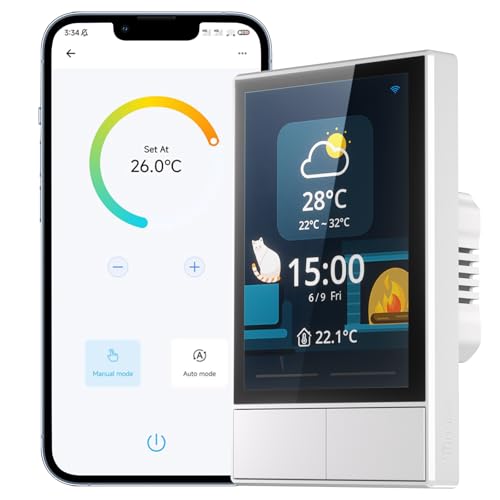
If you’re looking for an all-in-one solution to streamline your smart home experience, the SONOFF Smart Switch with Touchscreen and WiFi Compatibility is an excellent choice. This sleek, white panel lets you control multiple SONOFF devices effortlessly. With its integrated thermostat, you can set temperature schedules that automatically trigger your heating and cooling systems. You can manage it all through touch, voice commands, or the eWeLink app. Plus, it provides real-time updates on weather and indoor conditions. While it doesn’t work with SmartThings, its compatibility with Google Home, Alexa, and Siri makes it a versatile addition to your smart home.
Best For: Homeowners looking for an easy-to-use smart switch that integrates multiple devices and offers temperature control.
Pros:
- Versatile Control: Operate the switch via touchscreen, voice commands, or the eWeLink app.
- Integrated Thermostat: Automatically manages heating and cooling systems based on set schedules.
- Real-Time Updates: Provides current weather and indoor temperature information.
Cons:
- Not Compatible with SmartThings: Limited compatibility with other smart home ecosystems.
- Average Customer Ratings: Holds a 3.9 out of 5 stars based on customer reviews.
- Limited Current Rating: Rated for only 10 Amps, which may not support high-power devices.
LANBON Smart Light Switch (L8-HS-White)

Looking for a smart light switch that’s easy to use and integrates seamlessly with your Google Home setup? The LANBON Smart Light Switch (L8-HS-White) is your best bet. Available in 1-gang, 2-gang, and 3-gang configurations, it features a sleek LCD Magic Panel and WiFi Mesh technology, ensuring no lag. You can control it via voice commands with Google Home, a touchscreen interface, or the Smart Living app. With five customizable modes and support for up to 200 devices, it adapts perfectly to your home. Just remember, it requires a neutral wire for installation. Transform your spaces effortlessly!
Best For: Homeowners looking for a versatile and easy-to-use smart light switch that integrates seamlessly with their existing smart home setup.
Pros:
- Easy integration with Google Home and Alexa for voice control.
- Multiple configurations (1-gang, 2-gang, 3-gang) to suit different needs.
- Customizable modes for personalized lighting and curtain scenes.
Cons:
- Requires a neutral wire for installation, which may not be available in all homes.
- Limited to 2.4G Wi-Fi connectivity, potentially affecting speed and range.
- Some users may find the touchscreen interface less intuitive compared to traditional switches.
DIY WiFi Smart Switch with LCD Touchscreen

The DIY WiFi Smart Switch with LCD Touchscreen is perfect for tech-savvy homeowners seeking seamless integration into their smart home ecosystem. This mini control panel features a 3.5-inch touchscreen and supports multiple control methods, including manual buttons, voice commands via Google Assistant, and an IR remote. You can customize settings through the Tuya or Smart Life app, managing devices and scenes effortlessly. With partition control and Sigmesh functionality, you can easily select specific areas for device management. Plus, it’s FCC Certified and ETL Listed, ensuring reliability and safety for your home. Upgrade your space with this smart solution today!
Best For: Tech-savvy homeowners looking for an integrated smart home control solution with customizable options.
Pros:
- Multiple control methods, including touch, voice, and remote for convenience.
- Customization through Tuya or Smart Life app enhances user experience.
- Partition control and Sigmesh functionality allow for tailored device management.
Cons:
- Requires a neutral wire for installation, which may not be available in all homes.
- Limited to 2.4GHz Wi-Fi, potentially affecting connectivity in some setups.
- Maximum load capacities may not support higher wattage devices.
Factors to Consider When Choosing a Smart Home Control Panel With Google Home
When choosing a smart home control panel compatible with Google Home, you should consider several key factors. Think about compatibility, screen size, and voice control functionalities that fit your lifestyle. Don’t forget to evaluate installation options and energy monitoring capabilities to guarantee you make the best choice for your needs.
Compatibility With Google Home
To guarantee your smart home functions seamlessly with Google Home, it’s crucial to choose a control panel that explicitly states its compatibility. Look for options that support a wide range of Google Home-compatible devices, including lights, cameras, and smart locks, to maximize your smart home ecosystem. Panels that offer voice control through Google Assistant allow for hands-free operation, making your life easier. Don’t forget to review user feedback and product specifications to confirm consistent performance and reliability when using Google Home features. Additionally, check if the control panel supports popular communication protocols like Zigbee or Wi-Fi, as these enhance compatibility with various Google Home devices, promoting a smoother integration into your smart living environment.
Screen Size and Resolution
Selecting the right screen size and resolution for your smart home control panel can greatly enhance your experience. Typically, screen sizes range from 4.7 inches to 10.1 inches, influencing usability and visibility as you manage your devices. Higher resolution screens, like 1280×800 pixels, provide clearer visuals, making navigation through apps easier. Larger screens allow you to display multiple controls simultaneously, streamlining your smart home management. Plus, touchscreen responsiveness is essential; larger, high-resolution displays offer a more intuitive interaction. Don’t forget to take into account screen brightness and visibility in different lighting conditions, as this can greatly affect the effectiveness of your control panel in various environments. Choose wisely to optimize your smart living experience!
Voice Control Functionality
Screen size and resolution are important, but voice control functionality takes convenience to a whole new level. With voice control, you can manage your lights, thermostats, and security systems hands-free, simply by using voice commands. Many smart home control panels come with Google Assistant integration, enhancing compatibility with a wide range of devices. However, the effectiveness of voice control relies on the accuracy of the built-in microphone and how clearly you speak, which can affect how well your commands are executed. Look for features that allow you to create customized scenes or routines, enabling you to activate multiple devices at once. Additionally, some systems offer security measures like voice recognition, ensuring only authorized users can control specific functions.
Installation and Connectivity Options
When choosing a smart home control panel compatible with Google Home, there are several key installation and connectivity factors to take into account. First, check if the panel requires a neutral wire; some models can function without it, making installation easier. Next, explore connectivity options like Wi-Fi, Ethernet, and Zigbee integration to boost network strength and device compatibility. Consider the installation method—whether it’s designed for in-wall mounting or as a plug-in device—since this affects where you can place it. Don’t forget to verify power supply options, such as Power over Ethernet (POE) or standard AC connections, ensuring compatibility with your electrical setup. Finally, look for support for both wired and wireless connections for peak performance.
Energy Monitoring Capabilities
Understanding energy monitoring capabilities is essential for making the most of your smart home control panel compatible with Google Home. These features let you track daily energy consumption and identify usage patterns, helping you manage power effectively. Look for panels with built-in energy statistics that enable real-time monitoring of connected devices. Customizable alerts for high energy use can prompt you to take action, reducing your utility bills and improving efficiency. A user-friendly interface displaying energy usage data makes it easier to grasp your consumption trends. Additionally, integration with home automation systems can enhance monitoring, allowing you to automate devices based on energy thresholds or specific time-of-day settings, ensuring your home runs efficiently.
User Interface Design
Choosing a smart home control panel compatible with Google Home hinges on the user interface design, as it directly impacts how effectively you manage your devices. Look for a responsive touchscreen with a clear resolution, like 1280×800 pixels, to guarantee easy interaction and visibility. Intuitive navigation is essential; it lets you quickly access functions like lighting control and temperature settings without hassle. Voice control capabilities can enhance your experience, making it easier to operate devices hands-free. Customization options, such as quick access buttons and scene settings, can improve your efficiency and satisfaction. Finally, pay attention to user feedback and ratings, as they often reflect the effectiveness of a control panel’s interface and overall user-friendliness.
Security Features and Alerts
As you explore smart home control panels compatible with Google Home, don’t overlook the importance of security features and alerts. Look for panels that let you customize security modes, enabling different arming devices for varying levels of protection. Real-time alerts sent to your phone when a security sensor is triggered guarantee you’re immediately aware of potential threats. Consider panels with built-in cameras for live viewing of entry points, allowing you to monitor activity as it happens. Some models even offer energy monitoring, alerting you to unusual power consumption that may indicate security breaches. Finally, verify the panel supports various security devices, giving you centralized control over alarms, locks, and cameras from one interface.