Choosing the best CNC router for acrylic means balancing clean edges, reliable motion, usable work area, and enough spindle power for your projects. The right machine should cut consistently without making setup unnecessarily complicated.
These 10 options range from compact beginner kits to more rigid all-metal routers, helping makers, sign creators, educators, and small shops find a suitable match for their workload and budget.
Best 10 Cnc Router for Acrylic Picks for 2026
Premium Precision Pick

- Ball screws and linear guides target precise motion
- 800W spindle handles acrylic and multiple materials
- Mostly assembled with broad GRBL software support
Best For: Acrylic cutting, detailed engraving, and multi-material desktop work
Large-Format Acrylic Choice
SainSmart Genmitsu 4040-PRO MAX

- 410 x 405 x 77mm stated work area
- 710W trimmer supports cutting and engraving
- Reinforced spoilboard and 100mm pass height
Best For: Larger acrylic signs, panels, and desktop production work
Beginner Desktop Pick

- Compact 300 x 180 x 40mm work area
- 0.1mm stated engraving accuracy
- Supports acrylic, plastics, wood, and soft metals
Best For: Small acrylic projects, education, prototyping, and beginners
Stable Workhorse
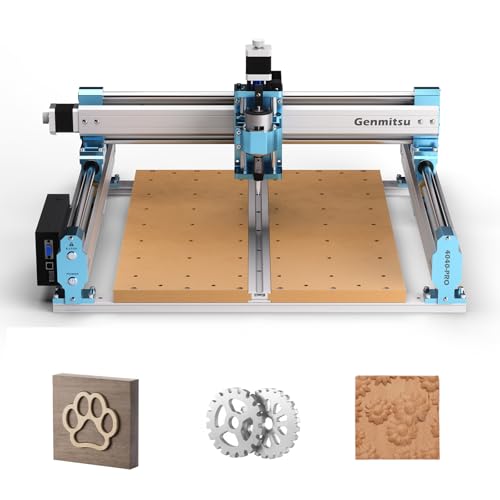
- 435 x 400 x 80mm working area
- Reinforced spoilboard reduces bed flex
- Rigid lead-screw and steel-tube motion system
Best For: Larger acrylic signs, prototypes, and stable desktop machining
Best Beginner Aluminum CNC

- All-aluminum frame with linear-rail Z-axis
- 400 x 400 x 60 mm work area
- Pre-wired assembly and expandable spindle support
Best For: Beginners making acrylic, wood, MDF, and nylon projects
Best High-Precision CNC

- 710W digital spindle with display
- Dual linear guides and ball screws
- Advertised ±0.03 mm precision
Best For: Detailed acrylic engraving and light metal work
Best Compact Starter CNC

- 300 x 180 x 45 mm working area
- GRBL control with offline controller
- Supports acrylic, wood, PVC, and PCB
Best For: Small acrylic projects and learning CNC basics
Best Upgrade-Ready Pick

- Rigid all-metal frame with dual linear guides
- 800W router with six speed settings
- Upgradeable spindle, motors, screws, and table
Best For: Home workshops needing a compact, expandable acrylic-capable CNC
Best Large-Work-Area Option

- 460 x 460 x 80 mm working area
- Rigid aluminum and stainless-steel build
- Includes tools, clamps, and test materials
Best For: Larger acrylic signs, panels, prototypes, and educational workshops
Best Straightforward Desktop Pick

- 500W spindle with 52mm and 65mm clamps
- 15.7 x 15.7-inch working area
- Includes clamps, probe, tools, cables, and manual
Best For: Beginners doing smaller acrylic engraving and cutting projects
Premium Precision Pick – LUNYEE 3020 Nova CNC Router
For makers seeking a precise cnc router for acrylic, the LUNYEE 3020 Nova combines an all-metal frame, ball screws, and linear guides with an 800W router. Its fully assembled design also helps reduce setup time.
Best For: Acrylic projects, detailed engraving, and users who want a versatile desktop machine that can also handle wood, plastics, PCB, leather, and some metals.
Pros:
- 1204 ball screws and HG-15 linear guides are designed to reduce backlash, with stated accuracy of ±0.05mm.
- 800W spindle offers 6,000–30,000 RPM, six speed settings, and constant torque control.
- Supports GRBL software including UGS, Fusion 360, Easel, and Candle.
- Arrives largely assembled, requiring Z-axis installation and power connection.
Cons:
- The supplied notes do not specify the work-area dimensions.
- It is a corded machine and may be more capability than needed for simple engraving.
The Nova stands out when precision and material flexibility matter. Its rigid drive system and powerful spindle make it a strong acrylic-focused choice for makers planning to expand into other materials.
Large-Format Acrylic Choice – SainSmart Genmitsu 4040-PRO MAX
The SainSmart Genmitsu 4040-PRO MAX is a practical cnc router for acrylic when you need more workspace and cutting height. Its 410 x 405 x 77mm work area, linear guide structures, and 710W trimmer suit larger desktop projects.
Best For: Makers producing larger acrylic signs, panels, and mixed-material projects who value a reinforced work surface and increased pass height.
Pros:
- Provides a 410 x 405 x 77mm work area for larger projects.
- 710W digital-display router supports high-powered engraving and cutting.
- Reinforced spoilboard with an aluminum support bar helps reduce sagging and adds T-track clamping options.
- 100mm pass height accommodates taller materials than the standard PRO version.
Cons:
- The supplied notes do not describe included acrylic-specific bits or cutting settings.
- The larger format may require more workspace than compact desktop machines.
With its spacious bed, reinforced spoilboard, and 100mm pass height, this model is well suited to acrylic work that exceeds the scale of smaller hobby routers. Its GRBL control also supports a flexible maker workflow.
Beginner Desktop Pick – TTC3018 3-Axis CNC Router
The TTC3018 is a compact, approachable cnc router for acrylic designed for desktop workshops, education, prototyping, and personal projects. Its 300 x 180 x 40mm work area and GRBL control keep the machine suited to smaller jobs.
Best For: Beginners and creators working on small acrylic engravings, prototypes, and mixed projects involving wood, plastics, and soft metals.
Pros:
- Compact overall size fits desktop workspaces, with a 300 x 180 x 40mm work area.
- 32-bit STM32 processor and GRBL control provide stated engraving accuracy of 0.1mm.
- 775 spindle with ER11 collet accepts 0.5–7mm bits.
- Supports TF card or USB operation and software such as Artcam and Fusion 360.
Cons:
- Requires assembly before use.
- Its 1500mm/min maximum speed and 7000–9000 RPM spindle are aimed at smaller, light-duty projects.
- Official software support is listed for Windows XP through Windows 10.
This TTC3018 makes sense as an entry point for acrylic engraving and learning CNC fundamentals. Its compact footprint and stated accuracy are useful for small work, though larger cutting jobs will need a more spacious machine.
Stable Workhorse – Genmitsu 4040-PRO CNC Router
The Genmitsu 4040-PRO is a solid cnc router for acrylic for makers who want a larger work area and stable motion. Its reinforced hybrid spoilboard, lead-screw drives, and 435 x 400 x 80mm workspace support consistent desktop machining.
Best For: Acrylic signs, reliefs, prototypes, and woodworking projects that benefit from a rigid frame and a relatively generous work area.
Pros:
- 435 x 400 x 80mm working area accommodates larger desktop projects.
- Reinforced hybrid spoilboard and center aluminum support bar help limit bed flex.
- Dual 16mm HSS steel tubes and lead-screw drives provide rigid motion.
- Pre-assembled modules enable assembly in about 15 minutes, according to the supplied notes.
Cons:
- The supplied specifications list a 9,000 RPM maximum speed, lower than some competing models.
- Acrylic cutting requires appropriate bits and cutting settings, which are not included in the notes.
- The machine is not described as fully assembled.
The 4040-PRO is a sensible choice when bed stability and workspace are more important than maximum spindle speed. Its upgrade-ready Z-axis carriage and accessory ports give experienced users room to develop their setup.
Best Beginner Aluminum CNC – FoxAlien Masuter Pro
The FoxAlien Masuter Pro is a practical cnc router for acrylic when you want an all-aluminum frame, a moderate 400 x 400 mm work area, and straightforward setup. Its pre-wired components and included engraving bits make it approachable for hobby projects involving acrylic, wood, MDF, and nylon.
Best For: Beginners and DIY users who want a stable, expandable machine for acrylic engraving and small-to-medium routing projects.
Pros:
- All-metal construction and a linear-rail Z-axis support stability during detailed work.
- Large 400 x 400 x 60 mm engraving area for a desktop hobby machine.
- Pre-wired parts and a step-by-step manual help simplify assembly.
- Includes 52 mm and 65 mm spindle clamps for customization options.
Cons:
- The included 60W spindle is more suited to hobby-scale work than demanding production cutting.
- Larger spindle and router upgrades require additional purchases.
- The 69 mm spindle clamp is sold separately.
Choose the Masuter Pro if accessible setup, aluminum construction, and expandability matter more than maximum spindle power. Its generous work area is useful for signs and panels, while the upgrade path leaves room to develop your setup.
Best High-Precision CNC – Genmitsu 3030-PROVer Ultra
The Genmitsu 3030-PROVer Ultra is a powerful cnc router for acrylic aimed at users who want more rigidity and precision than a basic desktop machine provides. Its 710W digital spindle, dual linear guides, and ball screws are designed for controlled engraving in acrylic, aluminum, and other demanding materials.
Best For: Makers and experienced DIY users prioritizing high precision, rigid construction, and stronger spindle performance for acrylic and light metal engraving.
Pros:
- 710W digital spindle provides substantially more power than older 300W spindle designs.
- All-metal chassis, dual linear rails, and ball screws support smooth, accurate motion.
- Advertised precision reaches ±0.03 mm for detailed custom parts.
- Supports the Genmitsu app, Candle, UGS, and Easel workflows.
Cons:
- At 23 kg, it is less portable than compact hobby CNC machines.
- The stronger feature set may be more than beginners need for occasional acrylic engraving.
- The supplied notes do not specify the machine’s working-area dimensions.
The 3030-PROVer Ultra stands out when rigidity, spindle power, and repeatable detail are your priorities. Its pre-assembled modules and 10-minute setup claim improve accessibility, while the heavier all-metal design suits more demanding workshop use.
Best Compact Starter CNC – Genmitsu 3018-PRO
The Genmitsu 3018-PRO is a compact cnc router for acrylic designed to help beginners learn carving, engraving, and basic milling. Its 300 x 180 x 45 mm work area, GRBL control, and included offline controller make it a practical choice for small acrylic projects without requiring a large workshop footprint.
Best For: Beginners, students, and makers creating small acrylic signs, prototypes, PCB projects, and other desktop work.
Pros:
- Compact 3-axis design fits home workshops, classrooms, and maker spaces.
- Works with acrylic, wood, PVC, plastic, PCB, and soft aluminum using appropriate bits and settings.
- Open-source GRBL control offers broad community support and Candle compatibility.
- Offline controller allows basic operation without a continuously connected computer.
Cons:
- The 300 x 180 x 45 mm work area limits projects to smaller pieces.
- Its 120W motor is intended for entry-level work rather than demanding cutting.
- Suitable bits and cutting settings are required for different materials.
The 3018-PRO is a sensible learning platform for users who value affordability, compact size, and a flexible GRBL workflow. Pick it for small acrylic work and CNC fundamentals, not large panels or high-throughput production.
Best Upgrade-Ready Pick – 3030-Evo Max CNC Router
For shoppers seeking a capable cnc router for acrylic, the 3030-Evo Max combines a rigid all-metal frame, dual linear guides, and an 800W trim router. Its compact format suits home workshops, while the upgrade path helps accommodate more demanding projects later.
Best For: Hobbyists who want to cut acrylic and other materials with a compact machine that can be upgraded over time.
Pros:
- Rigid all-metal construction with dual MGN-15 linear guides on each axis.
- 800W router supports six speed settings from 8,000 to 24,000 RPM.
- Supports acrylic, wood, MDF, plastics, aluminum, brass, and stainless steel.
- Upgradeable to a 1.5kW spindle, ball screws, closed-loop motors, and a larger table.
Cons:
- The router speed requires manual dial adjustment rather than software control.
- The compact work area is better suited to smaller projects than large panels.
- Some advanced capabilities require optional upgrades.
This is a strong choice when rigidity, material flexibility, and future expansion matter. Its included router is suitable for light-duty acrylic work, while the upgradeable design gives experienced users room to improve cutting capacity and precision.
Best Large-Work-Area Option – Twotrees TTC450 Pro
The Twotrees TTC450 Pro is a practical cnc router for acrylic when a larger desktop work area is a priority. Its 460 x 460 x 80 mm workspace, sturdy aluminum-and-stainless-steel construction, and included accessories make it suitable for signs, panels, prototypes, and detailed engraving.
Best For: Makers, educators, and small workshops handling larger acrylic pieces or varied engraving projects.
Pros:
- Large 460 x 460 x 80 mm working area for panels, signage, and batch work.
- Industrial-style aluminum and stainless-steel structure helps reduce vibration.
- Includes cutting tools, clamping plates, test materials, and a 775 spindle motor.
- GRBL compatibility works with ArtCam, Fusion 360, Easel, and Carveco Maker on major desktop operating systems.
Cons:
- The supplied 775 brushed spindle is less powerful than the 800W router in some competing options.
- Windows 11 users need the CH341 driver rather than the commonly referenced CH340 driver.
- Assembly and computer setup require some initial technical attention.
Choose this model if workspace and included accessories are more important than maximum spindle power. The larger bed and precise Z-axis positioning give it useful flexibility for acrylic signs, layered designs, and other detailed projects.
Best Straightforward Desktop Pick – 4040-PRO CNC Router
The 4040-PRO offers a straightforward entry point for buyers looking for a cnc router for acrylic. It combines a 15.7 x 15.7 x 2.9-inch work area with a 500W spindle, lead-screw-driven Z axis, and GRBL/Candle USB control for routine engraving and cutting tasks.
Best For: Hobbyists who want a ready-to-assemble desktop machine for acrylic, wood, and light milling projects.
Pros:
- 500W spindle includes both 52mm and 65mm clamp options for compatibility and upgrades.
- Supplied accessory kit includes clamps, Z-probe, test board, tools, cables, and manual.
- GRBL and Candle provide 3D preview, origin setting, axis unlocking, and live status display.
- Compact 4040 format offers a useful 15.7 x 15.7-inch working footprint.
Cons:
- The 500W spindle has less power than the 800W unit supplied with the 3030-Evo Max.
- X and Y motion uses belts and V-wheels rather than dual linear guides.
- Laser functionality is optional, not included.
This model is a sensible choice for beginners who value a complete accessory package and familiar GRBL control. Its 500W spindle and desktop work area are well matched to general acrylic engraving and smaller cutting jobs.
How We Picked the Best Cnc Router for Acrylic
We focused on the features that most affect acrylic routing: frame rigidity, motion accuracy, spindle or router power, working area, control compatibility, and setup requirements. The selection includes compact 3018-style machines for learning and small parts, mid-size 3030 and 4040 models for signs and panels, and larger or sturdier machines for more demanding production work.
Because acrylic can melt, chip, or develop rough edges when cutting conditions are poor, we also considered whether each machine offers useful control over feed rates, toolpaths, workholding, and cutting depth. Specifications can vary by seller and configuration, so verify the included spindle, collets, software, and accessories before ordering.
Quick Comparison
| Machine Type | Best For | What to Prioritize |
|---|---|---|
| 3018-class router | Beginners and small projects | Low cost, compact footprint, simple setup |
| 3030-class router | Signs, panels, and general making | Balanced workspace, rigidity, precision |
| 4040-class router | Larger acrylic sheets and repeated jobs | Expanded work area, stronger frame, stable motion |
| 450-class router | Higher-volume or heavier work | Rigid construction, motor strength, durability |
Key Buying Factors for a Cnc Router for Acrylic
Work Area and Material Size
Measure the acrylic blanks you expect to use, then allow room for clamps, tabs, and safe tool movement. A larger bed is useful for signs and batches, but it also requires more bench space and may cost more.
Rigidity and Motion System
A rigid frame helps prevent vibration and chatter, which can leave rough edges or cause tool breakage. All-metal construction, linear guides, ball screws, and well-supported axes are valuable when accuracy and repeatability matter.
Spindle or Router Power
More power is not automatically better for acrylic. The machine should provide stable speed control and accept suitable single- or two-flute plastic-cutting bits. Excessive heat is a common cause of melting, so feeds, speeds, chip clearance, and shallow passes remain important.
Control, Software, and Safety
Check for GRBL or another controller compatible with your preferred CAM software. Confirm that emergency-stop controls, limit switches, dust management, enclosure options, and safety documentation meet your workspace needs. Acrylic chips can be sharp, and routing produces noise and debris.
Who Should Buy Which Cnc Router for Acrylic?
New users: Choose a compact 3018-style kit if you are learning CAD/CAM, engraving, or small-part machining and want a manageable entry point.
Sign makers and serious hobbyists: A 3030 or 4040 machine offers a more useful balance of workspace, precision, and cost for acrylic panels, lettering, and prototypes.
Frequent users and small shops: Favor an all-metal 4040 or 450-class model with a rigid frame, dependable motion components, and a work area suited to your production blanks. Whichever Cnc Router for Acrylic you choose, plan on using proper workholding, acrylic-safe tooling, test cuts, and conservative depth passes before committing to a finished piece.