Choosing among enclosed CNC routers means balancing workspace, cutting power, software support, noise control, and ease of use. The right machine can make desktop milling and routing safer, cleaner, and more approachable.
These 10 options range from compact enclosed mills for detailed projects to larger CNC routers designed for aluminum, wood, plastics, and prototyping. Use the comparisons and buying advice below to narrow the field.
Best 10 Enclosed Cnc Routers Picks for 2026
Best Smart Desktop Pick
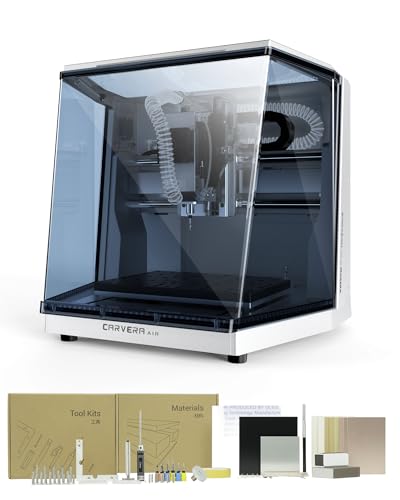
- Fully enclosed compact design
- Automatic probing and leveling
- Quick tool changing in about 10 seconds
Best For: Makers, prototyping, and small workshops
Best Metal-Cutting Value

- Rigid all-metal XYZ structure
- 800W router for light metal work
- Multiple upgrade paths
Best For: Home workshops cutting aluminum, brass, and wood
Best Beginner Enclosed Pick

- Beginner-oriented Makera ecosystem
- Built-in live-monitoring camera
- Handles wood, acrylic, PCB materials, and soft metals
Best For: First-time CNC users and desktop prototyping
Best Large-Format Entry Router

- 460-by-460-by-80 mm work area
- Sturdy aluminum and stainless-steel frame
- Expansion ports for 4th-axis and laser upgrades
Best For: Larger signs, panels, batch work, and makerspaces
Best Precision Pick
Carvera Air Desktop CNC with 4th Axis & PCB Kit

- True 4th-axis machining for cylindrical and 3D work
- Quick tool changer and automatic probing
- Includes PCB fabrication pack and versatile software
Best For: Makers seeking an automated enclosed desktop CNC for precision, multi-axis, and PCB projects
Best Larger Work Area
Genmitsu 4040-PRO MAX CNC Router

- 16.1-by-15.9-by-3.0-inch work area
- 710W router with reinforced linear-rail motion
- Upgradeable with Wi-Fi, rotary, dust-shoe, and extension kits
Best For: Workshop users needing a larger 3-axis cutting area and expandable hardware
Best Rotary Starter Bundle
Carvera Air with 4th Axis Rotary Kit

- 4th-axis module included for cylindrical and 3D machining
- Automatic probing and leveling
- Cross-platform control with Wi-Fi or USB
Best For: Hobbyists wanting an enclosed CNC bundle for rotary and complex desktop projects
Best Beginner Enclosed CNC Router
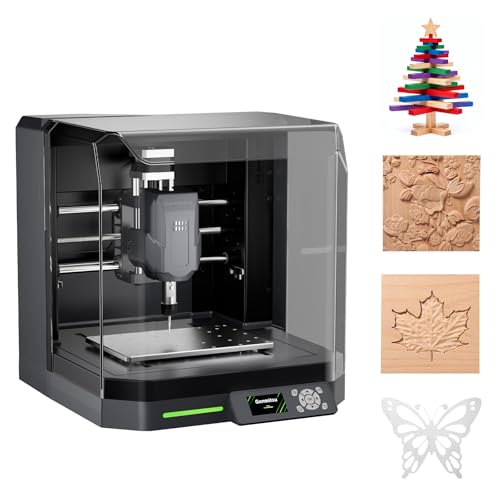
- Pre-assembled for a faster start
- Enclosure helps contain chips and noise
- Automatic Z-probing and surface mapping
Best For: Beginners making desktop projects in wood, acrylic, PCB, plastics, and suitable soft metals
Best Precision Enclosed CNC Router Alternative

- All-metal guides and ball screws
- 800W router for varied materials
- Supports widely used GRBL software
Best For: Makers prioritizing precision and material versatility over an integrated enclosure
Best Expandable CNC Router for Hobbyists

- 400 x 400 x 60 mm work area
- Pre-wired setup in about 10–15 minutes
- Supports spindle upgrades and Y-axis expansion
Best For: DIY hobbyists wanting a customizable, open-frame router for larger woodworking projects
Best Smart Desktop Pick – Carvera Air
For makers who want one of the more approachable enclosed cnc routers, the Carvera Air combines a compact footprint with guided CAM software, automatic probing, and a quick tool changer. Its enclosed design can help contain chips and dust while reducing noise in a home workshop or studio.
Best For: Hobbyists, prototype builders, jewelry makers, and small workshops needing precise, software-assisted machining.
Pros:
- Fully enclosed 19.7-by-17.7-by-17.7-inch footprint with an 11.8-by-7.9-by-5.1-inch work area
- Automatic probing and surface leveling support accurate machining
- Quick tool changer switches bits in about 10 seconds
- Works with wood, acrylic, carbon fiber, aluminum, brass, and more
Cons:
- Its compact work area limits the size of projects
- The standard model is a 3-axis machine
- At 90.3 pounds, it is not especially lightweight for a desktop unit
Carvera Air is a strong choice when cleanliness, ease of use, and precision matter more than a large cutting envelope. Wi-Fi and USB connectivity, cross-platform control, and compatibility with several CAD/CAM programs add flexibility as your projects become more advanced.
Best Metal-Cutting Value – 3030-Evo Max
The 3030-Evo Max stands out among enclosed cnc routers for buyers prioritizing a rigid, upgradeable platform for light-duty metal work. Its all-metal construction, dual linear guides, and included 800W trim router support projects in aluminum, brass, wood, acrylic, MDF, and plastics.
Best For: Home users and small workshops cutting metal and wood who want upgrade paths for the spindle, table, screws, or motors.
Pros:
- All-metal structure with dual MGN-15 linear guides on each axis
- Included 800W router offers six speed settings from 8,000 to 24,000 RPM
- Supports Wi-Fi control, macro buttons, probing, and GRBL-compatible software
- Upgradeable to a 1.5kW spindle, 1204 ball screws, closed-loop motors, and a larger table
Cons:
- It is described as a light-duty home machine
- Router speed adjustment requires manual dial control
- The machine requires assembly, despite major components being pre-assembled
This model offers a practical balance of rigidity and expandability. It is especially compelling for users willing to assemble and tune a machine, but buyers seeking a fully enclosed dust-containment solution should note that the supplied information emphasizes the router’s structure and upgrade options rather than a complete enclosure.
Best Beginner Enclosed Pick – Makera Z1 Standard
The Makera Z1 Standard is a beginner-focused option among enclosed cnc routers, designed to reduce setup friction through Makera CAM/APP resources, tutorials, and a maker community. Its compact design, built-in camera, and dust-management features make it suitable for visible, cleaner desktop machining.
Best For: Beginners, 3D printing users, educators, and makers learning CNC through small prototypes and creative projects.
Pros:
- Designed to shorten the learning curve for first-time CNC users
- Built-in camera helps monitor cuts in real time
- Supports wood, acrylic, PCB materials, plastics, and soft metals such as aluminum
- Offers stated machining accuracy of ±0.05 mm and positioning precision of 0.02 mm
Cons:
- The supplied listing identifies this as the Z1 Standard model, not the Z1Pro
- The notes do not specify the machine’s work-area dimensions
- Its intended materials and desktop format are better suited to smaller projects than large workpieces
Z1 Standard is a sensible starting point for users who value guidance and monitoring over maximum capacity. The Makera ecosystem gives beginners a clearer path from tutorials and simple projects toward more capable machines as their skills grow.
Best Large-Format Entry Router – Twotrees TTC450 Pro
The Twotrees TTC450 Pro is a capable alternative for shoppers comparing enclosed cnc routers with open-frame machines. Its 460-by-460-by-80 mm work area accommodates larger signs, panels, and batch work, while the aluminum-and-stainless-steel frame and NEMA 57 stepper motor support stable engraving.
Best For: Home craftsmen, makerspaces, schools, and small workshops needing a larger work area for wood, acrylic, signs, and functional parts.
Pros:
- Large 18.1-inch square working area for panels, signage, and batch production
- Aluminum-and-stainless-steel construction is designed to reduce vibration
- 3.5-inch capacitive touchscreen and expansion ports support 4th-axis and laser upgrades
- Compatible with Windows, macOS, Linux, and software such as Fusion 360, Easel, and Carveco Maker
Cons:
- The supplied details do not indicate that the machine is enclosed
- Assembly requires installing the appropriate CH340 or CH341 driver before computer connection
- The included 775 spindle motor is rated at 80 watts
TTC450 Pro makes the most sense when workpiece size and expandability are more important than an enclosed cabinet. Its broad software compatibility and included accessories make it approachable, while the expansion ports leave room for a more advanced setup later.
Best Precision Pick – Carvera Air Desktop CNC with 4th Axis & PCB Kit
For shoppers comparing enclosed cnc routers, the Carvera Air stands out as a compact desktop mill focused on automation and precision. It includes a 4th-axis version, PCB fabrication pack, quick tool changing, and software for milling, carving, and engraving across wood, plastics, and metals.
Best For: Makers who want an enclosed desktop CNC with automated probing, multi-axis capability, and PCB-focused accessories.
Pros:
- True 4th-axis machining supports cylindrical, double-sided, and 3D work.
- Quick tool changer switches tools in about 10 seconds.
- Auto-probing and leveling, closed-loop spindle control, and less than 0.01 mm stated spindle runout support precise cuts.
- Includes a PCB fabrication pack and cross-platform software compatibility.
Cons:
- The compact rotary work area is limited to 3.6 inches in diameter by 7.9 inches in length.
- Advanced capabilities such as the 4th axis may add complexity for beginners.
Choose this Carvera Air when precision, automation, and a broad desktop workflow matter more than a large cutting area. Its included 4th-axis and PCB accessories make it a particularly versatile enclosed option.
Best Larger Work Area – Genmitsu 4040-PRO MAX CNC Router
Among enclosed cnc routers and compact workshop machines, the Genmitsu 4040-PRO MAX is aimed at users who need a larger 16.1-by-15.9-by-3.0-inch work area. Its 710W router, reinforced spoilboard, linear rails, and integrated dust plate support higher-power engraving and cutting in wood, metal, and acrylic.
Best For: Workshop users who prioritize work area, rigid motion, and an upgradeable 3-axis platform.
Pros:
- Provides a 16.1-by-15.9-by-3.0-inch work area.
- 710W digital-display router supports powerful engraving and cutting.
- Modified SBR16 linear rails and lead screw are designed to reduce vibration and improve motion stability.
- Reinforced spoilboard includes aluminum support and integrated T-track clamping options.
Cons:
- Wireless control requires an optional Wi-Fi module.
- Dust shoe, 4th-axis rotary kit, and Y-axis extension are additional accessories.
- Unlike the Carvera models listed here, the supplied details describe a 3-axis machine.
The 4040-PRO MAX is the practical choice for larger flat work and future expansion. Its rigid, upgradeable design is appealing for workshop projects, though key wireless and rotary features require separate additions.
Best Rotary Starter Bundle – Carvera Air with 4th Axis Rotary Kit
If you are comparing enclosed cnc routers for detailed desktop work, this Carvera Air bundle includes the 4th-axis rotary kit for cylindrical, double-sided, and 3D machining. It combines a compact enclosed mill with quick tool changes, automatic probing and leveling, and Wi-Fi or USB control through Makera’s cross-platform software.
Best For: Hobbyists who want a ready-to-use enclosed CNC bundle centered on rotary and complex multi-step projects.
Pros:
- Includes the Carvera Air 4th Axis Module for a 3.6-inch-diameter by 7.9-inch-long rotary work area.
- Quick tool changer helps streamline multi-tool projects.
- Automatic probing and leveling support calibration on uneven materials.
- Works with Mac, Windows, iOS, Android, and Linux controller environments, plus popular CAD/CAM tools.
Cons:
- The rotary workspace is compact and may not suit larger cylindrical parts.
- The supplied package details do not list the PCB fabrication pack included with the other Carvera listing.
- Its 99-pound listed item weight may be significant for a desktop setup.
This bundle makes sense for hobbyists who specifically want rotary capability without sourcing the module separately. Consider it when enclosed operation, automated setup, and multi-axis projects outweigh the limitations of a compact work envelope.
Best Beginner Enclosed CNC Router – Genmitsu Cubiko
The Genmitsu Cubiko is one of the more approachable enclosed cnc routers for home workshops and maker spaces. It arrives pre-assembled, includes automatic Z-probing, and uses an integrated enclosure to help contain chips and reduce operating noise.
Best For: Beginners who want a simpler desktop CNC setup for wood, acrylic, PCB, plastics, and suitable soft metals.
Pros:
- Pre-assembled design helps shorten setup time.
- Integrated enclosure contains debris and helps reduce operating noise.
- Automatic Z-probing simplifies tool-height setup.
- Surface mapping helps compensate for minor work-surface variations during PCB milling.
Cons:
- Its beginner-focused desktop design may be less suited to larger projects.
- The supplied notes do not specify the maximum work area or spindle power.
Choose the Cubiko if ease of setup and a contained workspace matter more than heavy-duty production capacity. App, WiFi, compatible PC software, and offline control provide useful flexibility as your skills develop.
Best Precision Enclosed CNC Router Alternative – LUNYEE 3020 Nova
The LUNYEE 3020 Nova is a fully assembled desktop CNC router built around all-metal XYZ-axis guides and ball screws. While the supplied notes do not identify an integrated enclosure, its precision-focused drive system, 800W trimmer router, and broad material support make it a strong option for users prioritizing cutting capability.
Best For: Makers who need a rigid desktop machine for wood, acrylic, MDF, plastics, PCB work, and suitable aluminum or brass projects.
Pros:
- 1204 ball screws and HG-15 linear guides are designed to reduce backlash.
- 800W spindle offers 6,000–30,000 RPM, six speed settings, and constant torque control.
- Supports GRBL software including UGS, Fusion 360, Easel, and Candle.
- Arrives largely assembled with pre-connected wiring.
Cons:
- The supplied information does not mention an integrated enclosure.
- Users must install the Z-axis module after unboxing.
The 3020 Nova stands out for its all-metal construction, stated ±0.05 mm accuracy, and more powerful router. It is worth considering when material range and mechanical precision are higher priorities than enclosed operation.
Best Expandable CNC Router for Hobbyists – FoxAlien Masuter Pro
The FoxAlien Masuter Pro is an expandable 3-axis CNC router with an all-aluminum structure and a 400 x 400 x 60 mm engraving area. It is not presented as an enclosed machine, but its pre-wired components, dust-resistant controller, and spindle options make it a practical choice for hobbyists comparing enclosed cnc routers with open, customizable designs.
Best For: DIY users and hobbyists who want a relatively quick assembly process, a generous work area, and room for spindle upgrades.
Pros:
- All-metal frame and linear-rail Z-axis support stability.
- Pre-wired components can enable setup in about 10–15 minutes.
- Includes 52 mm and 65 mm spindle clamps with additional upgrade paths.
- Optional Y-axis extension kit can expand project capacity.
Cons:
- It does not include an integrated enclosure according to the supplied notes.
- The 69 mm spindle clamp is sold separately.
- Its included 60W configuration is less powerful than some upgrade options.
The Masuter Pro makes the most sense for users who value customization and a larger working area. Consider it alongside enclosed models if you can provide your own chip and noise management and want a platform that can grow with your projects.
How We Picked These Enclosed Cnc Routers
We focused on machines that offer a practical desktop or benchtop footprint, useful enclosure options, and enough capability for common maker, educational, prototyping, and small-shop work. We compared advertised work areas, spindle or router power, axis construction, drive systems, accessory support, and the intended user experience.
We also considered whether each machine is better suited to precision milling, general routing, PCB work, rotary projects, or beginner-friendly learning. Because included accessories and specifications can vary by configuration, verify the exact package before ordering.
Quick Comparison
| Best For | What to Look For |
|---|---|
| Compact precision work | Enclosed mini mills with rigid frames and CAM support |
| Wood and larger projects | A larger work area, stronger spindle, and robust spoilboard |
| Aluminum and brass | Ball screws or quality linear guides, low runout, and a rigid all-metal frame |
| PCB milling | Fine motion control, reliable Z-axis adjustment, and compatible tooling |
| Rotary work | A supported fourth axis or rotary accessory with suitable clearance |
Key Buying Factors for Enclosed Cnc Routers
Work Area and Machine Size
Measure both the material you plan to cut and the space available for the machine. A compact enclosure is convenient, but a larger usable bed reduces the need to divide signs, panels, or workpieces into multiple operations.
Rigidity, Motion, and Accuracy
Rigid frames, dual linear guides, ball screws, and properly supported axes can improve repeatability and surface quality. These features matter especially when cutting metals or making small, detailed parts. Also check the stated travel dimensions rather than relying on the machine’s outside size.
Spindle, Router, and Materials
Power alone does not determine cutting capability. Confirm the supported materials, collet or tooling standard, speed control, and cooling requirements. Wood and plastics are generally more forgiving, while aluminum and brass demand conservative feeds, sharp tooling, chip clearance, and a rigid setup.
Software and Workflow
Look for compatible CAM software, file formats, controller support, and clear calibration instructions. A machine that works with familiar software may save more time than one with higher headline specifications but a difficult workflow.
Enclosure, Noise, and Safety
An enclosure can help contain chips and reduce noise, but it does not eliminate the need for eye protection, ventilation, dust management, emergency-stop access, and safe operating practices. Check whether the enclosure, dust collection provisions, and safety hardware are included or optional.
Accessories and Expansion
Consider the cost of clamps, spoilboards, cutters, probes, dust shoes, rotary kits, and replacement parts. Fourth-axis and PCB accessories can expand a machine’s usefulness, but only if the control system and available work envelope support them.
Who Should Buy Which Enclosed Cnc Routers?
Beginners: Choose a machine with a straightforward setup, enclosed working area, accessible documentation, and supported software. Ease of calibration and customer support may matter more than maximum cutting power.
Makers and educators: Prioritize versatility, manageable noise, reliable repeatability, and accessory availability. A compact enclosed machine can be a strong fit where space and cleanup are important.
Metalworking and prototyping users: Favor rigid all-metal construction, dependable axis guides, ball screws where available, and a spindle or router suited to the materials. Plan for conservative feeds and proper workholding.
Advanced users: Look for fourth-axis compatibility, PCB capability, open workflow options, and enough travel for future projects. The best Enclosed Cnc Routers are those that match your actual materials and production needs rather than simply offering the largest motor.