If you want a display that keeps power use sensible without giving up clarity or comfort, an energy efficient computer monitor is a smart buy. The best options balance screen size, panel quality, and useful efficiency-minded features.
In this roundup, we focus on models that make sense for everyday use at home, in the office, or for light entertainment, with attention to value, eye comfort, and low-friction setup.
Best 10 Energy Efficient Computer Monitor Picks for 2026
Efficient Compact Choice
Philips 22-inch FHD 100Hz Monitor

- 22W power consumption
- 100Hz with Adaptive-Sync
- Flicker-Free and Low Blue Light
Best For: small desks, everyday work, and light gaming
Energy Star Office Pick
Amazon Basics 24-inch IPS Energy Star Monitor

- Energy Star certified
- IPS panel with wide viewing angles
- Tilt stand and VESA support
Best For: office work, home use, and efficient daily computing
Low-Power Eco Pick
AOC 22-inch 100Hz Eco-Friendly Monitor

- 13W eco mode for low power use
- 100Hz VA panel with Adaptive Sync
- Flicker-Free and Low Blue Light
Best For: eco-minded users who want a compact everyday monitor
Curved Comfort Pick
Samsung 27" Essential S3 100Hz Curved Monitor

- 35W power consumption
- Advanced Eye Comfort reduces blue light and flicker
- 100Hz curved 27-inch display
Best For: Energy-conscious users who want a curved, eye-comfort-focused monitor
Budget Home Office Value
Acer KA242Y G0bi 23.8" IPS Monitor
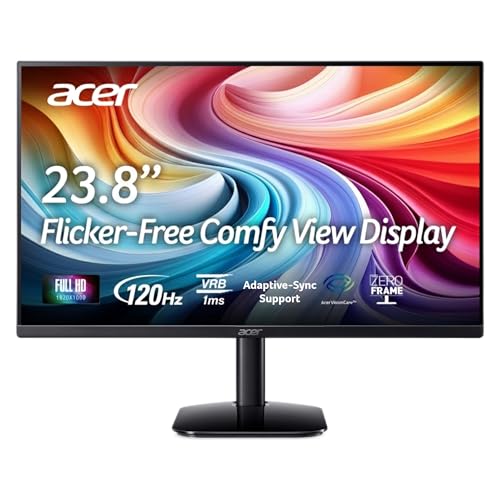
- Up to 120Hz refresh rate
- IPS panel with 99% sRGB
- ZeroFrame design for clean multi-monitor layouts
Best For: Home office and budget desktop buyers who want smooth basics
QHD Workhorse Choice
LG 27U631A-B 27" QHD IPS Monitor

- QHD resolution with IPS clarity
- USB-C with 15W power delivery
- Reader Mode and Flicker Safe for comfort
Best For: Users who want a sharper QHD display with simple USB-C connectivity
Value Eye-Care Pick
SANSUI 24-inch FHD Office Monitor

- 30W power consumption
- Flicker-free and low blue light
- HDMI, VGA, and VESA support
Best For: Budget-friendly home or office use
Large Screen Productivity Pick

- 27-inch IPS Full HD display
- 120Hz refresh with 1ms MBR
- Reader Mode and Flicker Safe
Best For: Work, streaming, and light gaming on a larger screen
Compact Eye-Care Pick
ASUS 22-inch Frameless 100Hz Monitor

- Space-saving 22-inch frameless design
- 100Hz refresh and 1ms MPRT
- Flicker-free, low blue light, and VESA
Best For: Small desks, study setups, and casual use
Efficient Compact Choice – Philips 22-inch FHD 100Hz Monitor
If you want an energy efficient computer monitor for basic work, streaming, or light gaming, this Philips 22-inch model keeps things simple and practical. Its 21.5-inch viewable panel delivers Full HD 1080p clarity, while the listed 22W power consumption helps keep energy use modest for an everyday desktop setup.
Best For: Budget-conscious users who want a smaller 1080p monitor with low power use and flexible everyday performance.
Pros:
- 22W power consumption keeps it relatively efficient for daily use
- 100Hz refresh rate and Adaptive-Sync help motion look smoother
- VA panel offers strong contrast with deep blacks and bright whites
- Flicker-Free and Low Blue Light features support more comfortable viewing
Cons:
- 21.5-inch class size is smaller than many modern office displays
- Only one HDMI port may feel limited for multi-device setups
- VGA is included, but connectivity is still fairly basic overall
Overall, this Philips monitor fits well if you value straightforward performance, a compact footprint, and lower power draw over premium extras. It is a sensible pick for an efficient home office or general-purpose desktop.
Energy Star Office Pick – Amazon Basics 24-inch IPS Energy Star Monitor
This Amazon Basics 24-inch option is a strong energy efficient computer monitor choice if you want a straightforward office display with broad viewing angles. It uses an IPS panel, supports 1080p resolution, and is Energy Star certified to meet stricter energy efficiency requirements while reducing power consumption.
Best For: Office and home users who want a practical 24-inch IPS monitor with certified energy efficiency.
Pros:
- Energy Star certified for reduced power consumption
- IPS panel provides accurate viewing from wide angles
- 24-inch Full HD screen suits work, webinars, and entertainment
- Includes tilt adjustment plus VESA compatibility for flexible setup
Cons:
- 75Hz refresh rate is adequate, but not especially fast
- Built-in speakers are included, but the listing does not emphasize audio quality
- More of a general-purpose monitor than a feature-heavy productivity display
For users who care about efficiency and comfort more than gaming extras, this monitor is easy to recommend. It balances a familiar office-friendly layout with certified energy savings and useful connectivity.
Sleek Efficient Everyday Monitor – Samsung 24-inch S3 120Hz IPS Monitor
The Samsung S3 24-inch monitor is a practical energy efficient computer monitor for users who want a clean design and smooth everyday performance. It lists 24W power consumption, pairs that with a 120Hz IPS panel, and adds Flicker Free plus Eye Saver Mode for longer sessions at the desk.
Best For: Users who want a sleek 24-inch monitor with good motion handling and eye-comfort features.
Pros:
- 24W power consumption keeps power use reasonable for a 120Hz monitor
- IPS panel delivers consistent color across the screen
- 120Hz refresh rate helps reduce lag and motion blur
- Eye Saver Mode and Flicker Free support comfortable viewing
Cons:
- Single-year manufacturer warranty is shorter than some alternatives
- No mention of height adjustment, so ergonomics may be limited
- Only HDMI connectivity is listed, which may restrict flexibility
This Samsung fits well when you want a modern monitor that stays efficient without feeling dated. It is especially appealing for general desktop use where smoothness, clean styling, and eye comfort matter.
Low-Power Eco Pick – AOC 22-inch 100Hz Eco-Friendly Monitor
If you are looking for an energy efficient computer monitor with a compact footprint, the AOC 22B2HM2 is a compelling option. It lists only 13W consumption in eco mode, yet still offers a 100Hz VA panel, Full HD resolution, and practical features like Adaptive Sync and Flicker-Free viewing.
Best For: Buyers who want a compact, low-power monitor with solid everyday performance and eco-friendly operation.
Pros:
- Consumes only 13W in eco mode for very low-power use
- 100Hz refresh rate and Adaptive Sync help motion look smooth
- VA panel provides strong 3000:1 contrast and wide viewing angles
- Flicker-Free, Low Blue Light, and VESA support add practical value
Cons:
- 21.5-inch viewable size is relatively small for multitasking
- Power consumption is listed at 22W overall, so eco mode matters most
- Basic port selection may limit larger workstation setups
This AOC stands out if energy savings are a top priority and you still want a monitor that feels responsive. It is a sensible compact pick for offices, desktops, and mixed-use setups where efficiency matters.
Curved Comfort Pick – Samsung 27" Essential S3 100Hz Curved Monitor
If you want an energy efficient computer monitor that still feels immersive, this Samsung 27-inch curved model is a practical fit for everyday work, media, and light gaming. It uses LED technology with a 35W power consumption rating, plus Advanced Eye Comfort features that help reduce blue light and flicker during long sessions.
Best For: Users who want a curved screen with low-power operation and easier-on-the-eyes viewing.
Pros:
- 35W power consumption keeps energy use relatively modest.
- Advanced Eye Comfort technology helps reduce blue light and flicker.
- 100Hz refresh rate supports smoother motion for work, video, and games.
- Curved 27-inch design adds immersion and reduces peripheral distraction.
Cons:
- FHD 1080p resolution is less sharp than higher-resolution options.
- HDMI and D-sub connectivity is functional, but not especially modern.
- Brightness is listed at 250 cd/m², which may feel average in bright rooms.
This monitor makes sense if energy efficiency, eye comfort, and simple versatility matter more than premium resolution. It’s a balanced pick for a budget-conscious desktop setup.
Budget Home Office Value – Acer KA242Y G0bi 23.8" IPS Monitor
The Acer KA242Y G0bi is a straightforward energy efficient computer monitor choice for home office and everyday desktop use. Its IPS panel, Full HD resolution, and 250-nit brightness keep things practical, while the up to 120Hz refresh rate and 1ms VRB response time add extra smoothness without pushing into power-hungry premium territory.
Best For: Budget shoppers who want a simple, flexible monitor for home, office, or desktop use.
Pros:
- Up to 120Hz refresh rate gives smoother motion than standard 60Hz displays.
- IPS panel and 99% sRGB support provide solid color quality.
- 1ms VRB response time helps reduce smearing and ghosting.
- ZeroFrame design is useful for multi-monitor setups.
Cons:
- There’s no USB-C or advanced docking feature.
- Manual tilt is the only ergonomic adjustment listed.
- FHD resolution is basic compared with higher-end productivity monitors.
For users who mainly want a dependable, efficient everyday display, this Acer keeps the feature set focused and affordable. It’s especially appealing if you value smoothness and a clean bezel-less look.
QHD Workhorse Choice – LG 27U631A-B 27" QHD IPS Monitor
If you’re looking for an energy efficient computer monitor with more workspace than standard Full HD models, the LG 27U631A-B stands out with its 27-inch QHD IPS panel. It pairs 100Hz refresh with Reader Mode, Flicker Safe, and a slim stand, making it a strong everyday display for work, streaming, and occasional gaming.
Best For: People who want a sharper QHD screen with USB-C convenience and comfortable long-session viewing.
Pros:
- QHD 2560 x 1440 resolution gives more detail and screen space.
- USB-C with up to 15W power delivery simplifies laptop connections.
- Reader Mode and Flicker Safe support easier viewing over long periods.
- 100Hz refresh and 5ms response time keep motion reasonably smooth.
Cons:
- 15W USB-C power delivery is useful, but limited for charging larger laptops.
- Brightness is listed at 250 nits, which is fairly standard.
- It is positioned more as a multimedia monitor than a specialized pro display.
This is a well-rounded option if you want a sharper screen without giving up practical comfort features. Its slim stand and borderless design also help keep the desk setup tidy.
Value Eye-Care Pick – SANSUI 24-inch FHD Office Monitor
If you want an energy efficient computer monitor for everyday office work, this SANSUI 24-inch model keeps the focus on practical essentials: Full HD resolution, flicker-free and low blue light features, and a modest 30W power draw. The 24-inch size and 178° viewing angles make it easy to place on a desk or share the screen in a home or office setup.
Best For: Budget-minded buyers who want a simple FHD monitor for work, home use, or light gaming.
Pros:
- 30W power consumption fits a low-power desk setup.
- Flicker-free and low blue light features support comfortable long sessions.
- 1920 x 1080 FHD panel with 178° viewing angles.
- HDMI and VGA inputs, plus VESA compatibility for flexible placement.
Cons:
- No built-in speakers or headphone jack.
- Brightness is rated at 250 nits, which is fairly basic.
- Best suited to standard productivity rather than premium color work.
Overall, this SANSUI monitor stands out as a straightforward, low-power choice with the features most people need for daily use. If you want a simple energy efficient computer monitor without paying for extras, it is an easy one to consider.
Large Screen Productivity Pick – LG 27-inch 120Hz IPS Monitor
This LG 27-inch monitor is a strong fit if you want an energy efficient computer monitor with a bigger screen and smooth everyday performance. It uses a Full HD IPS panel with 99% sRGB coverage, HDR10, and a 120Hz refresh rate, making it practical for work, streaming, and lighter gaming in a single display.
Best For: Users who want a roomy 27-inch screen with smooth motion and strong all-around image quality.
Pros:
- 27-inch Full HD IPS panel gives wide-angle viewing and clear detail.
- 120Hz refresh rate and 1ms MBR help keep motion smooth.
- Reader Mode and Flicker Safe are useful for long work sessions.
- HDR10 and up to 99% sRGB support richer-looking visuals.
Cons:
- Power consumption is not listed in the supplied details.
- Only HDMI connectivity is specified in the notes.
- It may be more monitor than needed for very basic tasks.
In practice, this LG model is about combining a larger workspace with comfort-focused features and smooth motion. If your priority is a well-rounded energy efficient computer monitor for work and entertainment, this is an appealing step up in size.
Compact Eye-Care Pick – ASUS 22-inch Frameless 100Hz Monitor
For a smaller desk or a clean dual-monitor setup, this ASUS 22-inch model is a practical energy efficient computer monitor choice focused on comfort and space savings. It offers Full HD resolution, a frameless design, 100Hz refresh, and ASUS Eye Care features like flicker-free and low blue light support.
Best For: People who want a compact monitor for everyday work, study, or casual gaming.
Pros:
- Compact 22-inch size with a frameless design saves desk space.
- 100Hz refresh rate and 1ms MPRT provide smoother motion.
- TÜV Rheinland-certified flicker-free and low blue light features.
- VESA wall mounting and HDMI/VGA support add setup flexibility.
Cons:
- Smaller 22-inch class screen may feel limited for multitasking.
- Brightness is listed as 856.5 lm rather than a standard nits rating.
- Only one HDMI port is specified.
Overall, the ASUS VP227HF is a smart pick if you want a space-saving monitor with comfort features and a smooth refresh rate. It is a good fit when the goal is an energy efficient computer monitor that stays simple, compact, and versatile.
How We Picked the Best Energy Efficient Computer Monitor
We prioritized monitors that combine practical resolution, reasonable refresh rates, and comfort features that can help reduce wasted energy and improve day-to-day usability. That includes LED backlighting, adaptive sync where relevant, automatic or preset display modes, and sizes that fit common desks without encouraging oversized power draw for basic tasks.
We also considered connectivity, stand adjustability, VESA support, and whether the monitor is well suited to mixed use such as office work, browsing, schoolwork, or casual media.
Quick Comparison
Smaller 22-inch and 24-inch models are often the most efficient choice for simple productivity setups. They usually use less desk space and can be a better match for text work, spreadsheets, and secondary displays. Larger 27-inch screens may still be efficient if you want more workspace, but they make the most sense when you truly need the added size or higher resolution.
If you want a more capable all-rounder, look for IPS panels, 100Hz or higher refresh rates, and eye comfort features such as flicker-free operation and low blue light modes. USB-C or adjustable stands can also improve convenience and reduce the need for extra accessories.
Key Buying Factors for an Energy Efficient Computer Monitor
Screen Size and Resolution
Match the monitor to the job. A 22-inch or 24-inch Full HD display is often enough for office tasks and basic home use. If you work with multiple windows, design files, or detailed content, a 27-inch QHD model can provide more usable space without feeling cramped.
Panel Type and Comfort Features
IPS panels usually offer strong viewing angles and consistent color, while VA panels can deliver better contrast. For long sessions, look for flicker-free technology, low blue light, reader modes, and anti-glare finishes. These features do not replace power management, but they improve comfort and help the monitor suit all-day use.
Refresh Rate and Power Use
A moderate refresh rate is often the sweet spot for an Energy Efficient Computer Monitor. Higher refresh rates can make motion look smoother, but for general productivity, 75Hz to 120Hz is usually more than enough. Use higher rates when you want smoother scrolling or occasional gaming, not as a default requirement.
Stand, Mounting, and Inputs
An adjustable stand helps you position the screen properly, which can improve comfort and reduce the need for extra desk gear. VESA compatibility is useful if you plan to use an arm or wall mount. HDMI, DisplayPort, VGA, and USB-C all affect how easily the monitor fits into your setup.
Who Should Buy Which Energy Efficient Computer Monitor?
Choose a 22-inch model if you want a compact, low-clutter screen for basic work or a secondary display. Go with a 24-inch IPS monitor if you want the most balanced mix of efficiency, comfort, and everyday versatility. Pick a 27-inch monitor if you need more on-screen space for multitasking, editing, or a larger viewing experience.
If your priority is simple, dependable use, focus on features that matter more than marketing claims: sensible size, clear text, good ergonomics, and power-friendly settings. That is the easiest way to find the right Energy Efficient Computer Monitor for your needs.