If you want a compact desktop that can handle office apps without wasting power or space, a low power mini PC for office work is a smart upgrade. These small systems are built for everyday tasks like email, documents, video calls, and browser-based tools.
Below, we focus on practical options that balance efficiency, performance, connectivity, and value for business and home office setups.
Best 10 Low Power Mini PC for Office Picks for 2026
Ultra-Compact Business Pick
GEEKOM Air12 for WFH and Office

- Tiny 4.6 x 4.4 x 1.35-inch design
- Intel Pentium 7505 for daily office work
- Upgradeable to 64GB RAM and 2TB SSD
Best For: Small offices and WFH users
Renewed Workhorse
Dell Optiplex 3060 Micro for Office

- Core i3-8100T with 16GB RAM
- 256GB NVMe SSD for quick boot times
- DisplayPort, HDMI, and 6 USB ports
Best For: Budget-minded office buyers
Silent Low-Watt Choice
Beelink Mini S13 N150 Office PC

- Intel N150 with 25W TDP
- 12GB LPDDR5 and 512GB SSD
- Dual HDMI plus 2.5G LAN
Best For: Quiet, efficient office setups
Classic Tiny Desktop
Lenovo ThinkCentre M710q for Office
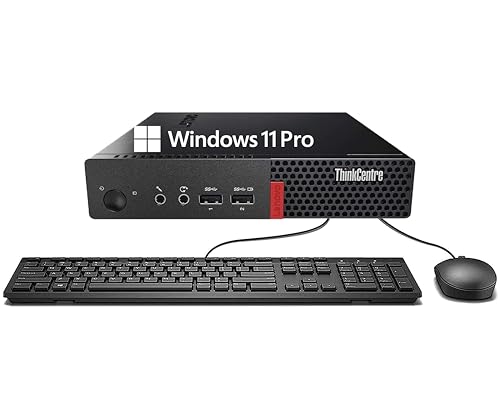
- Tiny desktop footprint for tight spaces
- Core i3-6100T for everyday work
- 8GB RAM and 256GB SSD included
Best For: Basic office and education users
Office Performance Pick
GMKtec G10 Ryzen 5 3500U Mini PC
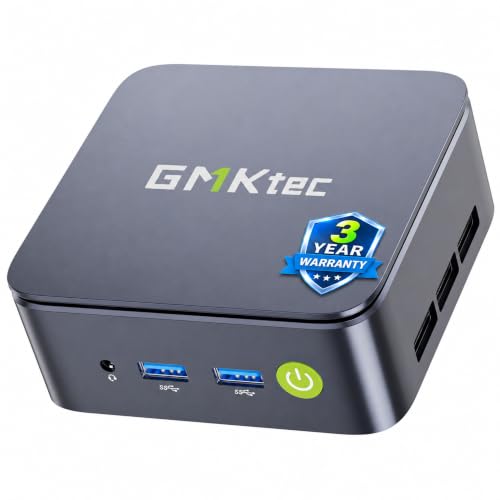
- Ryzen 5 3500U with 4C/8T design
- 16GB RAM and 512GB PCIe SSD included
- Triple 4K display and 2.5GbE LAN
Best For: Multitasking office users who want stronger performance and wired speed
Refurbished Business Value

- Quad-core i5-6500T for office tasks
- 16GB DDR4 RAM with 240GB SSD
- Includes keyboard, mouse, VGA, and DP
Best For: Budget office setups that need a ready-to-use refurbished system
Quiet Entry Office Choice

- Intel N95 low-power processor
- Dual HDMI with 4K@60Hz support
- 8GB RAM, 480GB SSD, and wall mount bracket
Best For: Light office work and space-saving dual-monitor setups
Best Overall for Triple-Monitor Work
BOSGAME E5 Ryzen 5300U Mini PC

- Triple-display support via HDMI, DP, and USB-C
- 16GB RAM plus 512GB NVMe SSD
- Dual 2.5G LAN with Wi-Fi 5 and Bluetooth 5.0
Best For: Users needing a compact office PC with multi-monitor support and wired networking
Best Renewed Business Value

- Hexa-core i5-8500T for reliable office multitasking
- 16GB RAM with 256GB NVMe SSD
- Compact renewed business PC with dual-monitor support
Best For: Budget-minded buyers who want a compact renewed business desktop
Best Budget Dual-Display Pick

- Ryzen 5 3500U for everyday office multitasking
- 1TB NVMe SSD with 16GB RAM
- Dual HDMI 2.0 and Wi-Fi 6 support
Best For: Users wanting a quiet office mini PC with dual monitors and plenty of storage
Ultra-Compact Business Pick – GEEKOM Air12 for WFH and Office
If you want a low power mini PC for office use that stays compact without feeling bare-bones, the GEEKOM Air12 is built around everyday productivity. Its Intel Pentium 7505, dual-slot memory design, and office-friendly connectivity make it a practical fit for front desks, remote work, classrooms, and light business multitasking.
Best For: Small offices, WFH setups, front desks, and users who want a compact Windows 11 Pro mini PC with upgrade room.
Pros:
- Ultra-compact chassis fits desks, reception areas, and shared workspaces.
- Intel Pentium 7505 is positioned for responsive browsing and daily business tasks.
- Dual-slot design supports up to 64GB RAM and 2TB SSD upgrades.
- Triple-display support and WiFi 6 help it work as a flexible office hub.
Cons:
- Base configuration ships with 8GB RAM and 256GB SSD.
- It is geared toward productivity, not heavy creative workloads.
The Air12 stands out if you want a low-power, business-ready mini PC with strong upgrade potential and a 3-year warranty. It keeps the footprint small while adding the display and connectivity options most office users need.
Renewed Workhorse – Dell Optiplex 3060 Micro for Office
Dell Optiplex 3060 Micro PC, Intel Core i3-8100T, 16GB DDR4 RAM, 256GB NVMe SSD, Win11Pro (Renewed)
Check Price On AmazonThe Dell Optiplex 3060 Micro is a straightforward low power mini PC for office users who want familiar Windows 11 Pro support and proven business hardware. With an Intel Core i3-8100T, 16GB of RAM, and an NVMe SSD, it is set up for routine productivity, fast boot times, and day-to-day reliability.
Best For: Budget-conscious offices and users who want a renewed business mini PC with dependable specs.
Pros:
- Core i3-8100T offers reliable 4-core/4-thread performance.
- 16GB RAM and 256GB NVMe SSD help with multitasking and quick startup.
- Includes DisplayPort, HDMI, Ethernet, and multiple USB ports.
- Windows 11 Pro and renewed pricing make it practical for business use.
Cons:
- Renewed unit only includes a 90-day limited warranty.
- Older 2019-era platform is less future-facing than newer low-power mini PCs.
This is a sensible pick if your priority is value and steady office performance rather than the newest processor platform. It gives you a compact business desktop with enough memory and storage for common workplace tasks.
Silent Low-Watt Choice – Beelink Mini S13 N150 Office PC
The Beelink Mini S13 is a strong fit if you want a low power mini PC for office work with modern efficiency and quiet operation. Its Intel N150 processor, 12GB LPDDR5 memory, and 512GB SSD are aimed at smooth multitasking, while dual HDMI and 2.5G LAN make it easy to slot into a compact workstation.
Best For: Quiet home offices, small workstations, and users who want a low-watt mini PC with current connectivity.
Pros:
- Intel N150 with 25W TDP keeps power use low.
- 12GB LPDDR5 and 512GB SSD are generous for everyday productivity.
- Dual HDMI supports 4K dual-display setups.
- WiFi 6, Bluetooth 5.2, and 2.5G LAN improve connectivity options.
Cons:
- LPDDR5 memory is listed as not exceeding 12GB maximum.
- Storage expands, but the core platform is still aimed at light office tasks.
This model is a good match for buyers who care about quiet, efficient operation more than raw performance. It delivers a practical office feature set in a very small footprint.
Classic Tiny Desktop – Lenovo ThinkCentre M710q for Office
The Lenovo ThinkCentre M710q Tiny Desktop is a compact option for buyers seeking a low power mini PC for office and education use. Its 6th Gen Core i3-6100T, 8GB of RAM, and 256GB SSD provide the basic speed and storage you need for web browsing, productivity apps, and routine desktop work.
Best For: Simple office, education, and everyday productivity setups where compact size matters.
Pros:
- Small ThinkCentre Tiny chassis is easy to place in crowded work areas.
- Core i3-6100T is designed for reliable everyday tasks.
- 8GB DDR4 RAM and 256GB SSD provide a responsive baseline.
- Includes DisplayPort, Ethernet, USB, Bluetooth, and WiFi support.
Cons:
- Older 6th Gen platform is less powerful than newer mini PCs.
- Storage and memory are adequate, but not generous for heavier multitasking.
If you need a compact business machine for standard work rather than demanding workloads, the M710q remains easy to recommend. It focuses on dependable basics and a familiar office-friendly layout.
Office Performance Pick – GMKtec G10 Ryzen 5 3500U Mini PC
If you’re shopping for a low power mini PC for office use, the GMKtec G10 stands out for balancing speed, expandability, and desktop-friendly connectivity. Its Ryzen 5 3500U processor and 16GB of dual-channel RAM make it a stronger multitasking choice than entry-level N-series chips, while the compact build keeps it easy to place on or under a desk.
Best For: Office users who want a compact PC for multitasking, triple-monitor work, and faster wired networking.
Pros:
- Ryzen 5 3500U offers solid 4-core/8-thread performance for office work and multitasking
- 16GB dual-channel RAM and 512GB PCIe SSD come preinstalled for responsive everyday use
- Triple 4K@60Hz display support works well for productivity dashboards and multi-window setups
- 2.5GbE LAN adds faster wired networking than typical office mini PCs
Cons:
- More capable than basic office boxes, which may be unnecessary if you only do very light work
- Noisy or thermal behavior is not specified in the supplied notes
Overall, the G10 is a practical pick if you want a low power mini PC for office tasks but still need extra headroom for multitasking and display-heavy workflows. It is especially appealing for users who value upgrade options and a more robust port selection.
Refurbished Business Value – HP EliteDesk 800 G2 Mini PC
The HP EliteDesk 800 G2 is a straightforward low power mini PC for office-style computing, especially if you want a proven business machine at a lower cost. With a quad-core i5-6500T, 16GB of DDR4 memory, and a 240GB SSD, it is built for basic productivity, education, and general desktop use.
Best For: Budget-minded office buyers who want a refurbished business mini PC with included keyboard and mouse.
Pros:
- Intel Core i5-6500T quad-core processor suits everyday productivity tasks
- 16GB DDR4 RAM and 240GB SSD provide a usable out-of-box setup
- Includes USB keyboard and mouse, which adds convenience for office deployment
- VGA and DisplayPort outputs give flexible monitor connection options
Cons:
- It is a renewed unit, so it may arrive in a generic box
- Storage capacity is modest compared with newer mini PCs
- Older platform with Windows 11 installed rather than a newer CPU generation
For simple office workloads, the EliteDesk 800 G2 is still a sensible choice thanks to its business-focused design and included accessories. If value matters more than having the newest hardware, it covers the essentials cleanly.
Quiet Entry Office Choice – Beelink Mini S12 N95 Mini PC
The Beelink Mini S12 is a low power mini PC for office users who want a compact, quiet system for everyday work, browsing, and streaming. Its Intel N95 processor, 8GB RAM, and 480GB SSD are aimed at routine productivity, while the dual HDMI outputs make it easy to run two displays at once.
Best For: Light office work, dual-monitor setups, and buyers who want a compact low-power desktop.
Pros:
- Intel N95 processor is designed as a low-power option for office and web use
- Dual HDMI supports 4K@60Hz dual-screen output for multitasking
- 4 x USB 3.2 Gen 2 ports and Gigabit LAN offer solid everyday connectivity
- Wall-mount bracket helps save desk space and keep setups tidy
Cons:
- 8GB single-channel RAM is more limited than dual-channel office systems
- Built-in Bluetooth 4.2 is older than newer wireless standards
- Storage and memory are expandable, but the base config is still modest
The Mini S12 is a practical entry-level choice if you want a low power mini PC for office basics without taking up much room. It is best suited to users who value simplicity, compact size, and dual-display support over heavy workloads.
Best Overall for Triple-Monitor Work – BOSGAME E5 Ryzen 5300U Mini PC
If you want a low power mini PC for office tasks that still feels responsive, the BOSGAME E5 is built for light productivity, multitasking, and video calls. Its Ryzen 5300U, 16GB of RAM, and compact footprint make it a practical desk-friendly option for everyday business use.
Best For: Office users who want triple-display support, dual LAN, and a compact Windows 11 Pro mini PC.
Pros:
- Ryzen 3 5300U processor with 4 cores and up to 3.8 GHz for smooth light office work
- Supports three displays through HDMI, DisplayPort, and USB-C
- 16GB DDR4 RAM and 512GB NVMe SSD with an extra internal M.2 slot
- Dual 2.5G LAN, Wi-Fi 5, and Bluetooth 5.0 for flexible connectivity
Cons:
- Wi-Fi 5 is older than newer Wi-Fi 6 options
- Integrated graphics are suited to office and media use, not heavier creative workloads
Overall, this is a strong pick if your office setup benefits from multiple monitors and wired-network flexibility. It offers a sensible balance of efficiency, expandability, and everyday speed for a compact workstation.
Best Renewed Business Value – HP EliteDesk 800 G4 Mini
The HP EliteDesk 800 G4 is a straightforward low power mini PC for office setups that need reliable everyday performance in a tiny chassis. With a 6-core Intel i5-8500T, 16GB of RAM, and an NVMe SSD, it’s aimed at practical business use rather than flashy features.
Best For: Buyers who want a compact renewed business PC with Windows 11 Pro and dual-monitor support.
Pros:
- Intel Core i5-8500T hexa-core processor for dependable multitasking
- 16GB DDR4 RAM and 256GB NVMe SSD for fast startup and daily use
- Dual-monitor support with HDMI and DisplayPort
- Very compact mini chassis that fits neatly on or under a desk
Cons:
- Renewed unit may show minor cosmetic wear
- 90-day warranty is shorter than many new mini PCs
- 256GB storage is modest compared with 512GB or 1TB options
This model makes sense if you want a business-class machine and are comfortable with renewed hardware. It keeps the focus on practical office performance, simple connectivity, and a clean desktop footprint.
Best Budget Dual-Display Pick – Getorli Ryzen 5 3500U Mini PC
If you need a low power mini PC for office work, the Getorli model focuses on quiet everyday computing in a small, easy-to-place design. Its Ryzen 5 3500U, 16GB RAM, and 1TB SSD make it a practical fit for browsing, office apps, and media without taking up much desk space.
Best For: Everyday office and home users who want dual 4K display support, Wi-Fi 6, and lots of storage.
Pros:
- Ryzen 5 3500U processor with 4 cores and 8 threads for daily multitasking
- 16GB DDR4 RAM and a roomy 1TB NVMe SSD
- Dual HDMI 2.0 ports with 4K@60Hz support for two monitors
- Wi-Fi 6 and Bluetooth 5.3 for updated wireless connectivity
Cons:
- RAM maxes out at 32GB, which is lower than some expandable office PCs
- Integrated graphics are intended for productivity and media, not demanding workloads
- Operating system is listed generically as OS in the supplied details
For office buyers who want a quiet, compact system with generous storage and dual-monitor support, this is an appealing option. It covers the essentials well and adds modern wireless features without overcomplicating the setup.
How We Picked the Best Low Power Mini PC for Office
We prioritized systems that make sense for everyday office use: efficient processors, enough memory for multitasking, fast SSD storage, and the right ports for monitors and peripherals. We also looked for models with a small footprint, quiet operation, and business-friendly features such as Windows 11 Pro, dual-display support, and wired networking options.
Quick Comparison
For the lightest workloads, entry-level Intel N-series systems are the most power-conscious choice. For smoother multitasking, spreadsheets, lots of browser tabs, or frequent video calls, older business minis with Core i5 chips or Ryzen 5 processors usually offer more headroom. If you need dual monitors, choose a model with DisplayPort, HDMI, or USB-C video output support that matches your desk setup.
Key Buying Factors for a Low Power Mini PC for Office
Processor Class
For basic office work, Intel N95, N100, and similar chips can be enough. If you expect heavier multitasking or use multiple business apps at once, look at Core i5 or Ryzen 5 systems instead. A Low Power Mini PC for Office use should still feel responsive when opening large spreadsheets or joining calls while multitasking.
Memory and Storage
8GB of RAM is the practical minimum, but 16GB is the better long-term choice for office productivity. An SSD is essential for fast boot times and app loading, and larger capacities help if you store local files, offline documents, or synced project data.
Display and Connectivity
Check how many monitors the system supports and which video outputs it includes. Dual-monitor support is a major productivity advantage. Also confirm Wi-Fi version, Bluetooth, USB port count, and whether you need Ethernet or faster 2.5GbE for a more stable office connection.
Expandability and Support
Some compact PCs allow RAM or storage upgrades, which extends their useful life. Business models often offer better serviceability and more consistent firmware support, while renewed units can be a strong value if you are comfortable buying refurbished hardware.
Who Should Buy Which Low Power Mini PC for Office?
If you mainly use browser-based apps, cloud email, and video meetings, an efficient N-series mini PC is usually the best fit. If your workday includes heavier multitasking, a Core i5 or Ryzen 5 model is the safer pick. For shared workspaces, choose a business-class mini with reliable ports and Windows 11 Pro. If you want the best balance of efficiency and everyday speed, look for 16GB RAM, SSD storage, and dual-display support in a compact chassis.