If you’ve been considering upgrading your home, smart networking and control systems are essential. These systems not only enhance connectivity but also streamline the management of your devices. With numerous options available, it’s vital to find the right fit for your needs. The following list highlights the top contenders that could transform your living space. So, which one will best elevate your smart home experience?
TP-Link Deco X15 WiFi 6 Mesh System (3-Pack)
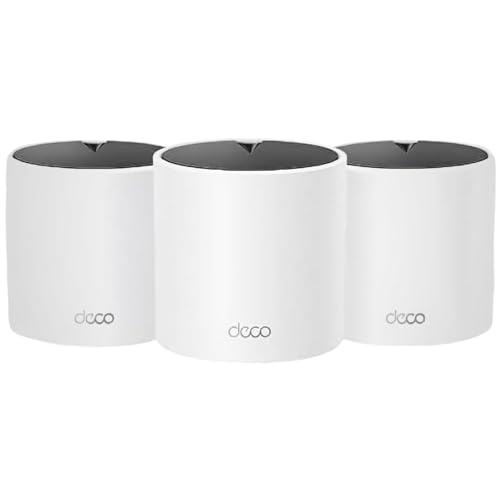
If you’re looking to enhance your home connectivity, the TP-Link Deco X15 WiFi 6 Mesh System (3-Pack) is an excellent choice for families and tech-savvy individuals alike. This dual-band AX1500 system covers up to 5,600 sq. ft. and supports up to 120 devices, ensuring everyone stays connected. With speeds reaching 1,201 Mbps on 5 GHz and 300 Mbps on 2.4 GHz, buffering will be a thing of the past. The easy setup via the Deco app and compatibility with Alexa and Google Assistant make managing your network a breeze. Plus, advanced security features keep your smart home safe.
Best For: Families and tech-savvy individuals seeking reliable, high-speed Wi-Fi coverage throughout their homes.
Pros:
- Extensive coverage: Up to 5,600 sq. ft. to eliminate Wi-Fi dead zones.
- Supports multiple devices: Can connect up to 120 devices simultaneously without sacrificing performance.
- Advanced security features: TP-Link HomeShield offers robust network protection and parental controls.
Cons:
- Requires a modem: The system is not a standalone product and needs a compatible modem for internet access.
- Dual-band only: Some users may prefer a tri-band system for even more speed and capacity.
- Dependence on the app: Network management relies heavily on the Deco app, which may not appeal to all users.
TP-Link Deco 7 BE25 Dual-Band WiFi 7 Mesh System (3-Pack)

The TP-Link Deco 7 BE25 Dual-Band WiFi 7 Mesh System (3-Pack) is ideal for tech-savvy households that demand high-speed connectivity and extensive coverage. With speeds reaching up to 5 Gbps and seamless coverage of 6,600 sq. ft., you’ll enjoy smooth streaming and gaming. It supports over 150 devices simultaneously, thanks to its robust design with high-gain antennas. Plus, the system includes two 2.5 Gbps WAN/LAN ports for wired devices. Enhanced security features like HomeShield and VPN support guarantee your network stays protected. With AI-Roaming and voice control compatibility, maneuvering your smart home has never been easier.
Best For: Tech-savvy households that require high-speed connectivity, extensive coverage, and robust device support.
Pros:
- Supports speeds up to 5 Gbps with seamless coverage of up to 6,600 sq. ft.
- Can handle over 150 devices simultaneously without performance loss.
- Advanced security features like HomeShield and VPN support ensure network protection.
Cons:
- The price point may be higher compared to standard WiFi systems.
- Dual-band may not provide the same speed benefits as tri-band systems for all users.
- Requires a stable internet connection to fully utilize its high-speed capabilities.
Flair Bridge Networking Device

For homeowners looking to optimize their HVAC systems, the Flair Bridge Networking Device stands out as an indispensable tool. This plug-and-play gateway connects your Flair Pucks and Smart Vents, making setup and wireless connectivity a breeze. You can connect the Bridge directly to your router via Ethernet for faster, more reliable access or use Wi-Fi as needed. It’s vital for central HVAC systems with ductwork, while mini splits benefit from its wireless capabilities. For full functionality, integrating a Bridge simplifies your setup. Plus, Flair’s support team is ready to assist you from 9am to 5pm ET, Monday through Friday.
Best For: Homeowners with central HVAC systems or mini splits seeking efficient and reliable wireless connectivity for their Flair Pucks and Smart Vents.
Pros:
- Easy Setup: The plug-and-play design allows for quick installation and connectivity.
- Flexible Connectivity Options: Can connect via Ethernet for reliability or Wi-Fi for convenience.
- Enhanced Control: Provides access to Flair hvacOS for comprehensive configuration and management of the HVAC system.
Cons:
- Requirement for Central Systems: A Bridge is mandatory for every new Flair home with central HVAC systems, which may add to initial costs.
- Recommended for Mini Splits: Although not mandatory, integrating a Bridge is suggested for optimal wireless functionality, which some users may find unnecessary.
- Limited Support Hours: Customer support is only available during weekdays and specific hours, which may not be convenient for all users.
ASUS ZenWiFi BD4 Dual-Band WiFi 7 Mesh (2-Pack)

Experience seamless connectivity throughout your home with the ASUS ZenWiFi BD4 Dual-Band WiFi 7 Mesh system. With speeds up to 3600 Mbps and coverage extending up to 4900 sq.ft., this dual-band setup guarantees you stay connected in every corner. The powerful quad-core 1.5 GHz CPU and advanced AiMesh technology eliminate dead zones, providing robust performance. You’ll also enjoy 24/7 protection with AiProtection Pro, and features like dual 2.5G Ethernet ports simplify connectivity. Setting up multiple devices is a breeze thanks to Smart Home Master SSIDs. Elevate your smart home experience with the ASUS ZenWiFi BD4.
Best For: Those seeking a high-speed, reliable mesh WiFi solution to cover large homes with smart home capabilities.
Pros:
- Dual-band WiFi 7 speeds up to 3600 Mbps for fast and reliable internet.
- Extensive coverage of up to 4900 sq.ft., ensuring connectivity in every corner of your home.
- Advanced security features including AiProtection Pro and parental controls for enhanced online safety.
Cons:
- Higher initial investment compared to standard routers.
- Complexity in setup may be challenging for non-tech-savvy users.
- Limited compatibility with non-ASUS routers for extendibility.
TP-Link Deco S4 Whole Home Mesh WiFi System (2-Pack)

Offering up to 3,800 sq. ft. of coverage, the TP-Link Deco S4 Whole Home Mesh WiFi System (2-Pack) is perfect for anyone frustrated by dead zones in their home. With its 3×3 6Stream AC1900 technology, you’ll enjoy fast speeds and seamless connectivity for up to 75 devices. Set up is a breeze with the Deco app, letting you manage everything from guest access to parental controls. Plus, each unit has 2 Gigabit Ethernet ports for wired connections, enhancing your speed even further. Compatible with all major ISPs, the Deco S4 makes your smart home network reliable and efficient.
Best For: Those seeking a reliable and high-speed WiFi solution to eliminate dead zones in larger homes.
Pros:
- Wide Coverage: Provides up to 3,800 sq. ft. of seamless WiFi coverage.
- High Performance: Supports fast speeds with 3×3 6Stream AC1900 technology for up to 75 devices.
- User-Friendly Management: Easy setup and management through the Deco app, including parental controls and guest access.
Cons:
- Requires Modem: A modem is necessary for most internet services, which may be an additional cost.
- Limited Ethernet Ports: Each unit only has 2 Gigabit Ethernet ports, which may not suffice for multiple wired connections.
- Dependent on Placement: Optimal performance relies on strategic placement of the units to maximize coverage and minimize interference.
TP-Link Deco XE75 AXE5400 Tri-Band WiFi 6E Mesh System (3-Pack)

The TP-Link Deco XE75 AXE5400 Tri-Band WiFi 6E Mesh System is ideal for tech-savvy households with numerous devices, as its total speeds of up to 5,400 Mbps can easily support up to 200 connections simultaneously. Covering up to 7,200 sq. ft., it eliminates dead zones and buffering with its advanced tri-band technology, including a new 6 GHz band. The AI-driven mesh adapts to your usage, ensuring seamless connectivity. Plus, TP-Link HomeShield enhances cybersecurity, offering parental controls and IoT device identification. Setup is a breeze with the Deco app, and voice control through Alexa makes managing guest Wi-Fi easy.
Best For: Tech-savvy households with numerous devices requiring high-speed internet and extensive coverage.
Pros:
- Tri-Band technology with a new 6 GHz band provides enhanced performance and reduced interference.
- AI-Driven Mesh adapts to user behaviors for seamless and efficient connectivity.
- Robust cybersecurity features through TP-Link HomeShield, including parental controls and IoT device identification.
Cons:
- Requires a modem for most services to function properly, which may add to setup complexity.
- Higher price point compared to traditional dual-band routers.
- Setup may be challenging for users unfamiliar with app-based management or mesh systems.
Gryphon Guardian Mesh WiFi Router with Parental Control System

For families seeking a secure online environment, the Gryphon Guardian Mesh WiFi Router stands out with its thorough parental controls. You can easily schedule screen time, monitor online searches, and manage your family’s smart devices—all from one central app. With AC1200 dual-band radios and 2×2 MU-MIMO technology, each Guardian offers reliable coverage up to 1,500 sq. ft. Plus, it features a next-gen firewall that protects against malware, ransomware, and phishing scams. Setup is a breeze with the Gryphon Connect app, allowing you to manage your network and device access effortlessly. Enjoy peace of mind with Gryphon’s extensive security measures.
Best For: Families looking for a secure and manageable online environment for their children while maintaining reliable WiFi coverage.
Pros:
- Comprehensive parental controls for scheduling screen time and monitoring online activity.
- Reliable WiFi coverage of up to 1,500 sq. ft. per unit with advanced technology.
- Enhanced security features including a next-gen firewall and automatic phishing protection.
Cons:
- Compatibility limited to other Gryphon Guardian devices only.
- Initial setup may require the Gryphon Connect app, which some users may find cumbersome.
- May be more expensive compared to basic WiFi routers without advanced features.
TP-Link Deco XE75 Tri-Band WiFi 6E Mesh System (2-Pack)

Need seamless connectivity throughout your home? The TP-Link Deco XE75 Tri-Band WiFi 6E Mesh System (2-Pack) has you covered. With coverage up to 5,500 sq. ft., it replaces traditional routers and extenders. Enjoy true tri-band speeds up to 5,400 Mbps, thanks to the new 6 GHz band that reduces interference. Setting it up is a breeze via the Deco app, plus you can manage it remotely and use voice commands with Alexa. Enhanced security features through TP-Link HomeShield guarantee your network stays protected. It’s compatible with all major ISPs, making it a smart choice for any home.
Best For: The TP-Link Deco XE75 Tri-Band WiFi 6E Mesh System is best for households that require extensive WiFi coverage and high-speed internet connectivity without dead zones.
Pros:
- Easy installation with visual guidance through the Deco app.
- True tri-band speeds of up to 5,400 Mbps for seamless streaming and gaming.
- Robust security features provided by TP-Link HomeShield to protect your network.
Cons:
- Requires a modem for most internet service providers.
- Higher cost compared to traditional routers and extenders.
- Limited advanced features compared to some high-end router options.
Nest WiFi Router – Mesh Wi-Fi Extender and Smart Speaker
Looking to enhance your smart home? The Nest WiFi Router combines a powerful mesh Wi-Fi extender and a smart speaker in one sleek package. Covering up to 3,800 square feet, it effortlessly handles up to 100 connected devices, ensuring smooth streaming of multiple 4K videos at once. Each Nest WiFi Point doubles as a Google Assistant speaker, allowing you to manage music and devices via voice commands. Setup is a breeze with the app, and you can prioritize devices or set parental controls to manage online time. It’s the perfect solution for seamless connectivity and smart home integration!
Best For: Families and smart home enthusiasts who need extensive Wi-Fi coverage and integrated smart speaker functionality.
Pros:
- Supports up to 100 connected devices, making it ideal for large households.
- High performance with seamless streaming of multiple 4K videos simultaneously.
- Easy setup and management through a user-friendly app with parental controls.
Cons:
- Coverage may vary based on home layout and construction materials.
- Requires a compatible internet service provider for optimal performance.
- Additional points may be needed for larger spaces, which can increase overall cost.
Amazon eero 6+ Mesh WiFi System (3-Pack)

The Amazon eero 6+ Mesh WiFi System (3-Pack) is an ideal choice for those who require robust internet connectivity across multiple devices in a large space. With coverage of up to 4,500 sq. ft. and the ability to connect over 75 devices, it supports internet plans up to a gigabit. Its Wi-Fi 6 technology enhances bandwidth, ensuring smooth streaming and video calls for everyone. Setting it up is a breeze with the Eero app, while regular automatic updates keep your network secure. Plus, its smart home hub capabilities let you integrate Thread and Zigbee devices easily, all controlled through Alexa.
Best For: Those seeking reliable, high-speed internet connectivity for multiple devices in large homes or smart home setups.
Pros:
- Supports internet speeds up to a gigabit, making it ideal for heavy usage like streaming and gaming.
- Covers up to 4,500 sq. ft., effectively eliminating dead spots in large spaces.
- Easy setup and management through the Eero app, with automatic updates for enhanced security.
Cons:
- May require a subscription for advanced features and regular updates.
- Performance can be affected by physical obstructions in very large or complex layouts.
- The integrated smart home hub may not support all devices, limiting compatibility with certain systems.
Factors to Consider When Choosing a Smart Home Networking and Control System
When picking a smart home networking and control system, you need to think about several key factors. Consider your coverage area, the devices you’ll connect, and the speed you expect. Don’t forget to evaluate security features and how easy the setup and management will be for you.
Coverage Area Requirements
Choosing the right smart home networking system requires careful consideration of your coverage area needs. Different systems provide varying coverage capabilities, with some extending up to 7,200 sq. ft., making them ideal for larger homes. If you live in a household with multiple devices, opt for systems that support over 150 devices simultaneously to maintain performance. The layout of your home matters too; walls and obstacles can weaken signal strength. A mesh system can effectively eliminate dead zones and guarantee a seamless experience. If your home has multiple floors, select a system designed for reliable connectivity across all levels. Finally, think about future scalability, as you might add more smart devices down the line.
Device Compatibility Considerations
Considering device compatibility is essential for creating a seamless smart home experience. You’ll want a networking system that supports all Wi-Fi generations, ensuring it works with both older and newer devices. Look for systems that connect with various smart devices using protocols like Zigbee and Thread, enhancing your smart home’s versatility. Compatibility with voice assistants like Alexa and Google Assistant is also significant for hands-free control. Check if the system integrates easily with your existing hardware, so you won’t need a complete replacement. Finally, evaluate its capacity to handle multiple simultaneous connections, as many modern homes can support over 100 connected devices. This way, you’ll maximize your smart home’s potential without any hiccups.
Speed and Performance Metrics
A smart home thrives on reliable and efficient networking, and speed and performance metrics play an essential role in that equation. Look for Mbps ratings, as they indicate the maximum data transfer rates vital for multiple connected devices. Consider dual-band systems, which offer 2.4 GHz for range and 5 GHz for speed, or opt for tri-band systems that add a 6 GHz band to minimize congestion. Wi-Fi 6 technology can further enhance your experience, utilizing features like OFDMA and MU-MIMO for simultaneous data transmission. Don’t forget the coverage area—measured in square feet—ensuring seamless connectivity throughout your home. Finally, check device capacity to support your smart home’s IoT devices, with some systems accommodating over 150 simultaneous connections.
Security Features Importance
When it comes to smart home networking, security features are vital to protecting your devices from cyber threats and unauthorized access. Advanced security measures, like network protection and IoT device identification, help safeguard your home. Regular firmware updates are fundamental, as they address vulnerabilities and bolster your system’s resilience against emerging risks. Parental controls offer an added layer of safety, allowing you to manage and monitor your children’s online activities. Integrated cybersecurity measures, such as intrusion detection and phishing protection, prevent malicious attacks and guarantee the integrity of your connected devices. Finally, choosing manufacturers committed to security standards, like the Secure-by-Design pledge, reflects a dedication to creating safer networking solutions for your smart home.
Setup and Management Ease
How easy is it to set up and manage your smart home network? Many smart home networking systems come with user-friendly apps that let you get up and running in just a few minutes. You can monitor and control your network from anywhere, adding convenience and flexibility to your life. Some systems even use AI-driven technology to learn your habits and optimize performance automatically. Plus, voice control compatibility with popular virtual assistants means you can manage network functions hands-free. Automatic updates keep your system secure and up-to-date without you having to lift a finger. When considering a smart home networking system, prioritize ease of setup and management for a seamless experience.