If you’re looking to enhance your living space, smart home wall displays could be just what you need. These devices do more than show the time or date; they integrate with your calendar and serve as interactive organizers. Imagine having a vibrant touchscreen that keeps your family coordinated while adding a modern touch to your decor. Curious about which models stand out and how they can transform your environment? Let’s explore the top options available.
ApoloSign 21.5″ Digital Calendar with Touchscreen Display

If you’re looking for a smart home wall display that doubles as a family organizer, the ApoloSign 21.5″ Digital Calendar with Touchscreen Display is an excellent choice. This innovative device features dual-mode functionality, allowing you to sync calendars from Google, Outlook, and iCloud in Calendar Mode, or create a customizable dashboard in Android Mode. It includes a reward-based chore chart that turns tasks into engaging activities for kids, promoting healthy routines. With AI voice assistance and smart home integration, managing your family’s schedule and tasks becomes effortless. Plus, the vibrant HD touchscreen showcases your favorite memories beautifully.
Best For: Families looking for a smart, interactive way to organize schedules and manage chores.
Pros:
- Dual-mode functionality allows for seamless switching between calendar syncing and customizable dashboard.
- Engaging reward-based chore chart helps promote healthy routines for children.
- AI voice assistant and smart home integration simplify task management and home control.
Cons:
- The device may require a learning curve to fully utilize all features.
- Limited availability of the Apolosign App in regions outside the U.S., Canada, and the U.K.
- The size of the display may not be suitable for all wall spaces or preferences.
10.1’’ Smart Digital Calendar – Interactive Touch Screen Family Organizer

The 10.1’’ Smart Digital Calendar is the ideal choice for busy families looking to streamline their organization and enhance communication within the household. With its interactive touch screen and HD display, it fits perfectly in any room. Setting it up is a breeze—just plug in, connect to WiFi, and sync with popular calendar apps like Google Calendar and iCloud. Plus, it serves as a digital calendar, photo frame, and art display, making it multifunctional. Customize it with colors and emojis for each family member, and keep everyone updated with memories and important reminders effortlessly.
Best For: Busy families, professionals, and grandparents looking to enhance organization and communication within their households.
Pros:
- Integrates seamlessly with major calendar apps for real-time syncing among multiple users.
- Multifunctional design serves as a digital calendar, photo frame, and digital art display.
- Customizable features allow personalization for each family member, enhancing engagement.
Cons:
- Requires WiFi for full functionality, which may be a limitation for some users.
- Initial setup might be challenging for less tech-savvy individuals.
- The touchscreen interface may be sensitive for some users, leading to accidental inputs.
Digital Calendar Chore Chart with Touchscreen (10.1 Inch)
Looking for a way to streamline your family’s schedule? The 10.1 Inch Digital Calendar Chore Chart with Touchscreen is your solution. This all-in-one smart family calendar features a full HD interactive display, allowing you to color-code tasks for each family member effortlessly. With instant setup and auto-sync, you can connect to Wi-Fi and sync your calendars in minutes. Motivate your kids with fun chores while planning meals to eliminate the daily “What’s for dinner?” stress. Plus, when not in use, it transforms into a stylish digital photo frame, making it a perfect gift for any occasion.
Best For: Families looking to streamline their household schedule and motivate children with an interactive chore chart.
Pros:
- All-in-One Functionality: Combines a family calendar, chore chart, meal planner, and digital photo frame in one device.
- User-Friendly: Easy setup and auto-sync with popular calendar services make it accessible for all family members.
- Stylish Design: The modern yet rustic look fits well in any home decor, making it a thoughtful gift for various occasions.
Cons:
- Screen Size Limitation: The 10.1 inch display may be too small for larger family planners or for viewing from a distance.
- Wi-Fi Dependency: Requires a stable internet connection for full functionality, which may not be available in all households.
- Learning Curve: Some users, especially older family members, may find the touchscreen interface challenging to navigate initially.
Skylight 15-inch Wall Planner Digital Calendar

For busy families managing hectic schedules, the Skylight 15-inch Wall Planner Digital Calendar serves as an essential organizational tool. Its 15.4-inch touchscreen display makes it easy to assign colors, add events, and sync calendars from Google, iCloud, and more—all in one hub. Installation is a breeze; just plug it in, connect to Wi-Fi, and you’re set in minutes. You can mount it on the wall or use a stand, fitting seamlessly into any space. Plus, the interactive chore chart and weekly meal planner help build routines, making family life more manageable and stress-free.
Best For: Busy families looking for an efficient way to organize schedules and manage daily tasks.
Pros:
- Easy setup with quick Wi-Fi connectivity and simple installation.
- Versatile display options with wall mount or stand for various spaces.
- Interactive features like chore charts and meal planning enhance family routines.
Cons:
- Requires a Wi-Fi connection for full functionality.
- Premium features may come at an additional cost with the Plus Plan.
- Limited to a 15.4-inch display, which might not suit larger family needs.
Digital Calendar with IPS Touch Screen HD Display
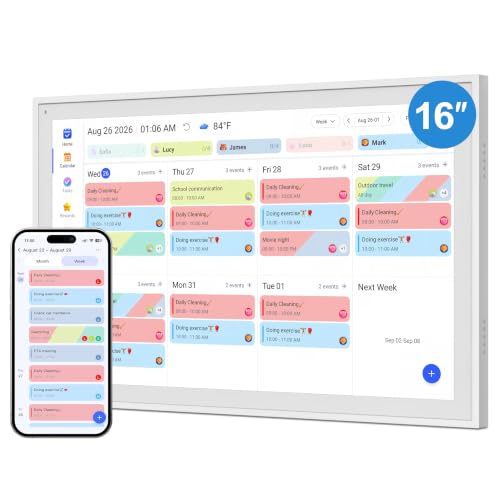
Stay organized and keep your family connected with a digital calendar featuring a vibrant 10.1-inch full HD IPS touch screen. This sleek device offers a wide 178° viewing angle and auto-brightness adjustment, ensuring clarity in any lighting. You’ll love the quick one-minute setup—just plug it in and connect to Wi-Fi. It syncs effortlessly with Google Calendar, Apple iCloud, and Outlook, keeping everyone updated in real-time. With alerts for important events and support for up to 20 family members, it’s perfect for coordinating schedules. Position it anywhere with its adjustable stand, and enjoy seamless organization day after day.
Best For: Families looking for an efficient way to coordinate schedules and stay organized together.
Pros:
- Easy Setup: Quick one-minute installation with plug-and-play operation.
- Real-time Sync: Automatic updates across multiple devices ensure everyone is on the same page.
- Custom Reminders: Built-in alerts and customizable repeat cycles help keep track of important events.
Cons:
- Limited Screen Size: The 10.1-inch display may be too small for some users’ preferences.
- Dependence on Wi-Fi: Requires a stable internet connection for synchronization and updates.
- Battery Life Concerns: Continuous use may lead to concerns about overheating despite the ultra-slim design.
LOOFII 10.1 Inch Smart Digital Calendar

The LOOFII 10.1 Inch Smart Digital Calendar stands out as an ideal choice for busy families seeking to streamline their schedules and enhance daily organization. With its vibrant HD display, you can easily view and add events, while the digital photo frame mode keeps your wall lively with a dynamic slideshow. Effortlessly sync with Google, iCloud, or Outlook using the free eCalendar App. Manage chores with an interactive chart and motivate your kids with customizable rewards. Plus, the meal planner keeps everyone informed about meal times. With smart sensors and Wi-Fi updates, this calendar grows with your family’s needs.
Best For: Busy families looking to enhance their organization and streamline scheduling while managing chores and meal planning.
Pros:
- Effortless synchronization with major calendar platforms like Google, iCloud, and Outlook.
- Interactive chore management system with customizable rewards to engage children.
- Intuitive meal planning feature to keep the whole family informed about food arrangements.
Cons:
- Requires Wi-Fi for updates and syncing, which may be limiting for some users.
- Initial setup may take time to configure all features effectively.
- Dependence on the eCalendar App could be a hassle for those unfamiliar with digital tools.
Digital Calendar 10.1inch Smart WiFi Electronic Calendar

If you’re looking for a smart home solution that keeps your family organized, the Digital Calendar 10.1-inch Smart WiFi Electronic Calendar stands out with its seamless synchronization across devices. Featuring a full HD IPS screen and a 178° viewing angle, it guarantees everyone can see the schedule easily. Setup takes just a minute, and it syncs automatically with major platforms like Google Calendar and Apple iCloud. You’ll appreciate the built-in silent vibration motor for reminders and color-coded schedules for up to 20 family members. With its ultra-slim design, it fits perfectly in any space, whether on a desk or kitchen counter.
Best For: Families looking for an efficient way to manage schedules and coordinate activities.
Pros:
- Seamless synchronization with major calendar platforms like Google Calendar and Apple iCloud.
- Built-in silent vibration motor for discreet reminders and alerts.
- Supports color-coded schedules for up to 20 family members, enhancing organization.
Cons:
- May require Wi-Fi for full functionality, limiting use in areas with poor connectivity.
- The screen size may not be suitable for larger households with extensive scheduling needs.
- Continuous display could lead to higher electricity usage compared to traditional calendars.
ApoloSign 15.6-inch Digital Calendar

Looking for a smart home wall display that simplifies family organization? The ApoloSign 15.6-inch Digital Calendar is your solution. With its dual-mode functionality, it seamlessly syncs with Google, Outlook, and iCloud in Calendar Mode while transforming into a family hub in Android Mode. Plus, it features a reward-based chore chart that makes task management fun for kids. With Google Gemini AI, you can set alarms and control smart home devices using voice commands. Personalize your display with photos, schedules, and weather updates, all while enjoying expert support for any syncing issues. Stay organized effortlessly!
Best For: Families looking for an all-in-one solution to manage schedules, chores, and smart home devices efficiently.
Pros:
- Dual-mode functionality allows for seamless integration with multiple calendar platforms and transforms into a family hub.
- Reward-based chore chart makes task management engaging for children, encouraging them to participate in household responsibilities.
- AI voice assistant enables hands-free control of tasks and smart home devices, enhancing convenience in daily routines.
Cons:
- Some users may find the initial setup and syncing process to be complex.
- Limited availability of the ApoloSign App in regions outside the U.S., Canada, and the U.K.
- The 15.6-inch screen size may not be ideal for larger family spaces or for those who prefer a bigger display for visibility.
ApoloSign 15.6-inch Digital Calendar with Smart Touchscreen

For families juggling busy schedules, the ApoloSign 15.6-inch Digital Calendar with Smart Touchscreen stands out as an essential tool for organization. With dual-mode functionality, you can sync your calendar across Google, Outlook, and iCloud or transform it into a family hub. The AI Voice Assistant helps manage tasks effortlessly, from setting alarms to controlling smart devices. You’ll love the visual display that doubles as a smart photo frame, showcasing your cherished memories. Plus, customizable dashboards allow you to prioritize chores, meals, and weather updates, making it simple to keep your household on track and efficient.
Best For: Busy families looking for an efficient way to manage schedules, chores, and family activities.
Pros:
- Dual-Mode Functionality: Seamlessly syncs with multiple calendar platforms for easy organization.
- AI Voice Assistant: Provides hands-free task management and smart home control.
- Customizable Dashboard: Offers personalized views for prioritizing chores, meals, and other important tasks.
Cons:
- Requires Internet Connection: Some features depend on a stable internet connection for full functionality.
- Limited App Availability: The mobile app is only available in the U.S., restricting access for international users.
- Learning Curve: Users may need time to familiarize themselves with the touchscreen and customizable features.
Amazon Echo Hub, 8” Smart Home Control Panel with Alexa

The Amazon Echo Hub stands out as the ideal smart home control panel for anyone seeking a seamless integration of voice and touch control in their home. This 8-inch display lets you effortlessly manage thousands of Alexa-compatible devices, from lights to smart plugs. With support for WiFi, Bluetooth, Zigbee, and more, syncing is a breeze. You can also enhance your home security by arming and disarming systems through the panel. Installation is simple, with options for wall mounting and cable concealment. Plus, it features privacy controls and is made from recycled materials, making it a smart, sustainable choice.
Best For: Those looking to simplify and centralize smart home control with an intuitive interface and robust integration options.
Pros:
- Wide Compatibility: Works with thousands of Alexa-compatible devices, enhancing flexibility in smart home setups.
- User-Friendly: The 8-inch display allows for both voice and touch control, making it easy to manage devices.
- Enhanced Security Features: Offers capabilities to arm and disarm security systems, providing peace of mind.
Cons:
- Additional Costs: Optional accessories like table-top stands and cable concealment solutions may add to the overall expense.
- Limited to Alexa Ecosystem: Primarily designed for use with Alexa-compatible devices, which may limit options for non-Alexa users.
- Privacy Concerns: Although it has privacy controls, some users may still be apprehensive about having a microphone in their home.
Factors to Consider When Choosing a Smart Home Wall Display
When choosing a smart home wall display, you need to take into account several key factors. Display size, connectivity features, and user interface design all play a significant role in how well the device meets your needs. Plus, think about multi-functionality and customization options to guarantee it blends seamlessly into your home.
Display Size Options
Choosing the right display size for your smart home wall display can greatly enhance your overall experience, especially if you’ll be using it for tasks like managing schedules or controlling smart devices. Display sizes typically range from 10.1 inches to 21.5 inches, so think about your space and needs. A larger 21.5-inch display offers improved visibility, making it easier for everyone in the family to view schedules and information. Conversely, a 10.1-inch display is more compact, perfect for smaller areas like kitchens or bedrooms. Keep in mind that larger screens improve readability and interaction, especially for older adults or those with visual impairments. Ultimately, consider how you plan to use the display—calendar, photo frame, or control hub—to guide your size choice.
Connectivity Features
A smart home wall display isn’t just about size; connectivity features play a vital role in how effectively it integrates into your home. Look for displays that support multiple connectivity protocols like WiFi, Bluetooth, Zigbee, and Thread. This guarantees seamless integration with various smart devices. Confirm the display can sync with major calendar applications such as Google Calendar, Outlook, and iCloud, helping you manage schedules efficiently. Consider devices that allow real-time syncing for multiple users, so family members can easily access and update shared information without extra fees. Check for compatibility with smart home ecosystems, enhancing functionality through voice or touch control. Finally, quick setup features, like one-minute WiFi connections, simplify the installation process.
User Interface Design
How can a well-designed user interface enhance your experience with a smart home wall display? An intuitive navigation system lets you access features like calendars, reminders, and chore management effortlessly. Customization options allow you to personalize dashboards and widgets, ensuring the display meets your family’s unique needs. A clear visual hierarchy, supported by color coding and icons, helps you quickly distinguish tasks and events, improving organization. Touchscreen responsiveness is essential; a high-quality display should provide smooth interactions and immediate feedback. Additionally, incorporating voice commands makes managing your schedules and tasks hands-free, especially beneficial for those with mobility challenges. Prioritizing these elements will greatly elevate your smart home experience.
Multi-Functionality Capabilities
When selecting a smart home wall display, considering its multi-functionality can greatly enhance your household management. Look for models that serve as digital calendars, photo frames, and chore charts, offering versatile uses. Many displays seamlessly integrate with major calendar applications like Google Calendar and Outlook, allowing real-time synchronization across devices for hassle-free scheduling. Features like interactive chore charts can make household tasks engaging for kids, promoting responsibility and organization. Additionally, some displays come with meal planning capabilities, helping you organize and prepare meals efficiently, reducing daily stress. Advanced models also offer smart home integration, giving you the convenience to control compatible devices and access voice assistants, further enhancing your living space’s functionality.
Customization and Personalization
While choosing a smart home wall display, the level of customization and personalization it offers can greatly impact your user experience. Look for options that let you add widgets for calendars, chores, meals, and weather, enhancing functionality. Customizable color schemes and emoji options for family members create a more engaging atmosphere. You can also upload personal photos and videos to turn the display into a digital photo frame when it’s not in use. The ability to rearrange and prioritize widgets on your dashboard gives you flexibility in how information is presented, catering to your preferences. Some displays even offer multi-page layouts, allowing access to various functions without cluttering the main interface, further enriching your personalized experience.
Integration With Smart Devices
Personalization enhances your smart home experience, but it’s equally important to evaluate how well your wall display integrates with other smart devices. Make sure your display is compatible with a range of devices like lights, thermostats, and security systems for seamless control. Look for support for multiple connectivity protocols such as WiFi, Bluetooth, Zigbee, and Thread, which boosts interoperability within your smart home ecosystem. Opt for displays that allow voice control through popular assistants like Alexa or Google Assistant for hands-free convenience. Additionally, check the display’s ability to integrate with major smart home platforms, ensuring it syncs effortlessly with devices from various manufacturers. Finally, features for scheduling and automating devices can optimize energy use and improve your overall setup.