If you’re looking to enhance your cooking experience, smart kitchen displays might be just what you need. These devices integrate technology into your culinary space, making meal prep easier and more enjoyable. From voice assistance to interactive meal planning, there’s a wide range of options available. But how do you choose the right one for your needs? Let’s explore the top contenders that can transform your kitchen into a modern cooking hub.
Amazon Echo Show 21 (Newest Model) with Fire TV and Alexa

If you’re looking for a versatile kitchen companion that seamlessly combines entertainment and smart home capabilities, the Amazon Echo Show 21 is an excellent choice. This 21″ Full HD display not only serves as a digital photo frame, but also offers a customizable home screen for your calendars and shopping lists. With built-in Fire TV, you can access countless apps like Prime Video and Netflix. Whether you want to control smart devices or make crisp video calls, its noise reduction technology guarantees clear communication. Plus, multiple privacy controls give you peace of mind while you enjoy your cooking and entertainment experience.
Best For: Those seeking a multifunctional kitchen device that enhances both entertainment and smart home management.
Pros:
- Versatile entertainment options with built-in Fire TV access to popular streaming apps.
- Crisp video calling capabilities enhanced by noise reduction technology for clear conversations.
- Customizable home screen allows for easy access to calendars, shopping lists, and more.
Cons:
- Size may be cumbersome for smaller kitchens or limited counter space.
- Dependence on Wi-Fi for optimal functionality, which may be an issue in areas with poor connectivity.
- Privacy concerns despite multiple control options, as users may still be wary of camera and microphone use.
SYLVOX Kitchen Smart TV (15.6 inch, 1080P Full HD)
The SYLVOX Kitchen Smart TV, featuring a compact 15.6-inch 1080P Full HD display, is perfect for those who want to maximize their kitchen space while enjoying entertainment. Its foldable design allows for versatile placement on countertops or wall mounting. With Google TV and a voice remote, you can easily navigate through a variety of apps and streaming services using simple voice commands. The high-quality visuals and immersive sound create an enjoyable viewing experience, whether you’re following a recipe or catching up on your favorite shows. This smart TV is ideal for kitchens, RVs, or small living spaces.
Best For: Individuals looking to enhance their kitchen experience with a compact smart TV that offers entertainment and easy access to streaming services.
Pros:
- Compact and versatile design allows for easy placement in kitchens, RVs, or small living spaces.
- Smart features like Google TV and voice remote make navigation simple and user-friendly.
- High-quality visuals and sound enhance the viewing experience, making it enjoyable for cooking or relaxing.
Cons:
- Limited screen size may not be suitable for larger kitchens or group viewing.
- Potential compatibility issues with some apps or services due to the compact operating system.
- Built-in speakers may not provide the same audio experience as external speaker systems.
Amazon Echo Show 11 with Full-HD Display and Alexa
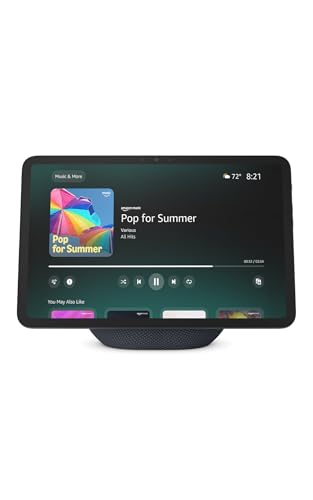
For anyone looking to enhance their kitchen experience, the Amazon Echo Show 11 stands out with its vibrant 11″ Full-HD touchscreen, offering 60% more viewing area than its predecessor. You’ll love the room-filling spatial audio and crisper vocals as you stream your favorite shows on Prime Video or Netflix. Thanks to Alexa+ Early Access, the device learns your preferences, suggesting songs and shows just for you. With built-in smart home capabilities, controlling lights and cameras is a breeze. Plus, the auto-framing camera guarantees your video calls feel natural, keeping you connected with family and friends while you cook.
Best For: Individuals seeking a versatile smart display that enhances their kitchen experience with streaming, smart home control, and video calling capabilities.
Pros:
- Vibrant 11″ Full-HD touchscreen offers an enhanced viewing experience for streaming and recipes.
- Built-in smart home hub allows seamless control of compatible devices without needing extra hardware.
- Auto-framing camera provides a natural feel for video calls, making it easy to stay connected while multitasking.
Cons:
- The larger screen size may take up more counter space than smaller models.
- Some users may find the learning curve of Alexa+ Early Access features to be steep.
- Privacy concerns may arise for those wary of always-on microphones and cameras.
10.1″ Digital Calendar and Meal Planner with Touch Screen

Looking for a practical solution to streamline your family’s schedules and meals? The 10.1″ Digital Calendar and Meal Planner with Touch Screen is your answer. This interactive smart calendar lets you add family members, synchronize schedules, and assign tasks effortlessly. With its dedicated meal-planning section, you can plan daily menus or special occasions, ensuring everyone knows what’s for dinner. Plus, it doubles as a digital photo frame, syncing memories right to your screen. Enjoy smart reminders, weather updates, and a user-friendly interface, all designed to enhance your home experience. You’ll love the convenience it brings to your busy lifestyle!
Best For: Busy families looking to organize their schedules and meal plans while enjoying a digital photo frame experience.
Pros:
- User-friendly interface makes it easy for all family members to access and manage schedules.
- Dual functionality allows it to serve as both a calendar and a digital photo frame, making it versatile for home use.
- Smart reminders and weather updates help keep everyone informed and on track with appointments and meal planning.
Cons:
- Touch screen sensitivity may vary, potentially leading to frustration during use.
- Dependence on app synchronization may require tech-savvy users for optimal setup and management.
- Screen size might be small for larger rooms or offices, limiting visibility for multiple users at once.
SYLVOX 15.6″ Under Cabinet Smart TV
Designed with culinary enthusiasts in mind, the SYLVOX 15.6″ Under Cabinet Smart TV brings a blend of functionality and style to your kitchen. Its flap-down design saves space and enhances aesthetics, while the 360° rotation and 90° flip-down screen offer versatile viewing angles. Operating on Google TV, you can download cooking apps to boost your culinary skills. With WiFi connectivity, ARC & CEC support, and a handy LED clock display, meal prep becomes a breeze. Enjoy stunning visuals with 1080P FHD resolution and vibrant colors, plus enhanced audio from the front dual speakers for an immersive cooking experience.
Best For: Culinary enthusiasts looking to enhance their cooking experience with a stylish and functional smart TV designed for kitchen use.
Pros:
- Space-saving design with a flap-down feature that enhances kitchen aesthetics.
- Versatile viewing options with 360° rotation and a 90° flip-down screen.
- Smart TV capabilities with Google TV, allowing access to cooking apps and WiFi connectivity.
Cons:
- Limited screen size at 15.6 inches may not suit all viewing preferences.
- Audio quality may not be sufficient for larger kitchen spaces.
- Dependence on WiFi for full functionality may limit use in areas with poor internet connectivity.
10.1 inch Smart Digital Calendar with HD Touchscreen
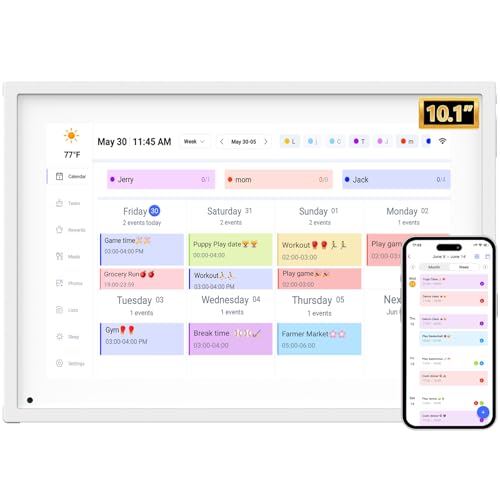
The 10.1-inch Smart Digital Calendar with HD touchscreen stands out as the perfect choice for busy families juggling multiple schedules. It centralizes your family’s plans with color-coded tasks, ensuring everyone stays on track. With real-time multi-member syncing, you’ll eliminate forgotten appointments and streamline planning through direct on-screen editing. This senior-friendly device easily syncs with Google, iCloud, and more, while its plug-and-play setup makes it a breeze to use. Plus, it features a Smart Meal Planner and automated reminders to support healthy living. Enjoy the added bonus of transforming it into a digital photo frame when not in use!
Best For: Busy families looking to efficiently manage multiple schedules and tasks in one centralized digital calendar.
Pros:
- Real-time multi-member syncing eliminates forgotten appointments and enhances coordination.
- User-friendly design with a senior-friendly interface and plug-and-play setup.
- Dual functionality as a digital photo frame when not in use, adding aesthetic value.
Cons:
- Cannot be wall-mounted, limiting placement options.
- Requires WiFi for auto-syncing features, which may be a drawback in areas with poor connectivity.
- The 10.1-inch screen size may not be sufficient for larger family schedules or detailed task management.
Amazon Echo Spot Smart Alarm Clock with Alexa
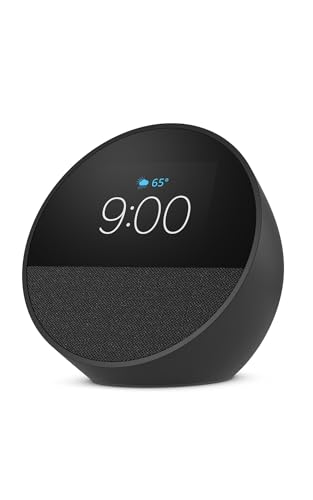
For anyone seeking a versatile addition to their kitchen or bedside, the Amazon Echo Spot Smart Alarm Clock with Alexa stands out as a top choice. This compact device features a customizable display that shows time, weather, and song titles, making it perfect for your daily routine. You can control your smart home devices effortlessly and set Alexa routines to wake up with your favorite music and gentle light. Enjoy vibrant sound quality for music, podcasts, and audiobooks through its touch screen. Plus, with privacy controls and sustainable materials, you can feel good about your purchase.
Best For: Those looking for a multifunctional smart alarm clock that enhances their daily routine with customizable features and smart home integration.
Pros:
- Customizable display allows users to view time, weather, and song titles at a glance.
- Vibrant sound quality delivers rich audio for music, podcasts, and audiobooks.
- Privacy controls ensure user data is protected, and the device is made from 36% recycled materials.
Cons:
- Limited color options as it is only available in black.
- Requires a stable Wi-Fi connection for full functionality with Alexa and smart home integration.
- Touch screen may be less intuitive for users unfamiliar with smart devices.
Amazon Echo Show 5 Smart Display with Alexa
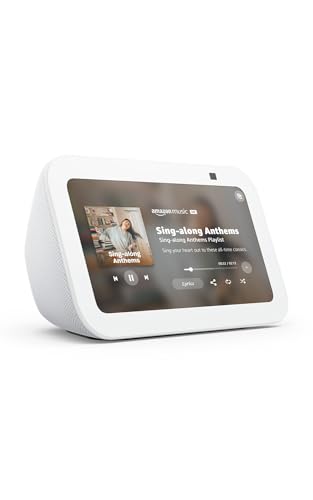
Looking for a compact yet powerful smart display to enhance your kitchen experience? The Amazon Echo Show 5 is your perfect kitchen companion. Its 5.5” display lets you watch shows, check the weather, and make video calls effortlessly. Enjoy enhanced audio with double the bass, making music and podcasts sound great. Control compatible smart devices like lights and thermostats, and monitor family or pets using the built-in camera. With privacy controls and eco-friendly materials, it’s designed with your peace of mind in mind. Plus, when not in use, it displays a rotating slideshow of your favorite photos.
Best For: Individuals looking for a versatile and compact smart display to enhance their daily routines, particularly in the kitchen.
Pros:
- Enhanced audio with double the bass for an improved listening experience.
- Built-in camera allows for easy video calling and monitoring of family or pets.
- Eco-friendly materials and privacy controls ensure user peace of mind.
Cons:
- Limited screen size may not be ideal for watching larger content.
- Some features may require compatible smart devices to fully utilize the product’s capabilities.
- The camera and mic may raise privacy concerns for some users.
21.5 Inch Smart Digital Calendar for Household Organization
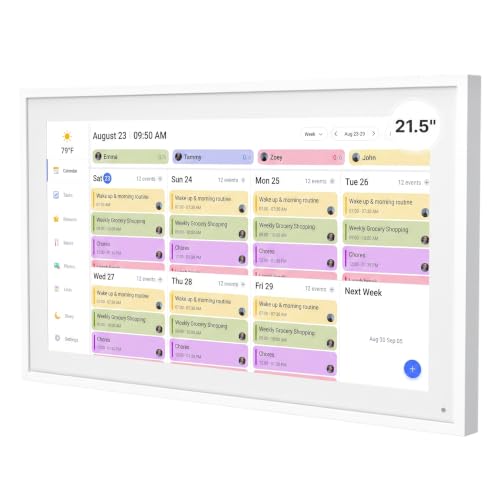
With its compact 5-inch design, the Smart Digital Calendar is perfect for anyone needing a quick glance at daily schedules without cluttering their kitchen space. This handy device syncs effortlessly with popular apps like Google Calendar and iCloud, keeping your family organized. You can manage meal planning, track appointments, and stay updated in real-time. Plus, it doubles as a digital photo frame, allowing you to display cherished memories. Its user-friendly interface guarantees you can switch modes easily. With a 1-year warranty and lifetime support, you can count on this smart calendar to enhance your home organization.
Best For: Families looking for an efficient way to manage household schedules and meal planning while enjoying a digital photo frame feature.
Pros:
- Easy synchronization with multiple calendar apps for real-time updates.
- Dual functionality allows for both calendar management and photo display.
- Large storage capacity and user-friendly interface enhance overall usability.
Cons:
- The 21.5-inch size may be too large for smaller spaces.
- Requires a mobile app for full functionality, which might not appeal to all users.
- Limited to the features provided by the synced applications, which may not suit everyone’s preferences.
Fosa 15.6 Inch Digital Calendar with WiFi Sync

The Fosa 15.6 Inch Digital Calendar is an ideal choice for busy families and home office workers seeking an efficient way to manage their schedules. With easy plug-in setup and WiFi sync, you can instantly access and edit your calendar through the device or a mobile app. The vibrant 1080P HD touchscreen guarantees smooth navigation, perfect for organizing chores and meal planning. Plus, its customizable chore chart helps you track responsibilities while eliminating dinner worries. With multiple mounting options and the ability to store photos, this versatile display fits seamlessly into any kitchen or office space, making planning a breeze.
Best For: Busy families and home office workers looking for an efficient scheduling tool.
Pros:
- Easy setup with plug-in and WiFi connection for immediate calendar access.
- Vivid 1080P HD touchscreen allows for smooth navigation and organization.
- Customizable chore chart helps track responsibilities and simplifies meal planning.
Cons:
- Requires a separate storage card for photo storage, which is not included.
- Limited storage capacity of up to 32GB may not suffice for extensive photo collections.
- May require initial learning to fully utilize the mobile app features effectively.
Factors to Consider When Choosing a Smart Kitchen Display
When you’re choosing a smart kitchen display, think about what matters most to you. Consider screen size, the smart features you’d like, and how well it integrates with your existing devices. You’ll also want to look at installation options and whether it works with your preferred voice assistant.
Screen Size Preferences
Choosing the right screen size for your smart kitchen display can greatly enhance your cooking experience. A larger screen offers an immersive view for cooking videos and recipe instructions, making it easier to follow along. If your countertop space is limited, a compact display around 10 to 15 inches is ideal. However, if you have more room, consider a display of 15 inches or larger for better visibility from a distance, perfect for multitasking. Think about how you’ll use the display; smaller screens are great for quick recipe checks, while larger ones can handle streaming shows or meal planning. Also, consider mounting options—wall-mounted screens can free up counter space for larger displays.
Smart Features Availability
Considering the multitude of smart features available, finding the right kitchen display can greatly elevate your culinary experience. Look for models that offer access to popular streaming services, allowing you to enjoy cooking shows, music, or tutorials while you prepare meals. Features like meal planning sections and interactive chore charts help your family coordinate schedules and manage daily tasks effectively. Additionally, syncing with calendar applications can keep everyone updated on events and appointments in real time. Some displays even double as digital photo frames, letting you showcase cherished memories while the device is idle. These smart functionalities not only enhance your cooking but also create a more organized and enjoyable kitchen environment. Choose wisely!
Voice Assistant Compatibility
How important is voice assistant compatibility in your smart kitchen display? It’s essential for seamless integration with your smart home devices. With compatible displays, you can control lights, thermostats, and appliances using just your voice, making multitasking effortless while cooking. Many popular smart kitchen displays come with built-in voice assistants like Alexa or Google Assistant, enhancing your hands-free experience.
Voice recognition technology varies, so look for devices with advanced features like natural language processing for intuitive interactions. Compatibility with different platforms boosts functionality, allowing you to access recipes, set timers, and manage shopping lists effortlessly. Plus, regular software updates can enhance these voice capabilities, ensuring you always benefit from the latest features and improved performance.
Installation Options
When it comes to smart kitchen displays, installation options play an essential role in ensuring they fit seamlessly into your kitchen layout. You can choose from wall mounting, under-cabinet mounting, or simply placing the display on your countertop, depending on your space. Look for models with foldable or rotatable designs, as they offer flexible viewing angles and save space. Many smart displays come in compact sizes, making them perfect for smaller kitchens without sacrificing functionality. Additionally, some displays feature built-in stands or removable brackets for easy shifts between installation styles. Best of all, the installation process is usually user-friendly, requiring minimal tools, so you can quickly integrate your new display into your cooking environment.
Connectivity and Integration
While choosing a smart kitchen display, it’s important to prioritize connectivity and integration features that enhance your cooking experience. Make sure the display supports WiFi connectivity for seamless syncing with family calendars and task management apps. Look for devices that integrate with popular platforms like Google Calendar, iCloud, and Outlook, so you can efficiently manage your schedule and receive alerts. Compatibility with smart home ecosystems is vital too; it allows you to control connected devices, such as lights and appliances, using voice commands. Opt for displays that offer dual functionality, serving as both a calendar and a digital photo frame. Finally, consider installation options, like wall mounting or countertop placement, to fit your kitchen layout perfectly.
Picture and Sound Quality
Picture and sound quality are essential factors to take into account when choosing a smart kitchen display. Aim for a model with at least 1080p Full HD resolution for crisp visuals and clear details while you watch cooking tutorials or your favorite shows. Also, consider displays with wide viewing angles, ideally around 178° both horizontally and vertically, to guarantee you can see the screen from different spots in your kitchen. High-quality audio can enhance your experience; look for features like room-filling spatial audio and rich bass for music, podcasts, and cooking instructions. Built-in speakers should deliver clear sound without distortion, and customizable display settings can help you adjust brightness and reduce glare for ideal viewing in varying lighting conditions.
Meal Planning Functionality
Meal planning functionality can considerably enhance your cooking experience, making it easier to organize daily meals and special occasions. Look for smart kitchen displays that feature dedicated meal planning sections, allowing you to pre-arrange menus effortlessly. It’s essential to choose a device that supports smart reminders for appointments and meal preparation, helping you stay on track. Additionally, syncing meal plans across multiple family members’ devices can improve coordination and communication. Visual meal planning tools like customizable chore charts and meal planners can further streamline your cooking process. Finally, a built-in weather forecast feature is invaluable, enabling you to adjust your menus based on upcoming weather conditions, ensuring your meals are always enjoyable and appropriate.
Privacy and Security Controls
When considering a smart kitchen display, privacy and security controls should be high on your list of priorities. Look for devices with physical features like microphone and camera off buttons to prevent unauthorized access. Some models even come with built-in camera shutters, letting you cover the camera when it’s not in use. Make sure user privacy settings are easily accessible, allowing you to customize what data is collected and how it’s utilized. Choose displays that emphasize not sharing your personal information with third parties, keeping your data confidential. Finally, regular software updates are essential for maintaining security and addressing potential vulnerabilities, so opt for a device that prioritizes ongoing privacy enhancements.