If you’re looking to take control of your smart home, selecting the right dashboard tablet is essential. With so many options available, it can be overwhelming to find the perfect fit for your needs. From vibrant displays to seamless connectivity, these devices can truly enhance your home experience. But what features should you prioritize, and which models stand out? Let’s explore the top contenders that can help you manage your home like a pro.
Amazon Echo Hub, 8” Smart Home Control Panel with Alexa

The Amazon Echo Hub, with its 8-inch display and Alexa integration, is the perfect choice for anyone looking to simplify their smart home experience. You can control lights, cameras, and smart plugs effortlessly through voice commands or touch. With compatibility for thousands of Alexa devices, integrating locks, thermostats, and speakers becomes a breeze. Plus, it supports various connectivity options like WiFi and Bluetooth for seamless syncing. You’ll appreciate the home security features that let you arm or disarm systems remotely. Installation’s easy too, and you can enhance privacy with built-in controls. It’s eco-friendly, made from recycled materials, ensuring a sustainable choice.
Best For: Anyone looking to streamline their smart home experience with a versatile control panel that integrates seamlessly with various devices.
Pros:
- Wide Compatibility: Works with thousands of Alexa-compatible devices, making it easy to integrate into existing smart home setups.
- User-Friendly: Offers both voice and touch controls for effortless operation.
- Home Security Features: Allows for remote monitoring and control of security systems through the Alexa app.
Cons:
- Additional Accessories Required: Wall mounting and table-top stands are sold separately, which may add to the overall cost.
- Limited Display Size: The 8-inch display may be small for some users who prefer larger screens for monitoring multiple feeds.
- Privacy Concerns: While there are privacy controls, some users may still be wary of having a smart device with a microphone in their home.
reTerminal E1002 Color E Ink Smart Display
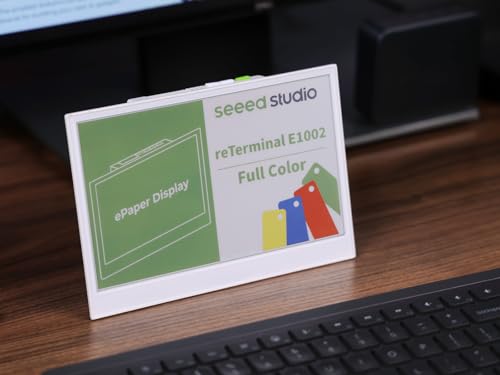
If you’re looking for a smart display that combines energy efficiency with user-friendly customization, the reTerminal E1002 Color E Ink Smart Display is an excellent choice. With its 7.3″ Color E Ink screen and 800×480 resolution, you can easily manage your smart home. The no-code SenseCraft HMI platform lets you design your dashboard using drag-and-drop elements, making it simple to integrate live data from various sources. Plus, its ultra-low power consumption provides up to three months of battery life in deep-sleep mode. Weighing just 1.18 pounds, it’s perfect for any project, from DIY to educational uses.
Best For: Those seeking an energy-efficient smart display for customizing home automation dashboards without any coding experience.
Pros:
- Ultra-low power consumption allows for up to 3 months of battery life in deep-sleep mode.
- No-code design using the SenseCraft HMI platform makes it easy for users of all skill levels to create custom interfaces.
- Versatile compatibility with various maker tools, smart home systems, and live data integration.
Cons:
- Limited resolution of 800×480 may not be suitable for detailed graphics or high-definition content.
- The built-in battery capacity may not support continuous use for more demanding applications.
- Customization might require a learning curve for complete beginners despite the no-code platform.
ApoloSign 32 inch UHD 4K Smart Portable TV Gen2

Designed for tech-savvy individuals seeking versatility in home entertainment, the ApoloSign 32 inch UHD 4K Smart Portable TV Gen2 offers an impressive 4K touchscreen display that transforms any space into a multimedia hub. You’ll enjoy ideal viewing angles thanks to its adjustable screen, while the built-in 8MP camera enhances your video calls. Running on the customized Android 15 OS, you can access the Google Play Store and enjoy smooth multitasking with 8GB RAM and 256GB storage. Plus, its portability and detachable charging base make it easy to move around, ensuring entertainment follows you wherever you go.
Best For: Tech-savvy individuals looking for a versatile and portable multimedia hub for home entertainment.
Pros:
- High-resolution 4K touchscreen provides stunning visuals and an immersive viewing experience.
- Built-in 8MP camera enhances video calls, making it ideal for remote work or virtual gatherings.
- Detachable charging base with a powerful battery allows for up to 8 hours of runtime, promoting versatility in movement.
Cons:
- Limited internal storage of 256GB may not suffice for users with extensive media libraries.
- Portability features may not be necessary for users who prefer stationary setups.
- Adjustable screen requires manual adjustments, which may be less convenient for some users.
Wall Mount Kit for Samsung Galaxy Tab A8 10.5 Tablet

Transform your Samsung Galaxy Tab A8 10.5 into a sleek, wall-mounted control center with the Wall Mount Kit. This kit is designed specifically for your tablet model (SM-x200/205) and includes a durable 2-piece mounting frame. With the specialty USB slim power cable, you’ll keep your device charged while it’s mounted. You can easily install it on a single gang box or directly on the wall. The wall mount is made from 3D printed PETG thermoplastic, ensuring a modern look. Plus, you’ll still have access to volume, power, and the front camera, making it both functional and stylish.
Best For: Individuals or businesses looking to create a permanent and stylish wall-mounted display for their Samsung Galaxy Tab A8 10.5.
Pros:
- Sleek design enhances the modern look of any space.
- Easy installation options allow for flexibility in mounting.
- Access to essential features such as volume, power, and front camera while the tablet is mounted.
Cons:
- Requires additional electrical boxes for certain mounting options, which are not included.
- 3D printing imperfections may detract from overall aesthetics.
- Limited compatibility only with specific tablet models (SM-x200/205).
17.3 Inch PoE Mount Tablet with Android 11

The 3 Inch PoE Mount Tablet with Android 11 is perfect for those seeking a compact solution for their smart home dashboard. This sleek tablet mounts easily, keeping your space organized and clutter-free. With Power Over Ethernet (PoE), you won’t need extra cables for power, simplifying installation. Its vibrant display guarantees that you can clearly see your smart home controls. Access millions of apps to customize your experience, making it more than just a control panel. With its user-friendly interface and solid performance, this tablet is an excellent choice for anyone looking to enhance their smart home setup.
Best For: The Raypodos 17.3 Inch PoE Mount Tablet is best for individuals looking to enhance their smart home setups with a versatile and easy-to-install control panel.
Pros:
- Large and vibrant display makes it ideal for viewing smart home controls and digital signage.
- Power Over Ethernet (PoE) eliminates the need for extra power cables, ensuring a cleaner installation.
- Dual OS support allows users to switch between Android and Linux for a tailored experience.
Cons:
- Weight of 1.76 pounds may require sturdy mounting hardware for secure installation.
- Flash memory limited to 16 GB, which may restrict app storage for some users.
- Best Sellers Rank indicates it may not be as popular or widely recommended as other tablets in the market.
eSamcore iPad Holder for Car (Suction Cup Mount)

For those who frequently travel with their tablets, the eSamcore iPad Holder for Car is an ideal solution. This versatile holder accommodates devices from 6″ to 11″, including popular models like the iPad Pro and Samsung Galaxy Tabs. Its powerful clamp securely grips tablets, even those in protective cases. With an adjustable mount arm and a 360° rotating ball joint, you can easily switch between portrait and landscape views. The strong suction cup guarantees a reliable hold on flat surfaces, and it’s reusable—just rinse it to restore stickiness. Enjoy a hassle-free way to access your smart home features on the go!
Best For: Those who frequently travel with their tablets and require a secure and versatile holder for their devices in the car.
Pros:
- Secure Grip: The powerful clamp accommodates devices with protective cases, ensuring they stay in place during travel.
- Flexible Viewing Options: The adjustable mount arm and 360° rotating ball joint allow for easy switching between portrait and landscape orientations.
- Reusable Suction Cup: The suction cup can be rinsed and reused, maintaining its stickiness for long-term use.
Cons:
- Limited Device Size: The holder is designed specifically for devices ranging from 6″ to 11″, which may exclude larger tablets.
- Surface Dependency: The suction cup requires a flat, clean surface for optimal performance, limiting where it can be mounted.
- Initial Setup: Some users may find the 3-step lock mechanism for the suction cup a bit cumbersome at first.
Cozyla Mate Calendar+ 15.6″ Digital Calendar Wall Touch Screen
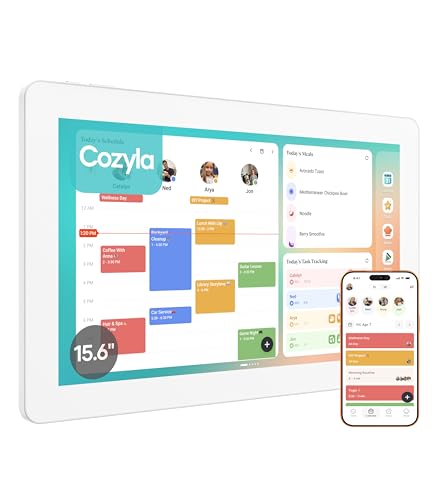
Looking for a seamless way to coordinate family schedules? The Cozyla Mate Calendar+ 15.6″ Digital Calendar Wall Touch Screen is your answer. It auto-syncs with Google, Apple, and more, allowing you to create color-coded family profiles for easy event tracking. Manage routines and chores with reminders, plus a built-in rewards system to motivate your kids. You can personalize the dashboard with widgets for tasks, meals, and weather, all tailored to fit your daily needs. With desktop support and a Cozyla+ mobile app, keeping your family organized has never been easier. Enjoy 24/7 customer service whenever you need assistance!
Best For: Families looking for an efficient way to manage schedules, tasks, and meal planning in one centralized digital solution.
Pros:
- Auto-syncs with various calendar platforms for easy integration.
- Features a built-in rewards system to encourage children’s responsibility.
- Customizable dashboard allows for personalized organization and planning.
Cons:
- Requires a stable internet connection for optimal functionality.
- The touchscreen may not be as responsive in certain lighting conditions.
- Initial setup might be time-consuming for larger families with numerous profiles.
13.3 Inch PoE Mount Tablet with Android

Compact yet powerful, the 3 Inch PoE Mount Tablet with Android is perfect for anyone seeking a space-saving solution for their smart home dashboard. This sleek, wall-mountable tablet integrates seamlessly into your home, providing an elegant control hub. With the latest Android 11 operating system, you’ll enjoy a smooth user experience and access to countless apps. The PoE capability simplifies installation by reducing cable clutter, making your setup cleaner and more organized. Whether you’re managing devices or displaying information, this compact tablet delivers vibrant visuals and responsiveness, bringing efficiency and style to your smart home environment.
Best For: Those seeking a stylish and efficient control hub for their smart home automation and digital signage needs.
Pros:
- Sleek, modern design that seamlessly integrates with smart home aesthetics.
- Dual operating systems (Android and Linux) provide versatility and access to a wide range of apps.
- POE capability simplifies installation by reducing cable clutter.
Cons:
- Limited screen size may not be suitable for extensive digital signage needs.
- Potential compatibility issues with certain smart home devices or applications.
- Higher price point compared to standard tablets without POE functionality.
ApoloSign 32 inch FHD Smart Portable TV Gen2
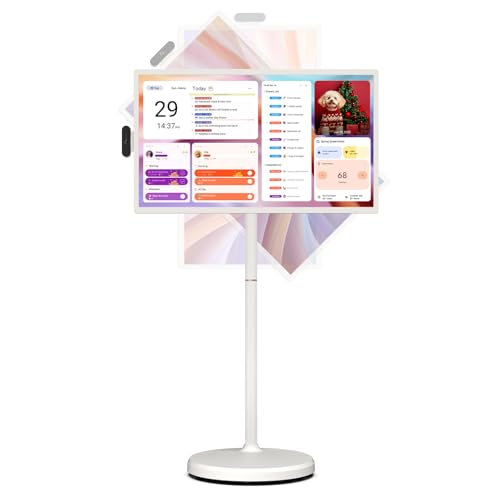
The ApoloSign 32 inch FHD Smart Portable TV Gen2 is perfect for those who want a versatile entertainment solution that fits seamlessly into their smart home environment. With its 32-inch touchscreen and 1920×1080 resolution, you’ll enjoy stunning visuals. The built-in 15000mAh battery offers up to 6 hours of runtime, making it portable and convenient. Access the Google Play Store for endless apps, and manage tasks effortlessly with its personalized calendar widget. Plus, with a voice-activated remote and adjustable viewing angles, controlling your content is a breeze. It’s the ideal blend of functionality and style for modern living.
Best For: Those seeking a portable and versatile entertainment solution for their smart home, ideal for streaming, video calls, and task management.
Pros:
- High-definition 32-inch touchscreen display with 1920×1080 resolution for stunning visuals.
- Long-lasting 15000mAh battery providing up to 6 hours of runtime, perfect for on-the-go use.
- Access to a wide range of apps through the Google Play Store, enhancing entertainment and productivity.
Cons:
- Limited battery life may require frequent recharging for extended use.
- The screen size may not be suitable for larger viewing areas.
- The reliance on Wi-Fi for optimal performance can be a drawback in areas with poor connectivity.
WixGear Universal Flat Stick On Dashboard Magnetic Car Mount Holder (2 Pack)

For those who want a reliable and versatile solution for mounting their devices, the WixGear Universal Flat Stick On Dashboard Magnetic Car Mount Holder (2 Pack) stands out. This ultra-slim mount, just 9.9 mm thick, easily adheres to your car’s dashboard without blocking air vents. With Fast Swift-Snap Technology, installation is a breeze. The four strong magnets provide exceptional stability, securely holding your smartphone even on bumpy roads. Plus, you can position your device horizontally or vertically for prime viewing. Made from rubberized material, it protects both your dashboard and phone from scratches, making it a smart choice for any driver.
Best For: Those seeking a reliable and easy-to-use magnetic car mount for smartphones and mini tablets.
Pros:
- Ultra-slim design at 9.9 mm thick, ensuring it fits seamlessly on any dashboard.
- Fast Swift-Snap Technology allows for quick and hassle-free installation.
- Four strong magnets provide excellent stability, keeping devices secure even on bumpy roads.
Cons:
- Adhesive may lose effectiveness over time with extreme temperatures.
- Limited to flat surfaces; may not work well on curved dashboards.
- Only compatible with devices that can be attached to magnets, which may require additional metal plates.
Factors to Consider When Choosing a Smart Home Dashboard Tablet
When choosing a smart home dashboard tablet, you’ll want to take into account several key factors. Think about the screen size that fits your space, the operating system that works best with your devices, and the connectivity options available. Additionally, pay attention to the user interface design and power supply features to guarantee a seamless experience.
Screen Size Considerations
Choosing the right screen size for your smart home dashboard tablet can greatly impact your experience. A larger display, like 15.6 inches or more, enhances readability and simplifies interaction with various smart home applications. Tablets with a screen size of 13.3 inches or larger offer a more immersive experience for managing devices and accessing multimedia content. On the other hand, smaller screens under 10 inches can limit your ability to view multiple controls simultaneously, making navigation tougher. Don’t forget about resolution; higher resolutions such as 1920×1080 or 3840×2160 on larger displays guarantee clear visuals for detailed dashboards. Also, consider where you’ll place the tablet; a size that matches the viewing distance can greatly improve usability.
Operating System Compatibility
Understanding the operating system of your smart home dashboard tablet is essential since it dictates compatibility with a range of smart home applications and devices. Tablets running on Android OS, particularly the latest versions like Android 11, offer access to a vast ecosystem of apps that enhance your smart home experience. If you prefer more flexibility, consider tablets with dual operating systems, like Android and Linux, which cater to various user preferences and technical needs. Additionally, the availability of updates and reliable support can greatly impact your tablet’s longevity and performance. By choosing a tablet with strong operating system compatibility, you guarantee it can effectively integrate with your smart home devices and protocols, making your setup smoother and more efficient.
Connectivity Options Available
A smart home dashboard tablet’s connectivity options play an important role in its overall functionality and compatibility with your smart home ecosystem. When choosing a tablet, look for models that support WiFi, Bluetooth, Zigbee, and Thread. These options guarantee compatibility with a wide range of smart devices. Power over Ethernet (PoE) is a great feature as it reduces clutter by powering the device through the same cable used for data. Additionally, consider tablets with multiple ports like HDMI, USB, and Ethernet for versatile connections. Support for both wired and wireless casting options is crucial for seamless content sharing. Finally, evaluate battery life and charging capabilities, especially for portable models, to assure consistent performance throughout the day.
User Interface Design
When selecting a smart home dashboard tablet, the user interface design is essential for an enjoyable experience. A user-friendly interface should incorporate drag-and-drop elements, allowing you to customize and arrange widgets easily. Look for a display resolution of 800×480 or higher, as this will enhance visibility for icons and text. Touchscreen functionality is a must, enabling you to access features and control devices with simple gestures. Integration with popular platforms like Google and Apple allows for seamless syncing of calendars, tasks, and reminders, keeping everything organized. Finally, customizable layouts and themes let you personalize your dashboard, making it easier to arrange information according to your preferences and routines.
Power Supply Features
Choosing the right power supply features can greatly enhance your experience with a smart home dashboard tablet. Look for models with Power over Ethernet (PoE) capabilities, allowing you to power and connect your device with a single cable for a neater setup. Built-in batteries are essential too; opt for tablets with 15000mAh batteries that provide several hours of use without needing a plug. Evaluate battery life, as some tablets can last up to three months in deep-sleep mode, perfect for low-maintenance needs. Additionally, choose devices with ultra-low power consumption to minimize energy usage, especially for continuous operation. These factors guarantee your smart home dashboard tablet runs efficiently and seamlessly integrates into your smart home environment.
Mounting and Portability
Selecting the right smart home dashboard tablet involves considering both mounting options and portability. Look for tablets that offer wall mount compatibility or come with detachable bases, allowing you to place them wherever you need. Portability is essential; choose devices with built-in batteries that provide several hours of runtime, making it easy to move them around the house or even outdoors. Pay attention to weight and dimensions—lightweight and compact tablets are easier to handle and install. Additionally, consider models that support Power over Ethernet (PoE) for a cleaner setup without extra cables. Finally, tablets with adjustable viewing angles or swivel features enhance usability, ensuring you get the best visibility from different positions in any room.
Integration With Devices
To guarantee your smart home dashboard tablet fits seamlessly into your existing ecosystem, you must prioritize compatibility with a variety of devices, such as locks, thermostats, and cameras. Look for tablets that support multiple communication protocols like WiFi, Bluetooth, Zigbee, and Matter, as this allows for smooth connectivity with various smart home systems. It’s also essential to choose a device that enables control of smart home features through both voice commands and touch interactions, giving you a versatile user experience. Ascertain the tablet supports necessary applications for home automation, providing access to popular platforms like Home Assistant. This will enhance functionality and improve real-time monitoring, making your smart home management more efficient and user-friendly.
Customization Capabilities
While customizing your smart home dashboard tablet, you’ll want to prioritize flexibility and ease of use. Look for tablets that feature no-code design platforms or drag-and-drop UI elements, allowing you to personalize the interface without any programming skills. Devices that support template usage or AI-generated layouts can help you quickly create dashboards tailored to your preferences. Also, consider tablets that integrate data from various sources, including live data from sensors, for a more dynamic experience. Guarantee compatibility with GPIO/I²C/SPI expansion for added functionality. Finally, choose a product that allows for widget personalization, so you can arrange and resize elements according to your daily routines and priorities, making your smart home management seamless.