As you explore the world of smart home automation, you’ll find numerous starter kits designed for beginners like you. These kits combine essential devices, making it easier to set up your smart home environment. From smart plugs to sensors, these options cater to various needs and preferences. However, with so many choices available, how do you determine which kit is the best fit for your home? Let’s break it down.
Smart Home Starter Kit with Echo Hub, Smart Plug, and Smart Bulbs

If you’re new to smart home technology and want a simple way to enhance your living space, the Smart Home Starter Kit with Echo Hub, Smart Plug, and Smart Bulbs is perfect for you. This kit includes everything you need for a seamless setup. Just unbox, plug in, and follow the quick start guide. The Echo Hub lets you control thousands of devices with just your voice, while the Smart Plug and color-changing Smart Bulbs add convenience and ambiance. Plus, with privacy features and a one-year warranty, you can feel secure while enjoying your smart home experience.
Best For: Anyone new to smart home technology looking for an easy and comprehensive way to enhance their living space.
Pros:
- Ease of Setup: Quick guided setup process with clear instructions makes it beginner-friendly.
- Voice Control: The Echo Hub allows for hands-free control of thousands of compatible devices using Alexa.
- Privacy Features: Includes multiple privacy options, such as a microphone off button and the ability to manage voice recordings.
Cons:
- Limited Compatibility: The Amazon Smart Plug and Smart Bulbs only operate on 2.4 GHz networks and are designed for indoor use.
- Dependence on WiFi: Requires a stable internet connection for functionality, which may not be ideal for all users.
- Size of Echo Hub: The 8” display may take up significant space on smaller surfaces.
KEYESTUDIO IOT ESP32 Smart Home Starter Kit for Arduino and Python
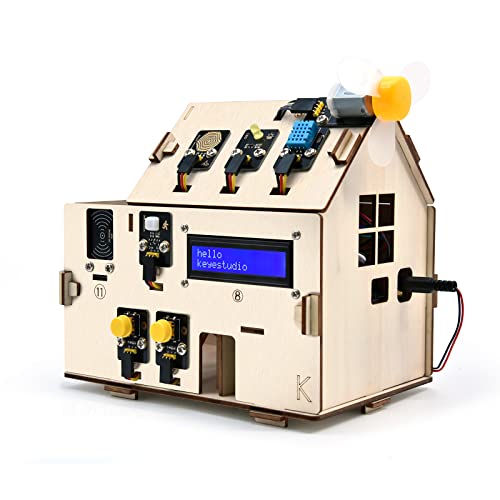
The KEYESTUDIO IOT ESP32 Smart Home Starter Kit is the perfect choice for adults and teens aged 15 and up who want to immerse themselves in home automation. This kit offers an engaging introduction to coding with Arduino and Python, featuring 13 projects that help you understand various components like buttons, LEDs, and sensors. You’ll explore multi-functional features, including a PIR Motion Sensor and a Dangerous Gas Alarm, while controlling devices like lights and fans through your mobile. With online tutorials and unassembled parts, you’ll enjoy a hands-on learning experience that’s both educational and fun! Just grab 6 AA batteries to get started.
Best For: Adults and teens aged 15 and up interested in learning about home automation and coding with Arduino and Python.
Pros:
- Offers 13 engaging projects that teach the basics of home automation and coding.
- Includes multi-functional features like a PIR Motion Sensor and Dangerous Gas Alarm for practical learning.
- Provides online tutorials for easy access to instructions and support.
Cons:
- The kit comes unassembled, requiring users to complete assembly before use.
- Batteries are not included, necessitating the purchase of 6 AA batteries separately.
- Limited to two programming languages (C and MicroPython), which may restrict some advanced users.
Tapo Door Sensor Starter Kit (T31 KIT)

For anyone looking to enhance home security without the hassle of complicated setups, the Tapo Door Sensor Starter Kit (T31 KIT) is an excellent choice. This kit includes three Tapo T110 Contact Sensors and a Tapo H100 Smart Hub, providing real-time notifications when doors or windows open. With a customizable 90dB alarm and integration with Tapo cameras, you’ll feel secure. It’s Matter-certified for compatibility with major smart home platforms, connecting up to 64 devices. Installation is easy, requiring no tools. Plus, the sensors boast a long battery life of up to two years, making them low-maintenance and reliable.
Best For: Homeowners looking for an easy-to-install, reliable security solution to monitor doors and windows.
Pros:
- Real-time notifications and customizable 90dB alarm enhance home security.
- Matter-certified for seamless integration with major smart home platforms.
- Long battery life of up to two years reduces maintenance concerns.
Cons:
- Limited to a 2.4 GHz Wi-Fi connection, which may not suit all home networks.
- Requires a smart hub for full functionality, adding to the initial setup.
- Battery replacement may be needed for sensors after two years, depending on usage.
KEYESTUDIO Smart Home Starter Kit for Arduino

Designed specifically for aspiring engineers and hobbyists aged 15 and up, the KEYESTUDIO Smart Home Starter Kit for Arduino offers an engaging introduction to home automation and electronics. You’ll immerse yourself in 15 hands-on projects, building a model smart house using laser-cut wood boards, sensors, and actuators. This kit features essential components like a Human Infrared Sensor, Gas Leak Alert, and Bluetooth control via mobile apps. You’ll need a computer for code uploads and 6 AA batteries for power. With online tutorials available, this kit is perfect for anyone keen on Arduino and smart home technology, making it a great gift idea!
Best For: Aspiring engineers and hobbyists aged 15 and up who are interested in Arduino, electronics, and home automation.
Pros:
- Engaging hands-on experience with 15 unique projects that teach electronics and programming.
- Includes a variety of sensors and components for exploring smart home applications.
- Supports control via mobile apps, enhancing user interaction and convenience.
Cons:
- Requires a computer for code uploads, which may limit accessibility for some users.
- Operates on 6 AA batteries, which can lead to additional costs over time.
- May be complex for complete beginners without prior knowledge of electronics or programming.
BroadLink Smart Home Starter Kit (Includes 3 Bulbs, 1 Scene Switch, 1 Hub)

Ideal for those new to smart home technology, the BroadLink Smart Home Starter Kit makes setting up your automated space a breeze. With three bulbs, a scene switch, and a hub, it utilizes FastCon and Bluetooth Low Energy for quick integration. You can easily manage up to 90 devices without creating an account, ensuring your privacy. Just download the BroadLink FastCon app, power the devices, and let them discover each other. Control your lights with voice commands through Alexa or Google Home, and enjoy one-tap scene changes that sync with your music, making your home smarter and more enjoyable.
Best For: Those new to smart home technology looking for an easy and affordable way to automate their living space.
Pros:
- Easy Setup: Quick integration with up to 90 devices without the need for account creation.
- Voice Control: Compatible with Alexa and Google Home for convenient management.
- Scene Customization: Allows for one-tap scene changes and color synchronization with music.
Cons:
- Limited Wi-Fi Support: The Mini Hub only supports 2.4GHz Wi-Fi, which may limit some users.
- Device Limit: While it can manage up to 90 devices, that might not be sufficient for larger smart home setups.
- Dependence on App: Full functionality relies on the BroadLink FastCon app, which requires downloading and installation.
THIRDREALITY Smart Switch Starter Kit with Bridge, Compatible with Apple HomeKit, Google Assistant, Alexa, SmartThings
The THIRDREALITY Smart Switch Starter Kit stands out as an excellent choice for beginners looking to immerse themselves in smart home automation, especially since it requires no wiring and easily snaps onto existing light switches. With its Zigbee switch and bridge, you can control your lights via voice commands or through an app. It’s compatible with Apple HomeKit, Google Assistant, Alexa, and SmartThings, making integration simple. The kit fits various switch types and supports different voltages, making it versatile. Plus, with features like timers and schedules, you’ll have complete control over your home lighting effortlessly.
Best For: Beginners looking to enhance their home automation experience without the need for complicated wiring or installation.
Pros:
- Easy Installation: No wiring required; simply snaps onto existing light switches.
- Wide Compatibility: Works with various platforms like Apple HomeKit, Google Assistant, Alexa, and SmartThings.
- Versatile Functionality: Supports multiple switch types and voltages, along with features like timers and schedules.
Cons:
- Limited Customer Ratings: Averaging only 3.2 out of 5 stars from 45 reviews.
- Wi-Fi Limitations: Only supports 2.4GHz Wi-Fi, which may not suit all users.
- Requires Zigbee Bridge: The bridge is necessary for operation, potentially adding to the overall cost.
Lutron Caseta Smart Dimmer Switch Starter Kit

If you’re looking to dip your toes into smart home automation without overwhelming complexity, the Lutron Caseta Smart Dimmer Switch Starter Kit is a fantastic option. This kit includes a smart hub, a dimmer switch, a wall plate, and a Pico remote, all set to enhance your lighting experience. You can control up to 10 devices wirelessly, even through walls. With the Lutron app, you’ll enjoy scheduling, geofencing, and more. Installation is a breeze—no neutral wire needed—taking just about 15 minutes. Plus, 24/7 support guarantees you’ll get help whenever you need it. Enjoy smart lighting made simple!
Best For: Those seeking a user-friendly introduction to smart home lighting without the need for complicated installations or Wi-Fi dependency.
Pros:
- Easy Installation: No neutral wire required, allowing for a quick setup in about 15 minutes.
- Wide Compatibility: Works seamlessly with various smart home systems like Amazon Alexa, Apple Home, and Google Home.
- Robust Remote Control: The Pico remote enables wireless control of multiple devices from a significant distance.
Cons:
- Limited to 150W for LED: May not accommodate larger lighting setups if using LED bulbs.
- Additional Accessories Required: Wall-mount bracket for the Pico remote is sold separately.
- No Wi-Fi Dependency: While this is a pro for some, it may limit integration with other Wi-Fi-based smart home devices.
YoLink Smart Home Starter Kit with Smart Plugs and Hub

For those new to smart home technology, the YoLink Smart Home Starter Kit with Smart Plugs and Hub offers an easy entry point into automation. With two smart plugs that monitor energy usage, you can track your devices’ consumption right from the YoLink app. Its LoRa technology provides an impressive wireless range of 1/4 mile, making it perfect for areas where Wi-Fi struggles. You’ll love the voice control compatibility with Alexa and Google Assistant, allowing seamless integration into your daily routines. Plus, the durable design guarantees safety, while the app gives you real-time power data to help you save energy.
Best For: Those looking to easily integrate smart technology into their home while monitoring energy consumption and enjoying strong wireless connectivity in challenging areas.
Pros:
- Long-range connectivity with LoRa technology, effective even in basements and outdoor areas.
- Voice control compatibility with Alexa and Google Assistant for hands-free operation.
- Energy monitoring features through the YoLink app, enabling users to track power usage and save on energy costs.
Cons:
- Requires a 2.4 GHz Wi-Fi connection for the YoLink Hub, which may limit placement options.
- Limited to two smart plugs in the starter kit, potentially requiring additional purchases for more devices.
- Some users may find the initial setup process confusing if they are not familiar with smart home technology.
YoLink Smart Home Starter Kit with Smart Hub and Sensors
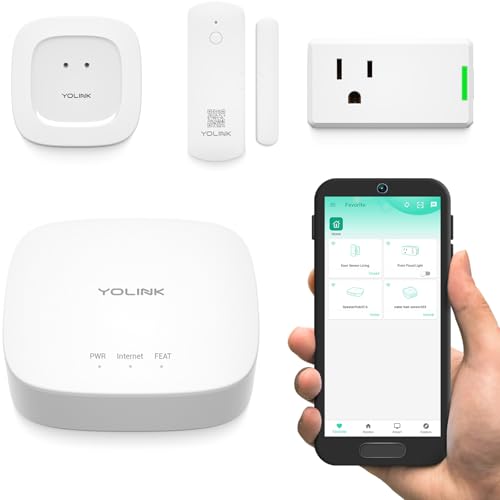
Looking for an easy way to enhance your home security and convenience? The YoLink Smart Home Starter Kit with Smart Hub and Sensors is your perfect solution. This kit includes a Smart Hub, Wireless Door Sensor, Water Leak Sensor, and Smart Plug, all compatible with Alexa and Google Assistant. With LoRa technology, it boasts an impressive 1/4-mile wireless range, making it perfect for tricky spots like basements and garages. Enjoy five-plus years of battery life on standard AAA batteries, and set up real-time notifications for water damage. Automate your devices effortlessly, ensuring energy savings and peace of mind.
Best For: Homeowners looking for an affordable and user-friendly smart home security solution.
Pros:
- Long wireless range of 1/4 mile utilizing advanced LoRa technology, ideal for challenging environments.
- Low power consumption allows for over 5 years of battery life on standard AAA batteries, reducing maintenance needs.
- Compatible with popular smart assistants like Alexa and Google Assistant, enabling easy voice control and automation.
Cons:
- Sensors lack audible alarms, which may require additional purchases for sound alerts (e.g., Siren Alarm).
- Limited to specific devices included in the kit, potentially requiring further investment for expanded smart home functionality.
- Initial setup may require a learning curve for users unfamiliar with smart home technology.
[New] Zigbee Starter Kit | Smart Home for Home Assistant by Pulcro.io
![[NEW] Zigbee Starter Kit | Smart Home for Home Assistant by Pulcro.io](https://m.media-amazon.com/images/I/41Wvz7-Ce6L._SL500_.jpg)
The Zigbee Starter Kit by Pulcro.io is the perfect choice for those diving into smart home automation with Home Assistant. This kit includes a pre-flashed Zigbee USB dongle, two smart plugs, and two contact sensors, providing everything you need to get started. You can control devices up to 1100W locally without needing the internet after setup. The contact sensors help monitor your doors and windows, triggering automations or alerts based on their status. Plus, with easy-to-follow video setup guides available via QR code, you’ll have support every step of the way, ensuring a smooth introduction to smart home technology.
Best For: Beginners looking to start their smart home journey with Home Assistant.
Pros:
- Easy setup: Includes a video guide via QR code for straightforward installation.
- Local control: Operates without needing an internet connection after initial setup.
- Comprehensive kit: Comes with essential components like smart plugs and contact sensors for immediate use.
Cons:
- Limited range: The kit may not cover larger homes effectively without additional devices.
- Basic functionality: Advanced features may require more complex configurations or additional equipment.
- Compatibility concerns: While it works with ZHA and Zigbee2MQTT, it may not support all Zigbee devices.
Factors to Consider When Choosing a Smart Home Automation Starter Kit
When choosing a smart home automation starter kit, you’ll want to take into account several key factors. Compatibility with your existing devices, ease of setup, and the range of connectivity can greatly impact your experience. Additionally, think about the features and functionality, as well as how well the kit allows for programming and integration with other systems.
Compatibility With Devices
How can you guarantee that your smart home automation starter kit meets your needs? Start by ensuring it’s compatible with a wide range of devices like lights, plugs, sensors, and cameras. This maximizes functionality and integration options. Look for kits that support multiple communication protocols—Wi-Fi, Zigbee, and Bluetooth—allowing seamless connectivity with various smart devices. Verify compatibility with popular voice assistants like Alexa, Google Assistant, and Apple HomeKit for convenient voice control. Additionally, check if the kit integrates with any existing smart home ecosystems, enabling control over pre-installed devices. Finally, consider how many devices the hub or bridge can support, as a higher capacity enhances the scalability of your smart home system.
Ease of Setup
While diving into the world of smart home automation, ease of setup is essential for a smooth changeover. You’ll want a starter kit that provides quick, guided setup instructions, catering to users with various technical skills. Look for plug-and-play devices; just plug them in and tap to start using them. A dedicated app can greatly enhance your experience, offering step-by-step guidance throughout the setup process. It’s also beneficial if the kit supports multiple connectivity options like Wi-Fi, Bluetooth, or Zigbee, ensuring compatibility with a broader range of devices. Finally, easy installation features—like no required wiring or simple mounting hardware—make smart home technology more accessible, paving the way for a hassle-free introduction to automation.
Range and Connectivity
Choosing the right range and connectivity options is essential for creating a reliable smart home automation setup. Smart devices vary in connectivity; while Wi-Fi is common, its range can be limited, and interference from other devices might disrupt performance. Consider using technologies like Zigbee or LoRa for extended range capabilities, which can reach up to a quarter mile without draining battery life. Additionally, low-power wireless protocols are ideal for battery-operated sensors. Check how many devices can connect to your hub; some systems support dozens, enhancing scalability. Finally, verify compatibility with your existing network, like dual-band Wi-Fi or low-energy mesh networks, to boost the reliability and overall range of your smart home devices.
Features and Functionality
When you’re selecting a smart home automation starter kit, it’s crucial to evaluate the features and functionality that best fit your lifestyle. Look for kits that include a hub, as this centralizes control and enhances compatibility with various devices and protocols like Zigbee and Wi-Fi. Consider the number and type of components included, such as smart plugs, bulbs, and sensors, to expand your automation options. Evaluate connectivity features to guarantee reliable communication methods like Bluetooth or Zigbee are supported. Additionally, check for energy monitoring capabilities within smart plugs or sensors to help manage energy consumption effectively. Finally, review the integration potential with existing platforms like Alexa, Google Assistant, or Apple HomeKit for a seamless smart home experience.
Programming and Integration
Understanding the features and functionality of smart home automation starter kits sets the stage for considering programming and integration aspects. First, check the supported programming languages; some kits limit you to C or MicroPython. Next, look for integration capabilities with platforms like Alexa, Google Home, and Apple HomeKit to guarantee your devices connect seamlessly. The choice of communication protocols—Zigbee, Wi-Fi, or LoRa—affects your devices’ range and reliability. Consider kits that offer online tutorials or app-based programming interfaces; these can greatly enhance your experience, especially as a beginner. Finally, verify the kit supports automation features, allowing you to create routines and scenes that improve your home management and convenience.